Theme
Updated
Apparatus
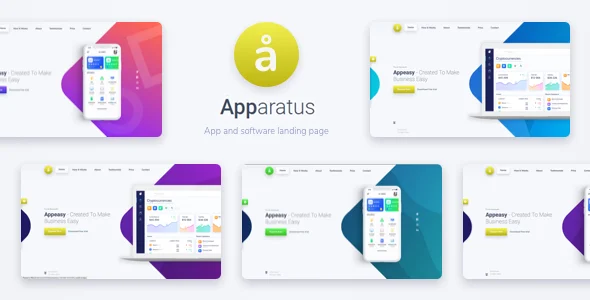
Apparatus is a multi-purpose WordPress theme built for one-page landing sites. It gives you a clean, minimalist layout with smooth scrolling and customizable sections, so you can present a portfolio, a business or a personal project on a single page.
- Version
- 4.4.0
- Released
- Nov 23, 2021
- Type
- WordPress theme
- Licence
- GPL
- Included in
- Every plan, or $2.39 on its own
What’s new in Apparatus 4.4.0
Version 4.4.0 · Nov 23, 2021
Latest
- ImprovedWooCommerce version 5.8.x compatibility work done.
What it does
Many small sites only need one page that explains who you are, what you offer and how people can reach you. A full multi-page theme can feel like too much for that job. This theme focuses on the single-page format, stacking content into sections that visitors move through with smooth scrolling. The layout is responsive, so the page adapts to desktop, tablet and phone screens.
You build the page by adjusting its modular sections to fit your content and brand, using theme settings that do not require coding. There are dedicated portfolio sections for displaying projects and creative work, and the general layout suits both business and personal branding. The design is modern and minimalist, which keeps attention on your text and images. The theme is also built to work across major web browsers.
Best for
- Creative professionals building a one-page portfolio
- Small businesses needing a simple landing page
- Individuals promoting a personal project or brand
Features
One-page landing layout
All of your content sits on a single page divided into sections, a format suited to focused landing pages and simple personal or business sites.
Smooth scrolling navigation
Visitors glide between sections of the page with smooth scrolling, which gives a one-page site a tidy, polished way to move around.
Responsive design
Layouts adjust to desktop, tablet and smartphone screens, so your landing page stays readable and well arranged on different devices.
Customizable content sections
Modular sections can be adapted to your brand and message, letting you choose how to present your services, story or offerings.
Portfolio sections
Dedicated portfolio areas let you display projects and creative work directly on your landing page alongside the rest of your content.
No-code theme settings
Simple theme settings handle customization, so you can adjust the look and content of your page without writing code.
Modern minimalist style
A clean, minimalist design keeps the focus on your content and gives the page a professional appearance.
Cross-browser compatibility
The theme is built to display consistently across major web browsers, so visitors see the same page regardless of the browser they use.
Questions about Apparatus
Can I use this theme for a business site as well as a portfolio?
Yes. The theme is described as multi-purpose, with a layout suited to a range of industries and to personal branding. Its customizable sections let you present services and company details, and the portfolio sections are there if you also want to display work.
Will my landing page look right on phones and tablets?
The theme uses a responsive design that adapts layouts to desktop, tablet and smartphone screens. That means your sections rearrange to fit smaller displays instead of needing a separate mobile version of the page.
Do I need coding skills to customize Apparatus?
No. Apparatus includes theme settings meant for customization without coding knowledge. You can adjust its modular content sections to match your brand and message through those settings.
Is this theme meant for large multi-page websites?
It is designed as a one-page landing theme, with content arranged in sections that visitors scroll through. It fits sites that can say what they need on a single page, such as portfolios, small business pages and personal project sites.
Is Apparatus free?
The code of Apparatus is licensed under the GPL, so anyone may use, change and share it. GPL Feast is a paid service: a plan or a single purchase gives you the download and automatic updates. The developer's own support, licence key and online services are not included.
Which version of Apparatus is this?
Version 4.4.0, released Nov 23, 2021. New versions appear here when the developer publishes them, and members get them as automatic updates.
How do I update Apparatus?
Install the free GPL Feast Updater on your site and connect it with your API key. It installs new versions of Apparatus automatically and keeps a backup, so you can roll back.
You might also like