Theme
Updated
Artica
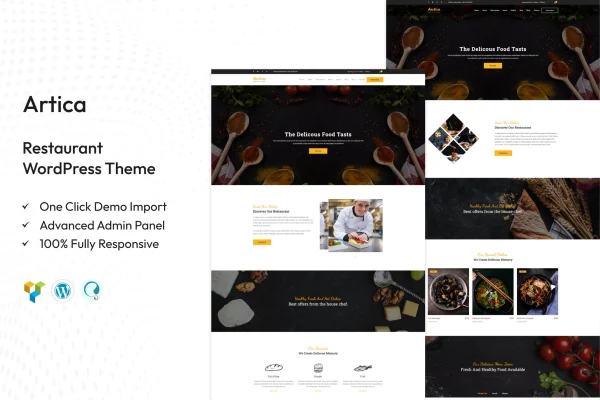
Artica is a restaurant WordPress theme by TonaTheme, built for restaurants, cafes and bistros. It gives you modern layouts for presenting your menu, your dining space and your special offerings, and it adapts to your branding without requiring much coding knowledge.
- Version
- 2.4
- Released
- Aug 15, 2026
- Developer
- TonaTheme
- Type
- WordPress theme
- Licence
- GPL
- Included in
- Every plan, or $3.99 on its own
What’s new in Artica 2.4
Version 2.4 · Aug 15, 2026
Latest
What it does
A restaurant website has a few clear jobs: show the menu, give people a feel for the room, and make it easy to book a table or place an order. Artica is designed around those needs. It includes menu sections with images, descriptions and pricing, gallery areas for photos of your space, and layout templates you can adjust to match the personality of a cozy cafe, a fine dining room or a casual bistro.
The theme works with drag-and-drop page builders, so you can rearrange page structure and appearance visually. Its responsive design adapts to desktops, tablets and phones. Artica is compatible with WooCommerce for online ordering or merchandise sales, and it can work alongside reservation plugins so guests can book tables from your site. Multilingual and right-to-left script support help if you serve diners in more than one language.
Best for
- Restaurants and fine dining venues
- Cafes, bistros and coffee shops
- Food businesses offering online ordering or table booking
Features
Menu sections
Present your dishes in dedicated menu sections that include images, descriptions and pricing, so visitors can browse what you serve before they arrive.
Customizable layouts
Adjust site structure and appearance using flexible templates and drag-and-drop page builders to match your brand identity and the style of your venue.
Gallery and atmosphere display
Use gallery areas to display photos of your dining space and ambiance, giving visitors a clear sense of what it feels like to eat there.
Reservation plugin integration
Connect popular reservation plugins so guests can book tables directly from your website instead of calling or emailing you.
WooCommerce compatibility
Run online ordering or sell merchandise such as gift items through your site, since the theme is compatible with WooCommerce.
Responsive design
Layouts adapt to different screen sizes, so your menu and pages remain readable on desktops, tablets and smartphones.
Multilingual and RTL support
Translate your site into multiple languages, including languages written in right-to-left scripts, to reach diners who read in different languages.
Questions about Artica
Can I show prices and photos on my menu?
Yes. The theme includes menu sections designed to display your dishes with images, descriptions and pricing, so visitors can see what you offer and what it costs in one place.
Will guests be able to reserve a table online?
The theme is built to integrate with popular reservation plugins. Once you add one, guests can book tables directly from your website. The booking itself is handled by the reservation plugin you choose.
Does it support online ordering?
It is compatible with WooCommerce, which you can use to set up online ordering for food or to sell merchandise directly through your restaurant's website.
Can I build a site in a language other than English?
Yes. Artica offers multilingual support for translating your site into multiple languages, and it includes compatibility with right-to-left scripts for languages that read in that direction.
Is Artica free?
The code of Artica is licensed under the GPL, so anyone may use, change and share it. GPL Feast is a paid service: a plan or a single purchase gives you the download and automatic updates. The developer's own support, licence key and online services are not included.
Which version of Artica is this?
Version 2.4, released Aug 15, 2026. New versions appear here when the developer publishes them, and members get them as automatic updates.
How do I update Artica?
Install the free GPL Feast Updater on your site and connect it with your API key. It installs new versions of Artica automatically and keeps a backup, so you can roll back.