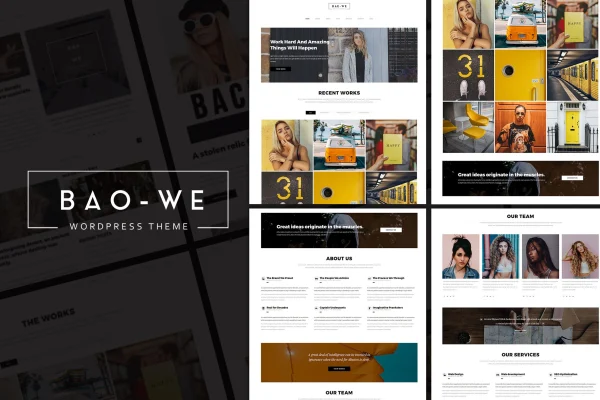
Theme
Updated
Baowe
Baowe is a WordPress theme built for creative professionals, agencies and freelancers who want to present a portfolio and promote their services. It offers a clean, modern and bold look, 10 homepage styles and both one-page and multi-page layout options.
- Version
- 1.1
- Released
- Aug 11, 2026
- Developer
- ridianur
- Type
- WordPress theme
- Licence
- GPL
- Included in
- Every plan, or $3.99 on its own
What’s new in Baowe 1.1
Version 1.1 · Aug 11, 2026
Latest
What it does
Creative work needs a site that puts projects front and center without a lot of clutter. This theme takes a minimalist approach with clean lines and an easy layout, so visitors can move through your work and services without confusion. It is built on the Twitter Bootstrap framework and uses a responsive design, so pages adapt to phones, tablets and desktops. Retina ready graphics keep icons and images sharp on high-resolution screens.
Setup starts with a one-click demo importer that brings in ready-made layouts, which you can then adjust with a drag and drop page builder and custom page builder elements made for creative content. Portfolio items can be sorted with isotope filtering, and video or YouTube backgrounds add motion to key sections. FontAwesome icons are included for menus, service blocks and other interface details. It suits digital agencies, freelancers and personal portfolio sites.
Best for
- Freelance designers and creatives building a personal portfolio
- Digital agencies presenting services and client work
- Startups wanting a clean, minimalist one-page site
Features
Ten homepage styles
Choose from 10 distinct homepage styles to match your brand and the kind of projects you want to present to visitors.
One-page and multi-page layouts
Build a compact single-page site or a fuller multi-page site, depending on how much content and how many services you need to cover.
Drag and drop page builder
Arrange page content visually with a drag and drop builder, plus custom page builder elements designed for presenting creative work, all without writing code.
One-click demo importer
Import the pre-designed demo layouts in one step, giving you a working starting point that you can then edit with your own content.
Isotope portfolio filtering
Let visitors sort and filter portfolio items by category, so they can quickly find the type of project they care about.
Video and YouTube backgrounds
Place self-hosted video or YouTube clips behind page sections to add motion to headers and feature areas of your site.
Bootstrap and responsive design
Built on the Twitter Bootstrap framework with a responsive design that adjusts layouts for smartphones, tablets and desktop screens.
Retina ready with FontAwesome
Graphics and icons display sharply on high-resolution screens, and the FontAwesome icon set is available throughout the theme.
Questions about Baowe
Can I build a one-page site with this theme?
Yes. Baowe offers both one-page and multi-page layout options, so you can keep everything on a single scrolling page or split your content across separate pages for services, portfolio and contact details.
Do I need to know how to code to customize the pages?
No coding is needed for page layout. The theme includes a drag and drop page builder and custom page builder elements, and the one-click demo importer gives you ready-made layouts to edit.
How does the portfolio filtering work?
The theme uses isotope filtering, which lets visitors sort and filter portfolio items on the page. This makes it easier for them to browse a large body of work by the categories you set up.
Will the site look right on phones and high-resolution screens?
The theme is built on Twitter Bootstrap with a responsive design that adapts to phones, tablets and desktops. It is also retina ready, so graphics and icons stay sharp on high-resolution displays.
Is Baowe free?
The code of Baowe is licensed under the GPL, so anyone may use, change and share it. GPL Feast is a paid service: a plan or a single purchase gives you the download and automatic updates. The developer's own support, licence key and online services are not included.
Which version of Baowe is this?
Version 1.1, released Aug 11, 2026. New versions appear here when the developer publishes them, and members get them as automatic updates.
How do I update Baowe?
Install the free GPL Feast Updater on your site and connect it with your API key. It installs new versions of Baowe automatically and keeps a backup, so you can roll back.