Theme
Updated
Binduz
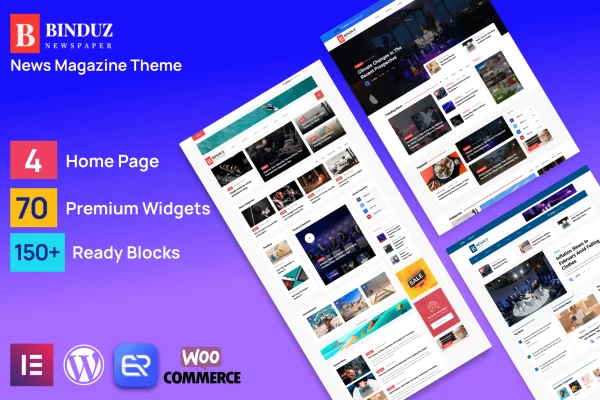
Binduz is a WordPress theme by QuomodoTheme built for news portals, online magazines and content-heavy blogs. It gives publishers a clean, modern layout for organizing stories by category, along with Elementor page building and a range of header and article options.
- Version
- 2.7.0
- Released
- Dec 7, 2024
- Developer
- QuomodoTheme
- Type
- WordPress theme
- Licence
- GPL
- Included in
- Every plan, or $3.99 on its own
What’s new in Binduz 2.7.0
Version 2.7.0 · Dec 7, 2024
Latest
What it does
Running a news site or digital magazine means handling a steady flow of articles, categories and media, and presenting it all so readers can find what they want. Binduz is designed around that job. It supports multiple content categories and flexible post formats, so news pieces, editorials, blog posts and multimedia content can each have a fitting style. The clean, minimal look keeps attention on the writing, which suits professional journalism as well as creative blogging in niches like lifestyle, fashion or tech.
The theme is built on the Bootstrap framework and uses a responsive, retina-ready design so pages display well on desktops, tablets and phones. Page building happens in Elementor, with support for Elementor Pro and custom widgets aimed at news and magazine layouts, so you can arrange pages without writing code. WooCommerce compatibility lets you add a shop for merchandise, subscriptions or digital products, and WPML compatibility helps if you publish in more than one language.
Best for
- Online newspapers and news portals
- Digital magazines covering lifestyle, fashion or tech
- Content-rich blogs with many categories
Features
Elementor and Elementor Pro support
Build and adjust pages with drag-and-drop editing in Elementor, using pre-built widgets tailored to news and magazine layouts, with no coding needed.
Multiple header and article styles
Choose from a variety of header styles and article templates to shape the look of your publication and give it its own identity.
Flexible post formats
Publish news, editorials, blog posts and multimedia content with varied post styles, and manage them across multiple content categories.
Responsive, retina-ready design
Layouts adapt to desktops, tablets and smartphones, and graphics stay sharp on high-resolution screens so articles read cleanly on any device.
WooCommerce compatibility
Add a store to your publication with WooCommerce to sell merchandise, subscriptions or digital products alongside your editorial content.
Multilingual ready with WPML
The theme works with WPML, so you can translate your content and serve readers in several languages from one site.
Built on Bootstrap
The Bootstrap framework underneath supports a mobile-first structure and consistent display across different browsers.
Questions about Binduz
Can I build and edit pages without coding?
Yes. The theme supports Elementor and Elementor Pro, so you can lay out home pages, category pages and other sections with drag-and-drop editing. It also includes custom widgets made for news and magazine layouts.
Does this theme work for a multilingual news site?
It is compatible with WPML, a plugin for translating WordPress content. That lets you publish articles in more than one language and reach readers who prefer different languages, all from the same site.
Can I sell products or subscriptions on my magazine site?
Yes. Binduz is compatible with WooCommerce, so you can add a shop to your publication. The theme describes this as a way to offer subscriptions, merchandise or digital products alongside your articles.
Is it only suited to hard news, or can I use it for a niche blog?
It works for both. The clean, minimal design and flexible post formats fit professional news coverage, and the theme is also aimed at lifestyle magazines, fashion blogs, tech news sites and other niche publications.
Is Binduz free?
The code of Binduz is licensed under the GPL, so anyone may use, change and share it. GPL Feast is a paid service: a plan or a single purchase gives you the download and automatic updates. The developer's own support, licence key and online services are not included.
Which version of Binduz is this?
Version 2.7.0, released Dec 7, 2024. New versions appear here when the developer publishes them, and members get them as automatic updates.
How do I update Binduz?
Install the free GPL Feast Updater on your site and connect it with your API key. It installs new versions of Binduz automatically and keeps a backup, so you can roll back.