Theme
Updated
Carlink
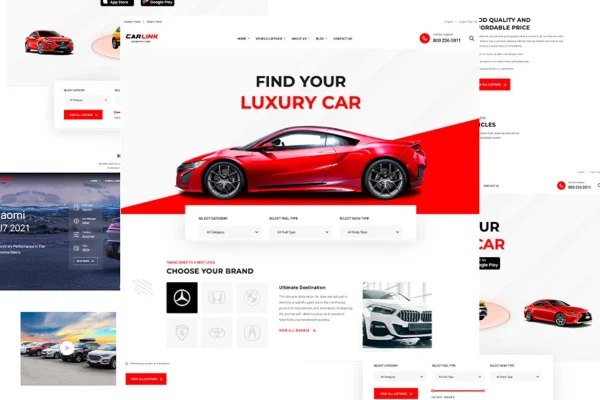
Carlink is an automotive WordPress theme by Templines, built for car dealerships, auto shops and car enthusiasts. It gives you vehicle listings, inventory search and filtering, image galleries and inquiry forms so you can present cars for sale and let buyers get in touch.
- Version
- 1.0.7
- Released
- Aug 7, 2026
- Developer
- Templines
- Type
- WordPress theme
- Licence
- GPL
- Included in
- Every plan, or $3.99 on its own
What’s new in Carlink 1.0.7
Version 1.0.7 · Aug 7, 2026
Latest
What it does
A dealership website has to do more than look tidy. Buyers want to see each car's specifications and photos, narrow a large inventory down to the few models they care about, and contact a salesperson without hunting for a phone number. This theme is designed around those needs, with custom vehicle listings that hold detailed information and images, plus search and filter tools that let visitors sort through stock using criteria you can customize.
You can start from one of several pre-made demo layouts aimed at different kinds of automotive businesses, then adjust pages with drag-and-drop page builder support instead of writing code. The layout is responsive, so listings and galleries adapt to desktops, tablets and phones. WooCommerce compatibility means you can also sell automotive products or services online alongside your vehicle inventory, which suits shops that offer parts, accessories or bookable services.
Best for
- Car dealerships listing new or used vehicle inventory
- Auto shops selling parts, accessories or services
- Automotive enthusiasts building a car-focused website
Features
Custom vehicle listings
Create detailed listings for each vehicle with specifications, descriptive information and high-quality images so buyers can review a car before they reach out.
Inventory search and filters
Visitors can search your inventory and narrow results with customizable criteria and filters, making it easier to find a specific make, model or type of car.
Vehicle image galleries
Build photo galleries that display a vehicle from multiple angles and highlight its features, giving shoppers a closer look at each car in your stock.
Contact and inquiry forms
Built-in forms let customers send questions or inquiries straight to your sales team, keeping communication about specific vehicles simple for both sides.
Pre-made demo layouts
Choose from multiple starter templates designed for different automotive business styles, then customize the content and layout to fit your dealership or shop.
Page builder support
Adjust page layouts with popular drag-and-drop page builders, so you can rearrange sections and content without any coding knowledge.
Responsive design
Pages adapt to different screen sizes, so your listings, galleries and forms display properly for visitors on desktops, tablets and smartphones.
WooCommerce compatibility
Works with WooCommerce, letting you add an online store to sell automotive products or services from the same website as your inventory.
Carlink older versions
- 1.0.5Mar 1, 2025
Members and buyers of this product can download older versions.
Questions about Carlink
Can visitors filter cars by their own criteria?
Yes. Carlink includes advanced search and filtering for your vehicle inventory, and the search criteria and filters are customizable. That lets buyers narrow a large stock down to the cars that match what they are looking for.
Can I sell parts or services as well as list cars?
The theme is compatible with WooCommerce, so you can add e-commerce features and sell automotive products or services online. This works alongside the vehicle listings, which is handy for businesses that offer both cars and related products.
Do I need to know how to code to change the layout?
No coding is needed for layout changes. The theme supports popular drag-and-drop page builders, and you can begin from one of the pre-made demo layouts built for different automotive business styles, then edit from there.
How do customers contact me about a vehicle?
Carlink includes contact and inquiry forms that send messages directly to your sales team. Shoppers can ask about a car they found in your listings without leaving the website.
Is Carlink free?
The code of Carlink is licensed under the GPL, so anyone may use, change and share it. GPL Feast is a paid service: a plan or a single purchase gives you the download and automatic updates. The developer's own support, licence key and online services are not included.
Which version of Carlink is this?
Version 1.0.7, released Aug 7, 2026. New versions appear here when the developer publishes them, and members get them as automatic updates.
How do I update Carlink?
Install the free GPL Feast Updater on your site and connect it with your API key. It installs new versions of Carlink automatically and keeps a backup, so you can roll back.
More from Templines