Theme
Updated
Cerato
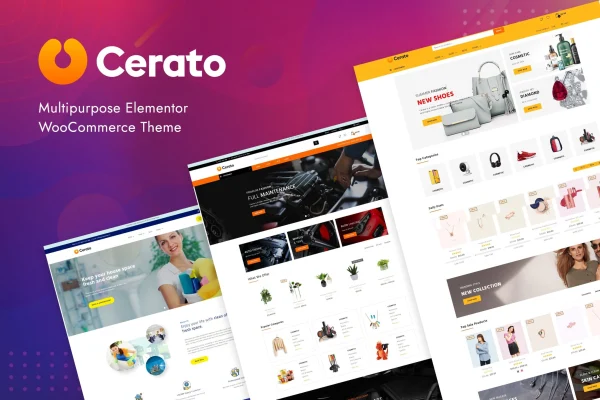
Cerato is a multipurpose WordPress theme by CleverSoft, built for WooCommerce and designed to work with Elementor. It gives online store owners a ready base for an e-commerce site, with pre-built layouts and design options they can adjust through drag and drop editing instead of code.
- Version
- 2.2.18
- Developer
- CleverSoft
- Type
- WordPress theme
- Licence
- GPL
- Included in
- Every plan, or $3.99 on its own
What’s new in Cerato 2.2.18
Version 2.2.18
Latest
What it does
Setting up an online store usually means juggling product pages, navigation and branding while trying to keep everything consistent. This theme pairs WooCommerce, which handles products, payments and shipping, with the Elementor page builder, so you can arrange pages visually with live previews. It is aimed at business owners, entrepreneurs and developers who want a working shop without writing custom code, and its multipurpose approach suits stores like a fashion boutique, an electronics shop or a store selling across several categories.
You can start from one of the pre-built layouts made for different industries, then shape it to your brand. Typography and color settings let you match your identity, and you can pick from several header and footer styles to set up navigation and highlight information visitors need. The design is responsive, so layouts adapt to desktops, tablets and phones. That makes it a practical fit for anyone building a new store or redesigning an existing WooCommerce shop in Elementor.
Best for
- Online store owners running WooCommerce shops
- Fashion boutiques and electronics stores
- Developers building client shops with Elementor
Features
WooCommerce support
Built to fully support WooCommerce, so you can manage your products, payments and shipping through the store platform while the theme handles how the shop looks.
Elementor drag and drop editing
Design pages and layouts in Elementor with a drag and drop interface and live previews, with no coding needed to change the look of your store.
Pre-built layouts
Choose from a variety of ready-made templates made for different industries, giving you a starting point you can adjust instead of designing every page from scratch.
Typography and color options
Adjust fonts and colors across the site to match your brand identity and keep product displays consistent with the rest of your store.
Flexible header and footer styles
Pick from several header and footer styles to organize navigation and place important information where shoppers can find it.
Responsive design
Layouts adapt to different screen sizes, so your store pages display properly on desktops, tablets and smartphones.
Cerato older versions
- 2.2.16Jul 11, 2023
Members and buyers of this product can download older versions.
Questions about Cerato
Do I need to know how to code to customize this theme?
No. The theme is designed for Elementor, which lets you edit pages with drag and drop controls and live previews. You can also change typography, colors, and header and footer styles through the theme's design options.
What kinds of stores does Cerato suit?
It is a multipurpose WooCommerce theme, so it works for many types of shops. Examples include a fashion boutique, an electronics shop or a store with products across several categories. Its pre-built layouts are tailored to different industries to help you get started.
Will my store look right on phones?
Yes. The theme uses a responsive design, so page layouts adjust to the screen they are viewed on, from large desktop monitors down to smartphones, giving shoppers a consistent experience across devices.
Can I manage products and shipping with this theme?
Product, payment and shipping management come from WooCommerce, which the theme is built to fully support. The theme controls how your shop pages look, while WooCommerce runs the store side.
Is Cerato free?
The code of Cerato is licensed under the GPL, so anyone may use, change and share it. GPL Feast is a paid service: a plan or a single purchase gives you the download and automatic updates. The developer's own support, licence key and online services are not included.
Which version of Cerato is this?
Version 2.2.18. New versions appear here when the developer publishes them, and members get them as automatic updates.
How do I update Cerato?
Install the free GPL Feast Updater on your site and connect it with your API key. It installs new versions of Cerato automatically and keeps a backup, so you can roll back.
More from CleverSoft