Theme
Updated
Cocoon
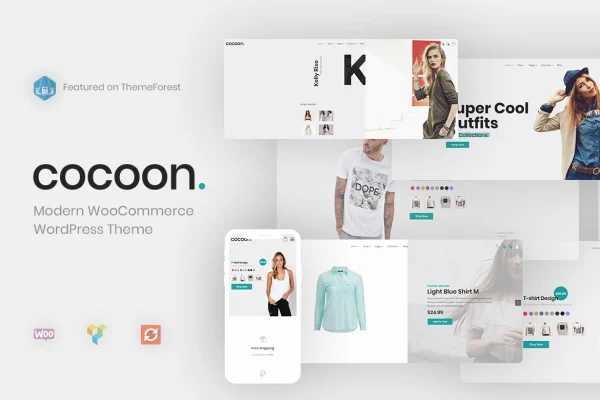
Cocoon is a WooCommerce WordPress theme by gnodesign, built for online stores that want a clean, minimal look. It pairs a modern design with shopping tools such as live product search, quick view, product badges and an off-canvas cart, and it suits fashion, clothing and general retail shops.
- Version
- 1.4.2
- Released
- Dec 20, 2025
- Developer
- gnodesign
- Type
- WordPress theme
- Licence
- GPL
- Included in
- Every plan, or $3.99 on its own
What’s new in Cocoon 1.4.2
Version 1.4.2 · Dec 20, 2025
Latest
- NewWP 6.9+ Compatibility
- ImprovedGetting started page code
- FixedCocoon new license link via "getting started" page
- FixedBundled plugins not downloadable
- ImprovedWPBakery Pager Builder to 8.7.2
- ImprovedRev Slider to 6.7.37
- ImprovedWooCommerce Templates
- ImprovedLang .POT files
What it does
Running a shop on WooCommerce means your theme has to handle product browsing, search and the cart without getting in the way. This theme gives store owners a tidy, minimal design that keeps attention on the products. It works with WPBakery Page Builder, so you can build custom page layouts with drag and drop instead of writing code. The layout is responsive and retina ready, so product images and pages adapt to desktops, tablets and phones with high-resolution screens.
On the shopping side, customers can switch between list and grid views, open a quick view of a product, and zoom into images in a lightbox. AJAX live search returns results by product name or SKU as people type. Add to cart notifications and an off-canvas cart let shoppers keep browsing after adding an item. Product pages include a shipping calculator and order tracking, and the theme is compatible with YITH WooCommerce Wishlist so visitors can save favorites for later.
Best for
- Fashion and clothing stores built on WooCommerce
- Retail shops with large product catalogs
- Store owners who prefer a clean, minimal design
Features
AJAX live search with SKU
Shoppers see instant results as they type, and they can search by product name or by SKU to find a specific item quickly.
Quick view and lightbox zoom
Customers can preview a product without leaving the catalog page and open product images in a lightbox to see the details up close.
Off-canvas cart
Items added to the cart trigger a notification and appear in a slide-out cart panel, so shoppers can keep browsing without a page change.
List and grid product views
Visitors can choose whether to browse the shop as a list or as a grid, depending on how they like to scan products.
Product badges
Badges can mark items as promotions, new arrivals or bestsellers, helping shoppers spot those products while browsing the catalog.
Load more and infinite scroll
Large catalogs can use a load more button or infinite scroll pagination, letting customers move through many products without clicking page numbers.
WPBakery Page Builder support
The theme is compatible with WPBakery Page Builder, so you can create custom page layouts with drag and drop tools and no coding.
Shipping calculator and order tracking
Product pages include a shipping calculator, and the theme offers order tracking so buyers can check on their purchases after checkout.
Cocoon older versions
- 1.4.1Sep 11, 20252 new, 6 improvements, 4 fixes
- 1.3.5May 28, 20233 improvements
Members and buyers of this product can download older versions.
Questions about Cocoon
Does this theme work with WooCommerce?
Yes. It is designed specifically as a WooCommerce theme and includes store features such as list and grid product views, quick view, product badges, an off-canvas cart, a shipping calculator and order tracking.
Which page builder can I use with it?
The theme is compatible with WPBakery Page Builder. That lets you put together custom page layouts with drag and drop tools, which is helpful if you would rather not edit code to change how pages look.
Can customers save products to a wishlist?
The theme is compatible with the YITH WooCommerce Wishlist plugin. With that plugin in place, shoppers can save products they like and come back to them later.
Will my store look right on phones and tablets?
Yes. The theme is fully responsive and retina ready, so layouts adjust to desktops, tablets and smartphones, and images stay sharp on high-resolution displays.
Is Cocoon free?
The code of Cocoon is licensed under the GPL, so anyone may use, change and share it. GPL Feast is a paid service: a plan or a single purchase gives you the download and automatic updates. The developer's own support, licence key and online services are not included.
Which version of Cocoon is this?
Version 1.4.2, released Dec 20, 2025. New versions appear here when the developer publishes them, and members get them as automatic updates.
How do I update Cocoon?
Install the free GPL Feast Updater on your site and connect it with your API key. It installs new versions of Cocoon automatically and keeps a backup, so you can roll back.
You might also like