Theme
Updated
Codate
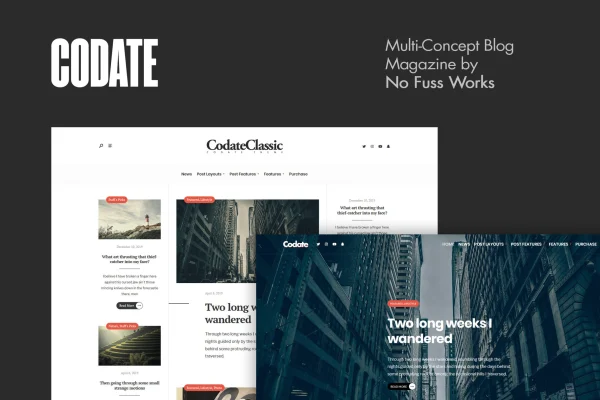
Codate is a WordPress theme by NoFussWorks, built for modern magazines, blogs and content creators. It gives you responsive, customizable layouts and typography controls so you can publish news, personal stories or niche articles in a clean, readable format.
- Version
- 2.0
- Released
- Aug 8, 2026
- Developer
- NoFussWorks
- Type
- WordPress theme
- Licence
- GPL
- Included in
- Every plan, or $3.99 on its own
What’s new in Codate 2.0
Version 2.0
Latest
- NewAutomatic Elementor setup
- NewDimension settings (theme.json)
- NewNew social networks
- ImprovedBetter demo import
- ImprovedMobile menu (sub-menu toggle buttons)
- ImprovedRedux Framework inclusion inside the theme_setup function
- ImprovedCanvas-off section icon
- ImprovedTGM activation
What it does
Running a magazine or blog means presenting a lot of content in a way readers can scan and enjoy. This theme handles that with multiple layout options for magazine and blog styles, plus settings for colors, fonts and text styles. You can shape the look to match your brand without starting from a blank design, and the responsive layout adapts your pages to desktops, tablets and phones.
The theme also focuses on storytelling. You can work images, videos and galleries into your posts, and content blocks are set up with readability in mind. Social profile links and sharing options help readers pass your articles along. It is a good fit for publishers who want a modern editorial look and a simple interface for managing posts day to day.
Best for
- Online magazines and news-style publications
- Personal bloggers sharing stories and opinions
- Niche content creators publishing visual, media-rich posts
Features
Responsive layout
Pages adjust to desktops, tablets and smartphones, so readers get a consistent layout on whatever device they use to browse your articles.
Multiple layout options
Pick from several layout options to build a magazine or blog style that suits your content and the identity of your publication.
Typography settings
Adjust fonts and text styles to improve readability and match the modern look of your site across headings and body text.
Color and font customization
Tailor colors and fonts throughout the theme so your magazine or blog reflects your brand rather than a stock design.
Media storytelling tools
Add images, videos and galleries to your posts to build visual stories that go alongside your written content.
Social media integration
Connect your social profiles and give readers sharing options so they can pass your posts along to their own followers.
Beginner-friendly interface
The interface is designed to make setup and ongoing content management easy, even for site owners who are new to WordPress.
Codate older versions
- 1.4Oct 10, 20243 improvements, 1 fix
Members and buyers of this product can download older versions.
Questions about Codate
Will my blog look good on phones and tablets?
Yes. The theme uses a responsive design that adapts your layouts to desktops, tablets and smartphones, so readers can browse and read your posts comfortably on any of those devices.
Can I change the layout and styling to fit my brand?
You can choose from multiple layout options for magazine or blog styles, and adjust colors, fonts and text styles. That lets you shape the design around your brand and the kind of content you publish.
Does it handle videos and galleries in posts?
It includes visual storytelling tools for adding images, videos and galleries to your content. These are meant to help you build posts that combine media with your writing in a readable way.
Is this theme manageable for someone new to WordPress?
The theme is built around a user-friendly interface intended to make navigation and content management easy, including for beginners setting up and maintaining their first magazine or blog.
Is Codate free?
The code of Codate is licensed under the GPL, so anyone may use, change and share it. GPL Feast is a paid service: a plan or a single purchase gives you the download and automatic updates. The developer's own support, licence key and online services are not included.
Which version of Codate is this?
Version 2.0, released Aug 8, 2026. New versions appear here when the developer publishes them, and members get them as automatic updates.
How do I update Codate?
Install the free GPL Feast Updater on your site and connect it with your API key. It installs new versions of Codate automatically and keeps a backup, so you can roll back.
More from NoFussWorks