Theme
Updated
Cycure
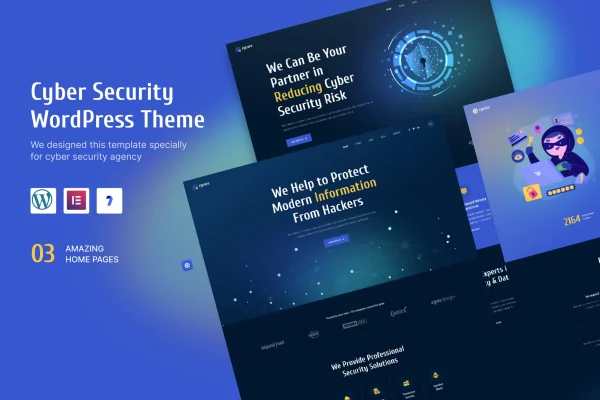
Cycure is a WordPress theme built for cyber security businesses, from consulting firms to solo security specialists. It gives you a clean, professional site with pre-built templates and Elementor editing, so you can present your services, expertise and client feedback without writing code.
- Version
- 1.1
- Released
- Mar 20, 2023
- Developer
- ThemeDox
- Type
- WordPress theme
- Licence
- GPL
- Included in
- Every plan, or $3.99 on its own
What’s new in Cycure 1.1
Version 1.1 · Mar 20, 2023
Latest
- ImprovedUpdate release
What it does
Security companies need a website that looks trustworthy and explains technical services clearly. Cycure is designed around that need, with layouts suited to digital security consultants, IT risk and compliance firms, and individual service providers. The pre-built templates give you a starting point for an agency homepage and detailed service pages, and the clean typography keeps content readable. Sections fit common security offerings such as consulting options, risk assessments, IT security protocols and client testimonials.
The theme works with the Elementor page builder, so you edit pages with drag and drop instead of code. Layouts are responsive across desktops, tablets and phones, and graphics are retina ready for high-resolution screens. Cycure is also compatible with WPML, which helps if you serve clients in more than one language. It is built with clean, semantic code and tested to behave consistently in major browsers.
Best for
- Cyber security companies and digital protection agencies
- IT risk and compliance consulting firms
- Independent cyber security consultants and service providers
Features
Elementor page builder support
Customize pages with Elementor's drag and drop editor, adjusting layouts and content without needing any coding skills.
Pre-built templates
Start from ready-made templates for pages like a professional agency homepage and detailed service pages, then adapt them to your business.
Responsive layouts
Pages adjust to desktops, tablets and smartphones so visitors get a consistent, readable experience on whatever device they use.
WPML compatibility
Works with WPML so you can build a multilingual website and present your security services to clients in different languages.
Retina ready graphics
Visuals are prepared for high-resolution screens, keeping logos, icons and images sharp on modern displays.
Security service sections
Layouts suit consulting options, risk assessment services, IT security protocols and client testimonials, the content security firms typically need to present.
Clean, semantic code
The theme is built with clean, semantic markup, giving search engines and browsers a well-structured page to read.
Cross-browser compatibility
Designed to display consistently across major web browsers, so visitors see the same layout regardless of their browser choice.
Questions about Cycure
Do I need coding skills to customize this theme?
No. Cycure works with the Elementor page builder, so you can change layouts, text and images with drag and drop. The pre-built templates give you a starting structure that you edit visually rather than in code.
Can I run a multilingual site with it?
Yes. The theme is compatible with WPML, a plugin for building multilingual WordPress sites. That makes it a reasonable choice if your security business serves clients in more than one language or region.
What kind of content is the theme designed to present?
It is built for cyber security services, with layouts suited to consulting options, risk assessment services, IT security protocols and client testimonials. Templates cover an agency homepage and detailed service pages.
Will the site look right on phones and high-resolution screens?
The design is responsive across desktops, tablets and smartphones, and graphics are retina ready, so images and icons stay sharp on high-resolution displays. It is also built to work consistently in major browsers.
Is Cycure free?
The code of Cycure is licensed under the GPL, so anyone may use, change and share it. GPL Feast is a paid service: a plan or a single purchase gives you the download and automatic updates. The developer's own support, licence key and online services are not included.
Which version of Cycure is this?
Version 1.1, released Mar 20, 2023. New versions appear here when the developer publishes them, and members get them as automatic updates.
How do I update Cycure?
Install the free GPL Feast Updater on your site and connect it with your API key. It installs new versions of Cycure automatically and keeps a backup, so you can roll back.