Theme
Updated
Cytrix
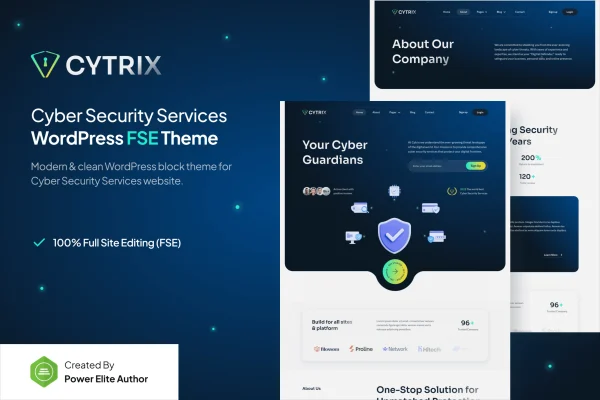
Cytrix is a WordPress theme built for cyber security service providers. It gives security firms and consultants a clean, modern website with homepage layouts, dedicated service sections and contact forms, so they can present what they offer and take inquiries from potential clients.
- Version
- 1.0.0
- Released
- Feb 11, 2025
- Developer
- jegtheme
- Type
- WordPress theme
- Licence
- GPL
- Included in
- Every plan, or $3.99 on its own
What’s new in Cytrix 1.0.0
Version 1.0.0
Latest
- NewInitial Release
What it does
Security companies need a website that looks serious and explains technical services in a way clients can follow. A generic business theme often leaves you building service pages from scratch. This theme starts from the needs of the cyber security industry, with content blocks meant for offerings such as threat analysis, vulnerability assessments and incident response. Sharp typography, professional color schemes and clean imagery set a tone that suits a field where trust matters.
The theme works with a drag and drop page builder, so you can adjust pages to match your brand without writing code. You pick a homepage layout, choose from several header and footer styles, and edit the service sections to describe your own work. Pre-built contact forms handle inquiries. The responsive design adapts to phones, tablets and desktops, which makes it a practical fit for security firms, consultancies and freelancers offering risk assessments or advisory services.
Best for
- Cyber security service companies
- Security consultants offering risk assessments
- IT firms selling threat analysis and incident response
Features
Customizable homepage layouts
Choose and adjust homepage layouts so visitors see your main security services as soon as they arrive on the site.
Security service sections
Dedicated, easy to edit content blocks for presenting services such as threat analysis, vulnerability assessments and incident response.
Drag and drop page building
Page builder integration lets you customize pages to fit your brand identity without needing any coding knowledge.
Multiple header and footer styles
Pick from several header and footer designs to present your navigation and contact information in a clear, orderly way.
Pre-built contact forms
Built-in contact and lead capture forms give prospective clients a simple way to send inquiries about your services.
Responsive layout
The design adjusts to smartphones, tablets and desktops so your pages stay readable and usable on any screen size.
Clean, modern visual style
Sharp typography, professional color schemes and engaging imagery give your site a serious look suited to security work.
Questions about Cytrix
Can I list my specific security services on this theme?
Yes. The theme includes dedicated service sections built for offerings like threat analysis, vulnerability assessments and incident response. They are easy to edit, so you can rename them, rewrite the descriptions and present your own range of services.
Do I need to know how to code to customize the pages?
No. The theme works with a drag and drop page builder, which lets you change layouts and content visually. You can also switch between homepage layouts and header and footer styles without touching code.
Will the site work well on mobile devices?
The theme uses a responsive design that adapts to smartphones, tablets and desktops. Your service pages, navigation and contact forms adjust to the screen, so visitors can browse and reach you from any device.
How can potential clients get in touch through the site?
Cytrix comes with pre-built contact forms and lead capture forms. You can place them on your pages so visitors can send inquiries about audits, consulting or other services directly from the website.
Is Cytrix free?
The code of Cytrix is licensed under the GPL, so anyone may use, change and share it. GPL Feast is a paid service: a plan or a single purchase gives you the download and automatic updates. The developer's own support, licence key and online services are not included.
Which version of Cytrix is this?
Version 1.0.0, released Feb 11, 2025. New versions appear here when the developer publishes them, and members get them as automatic updates.
How do I update Cytrix?
Install the free GPL Feast Updater on your site and connect it with your API key. It installs new versions of Cytrix automatically and keeps a backup, so you can roll back.