Theme
Updated
Cyvora
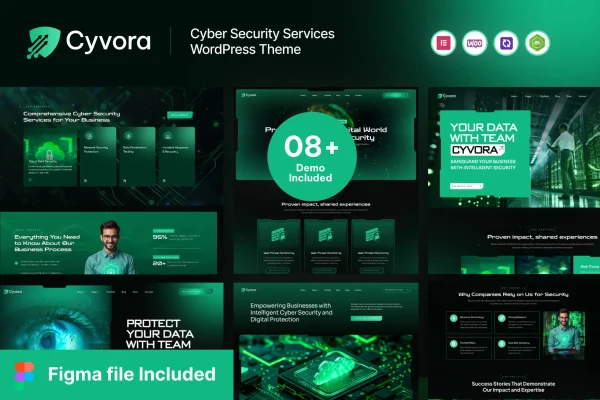
Cyvora is a WordPress theme built for cyber security service businesses. It gives security firms and consultants a modern, professional layout for presenting their services, team, case studies and client testimonials, with demo content and inner pages to start from.
- Version
- 1.0.0
- Released
- Aug 15, 2026
- Developer
- Case-Themes
- Type
- WordPress theme
- Licence
- GPL
- Included in
- Every plan, or $3.99 on its own
What’s new in Cyvora 1.0.0
Version 1.0.0 · Aug 15, 2026
Latest
What it does
Security companies sell trust, so their websites need to look credible and explain technical services clearly. This theme is designed around that need. It suits providers who offer work such as vulnerability assessments, penetration testing or security consulting and want a site that presents those offerings in an organized, professional way. The design is tailored to the cyber security niche, which saves you from adapting a generic business theme to fit an industry with its own tone and expectations.
You start from pre-built demo content and inner pages, then adjust colors, fonts and layouts through the customization options without writing code. The layout is responsive, so pages adapt to phones, tablets and desktops. The theme works with popular WordPress plugins and page builders, which lets you extend the site as your needs grow. Documentation is included to guide you through setup and customization, and the theme follows secure coding practices, a sensible fit for a business in the security field.
Best for
- Cyber security consulting firms
- Penetration testing and vulnerability assessment providers
- Managed security and IT protection companies
Features
Cyber security focused design
A modern, professional look made for cyber security businesses, helping you present a consistent brand identity to prospective clients.
Responsive layout
Pages adjust to different devices and screen sizes, so visitors on phones, tablets and desktops get a usable layout.
No-code customization
Change colors, fonts and layouts through the theme's customization options without needing any coding knowledge.
Demo content and inner pages
Pre-built demo content and inner pages cover services, team, case studies and client testimonials, giving you a ready structure to edit.
Page builder compatibility
Works with popular WordPress plugins and page builders, so you can add functionality and build pages the way you prefer.
SEO-friendly structure
The theme is built with an SEO-friendly structure that gives your service pages a clean foundation for search engines to read.
Secure coding practices
Built following secure coding practices intended to guard against common vulnerabilities, which suits a site representing a security business.
Included documentation
Documentation walks you through setting up the theme and customizing it for your own content and branding.
Questions about Cyvora
What kind of business is this theme designed for?
It is made for cyber security service providers. That includes companies offering vulnerability assessments, penetration testing and security consulting, plus any security business that wants to present its services, team and track record on a professional website.
Can I customize the look without coding?
Yes. The theme includes customization options for colors, fonts and layouts that work without coding knowledge. It is also compatible with popular page builders, which gives you a visual way to edit and arrange page content.
Which pages come with the demo content?
The pre-built demo content includes inner pages for presenting your services, team, case studies and client testimonials. You can import this content and replace the text and images with your own instead of building every page from scratch.
Will my site work well on mobile devices?
The theme uses a fully responsive layout, so pages adapt to different devices and screen sizes. Visitors browsing on a phone or tablet see a layout arranged for their screen.
Is Cyvora free?
The code of Cyvora is licensed under the GPL, so anyone may use, change and share it. GPL Feast is a paid service: a plan or a single purchase gives you the download and automatic updates. The developer's own support, licence key and online services are not included.
Which version of Cyvora is this?
Version 1.0.0, released Aug 15, 2026. New versions appear here when the developer publishes them, and members get them as automatic updates.
How do I update Cyvora?
Install the free GPL Feast Updater on your site and connect it with your API key. It installs new versions of Cyvora automatically and keeps a backup, so you can roll back.