Theme
Updated
Decades
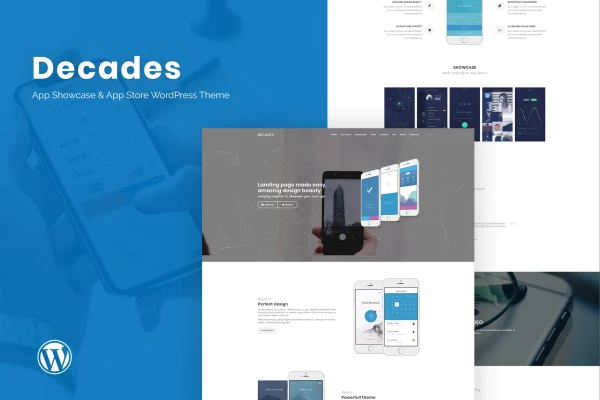
Decades is a WordPress theme for app developers, startups and businesses that want a website for their mobile apps. You can use it to build a single app landing page or a store-style site that presents several apps, with WPBakery Page Builder handling the layout work.
- Version
- 1.0.6
- Developer
- ThemeModern
- Type
- WordPress theme
- Licence
- GPL
- Included in
- Every plan, or $3.99 on its own
What’s new in Decades 1.0.6
Version 1.0.6
Latest
What it does
An app needs a home on the web where people can see what it looks like and what it does. This theme gives you that home without coding. It includes an interactive mobile mockup plugin, so you can place screens of your app inside a realistic phone frame that visitors can interact with. Multiple homepage layouts cover different goals, from promoting one new release to listing a whole catalog of apps in an app store style.
The theme is built on the Bootstrap framework and LESS, and it is responsive and retina ready for phones, tablets and desktops. Pages are assembled with the WPBakery Page Builder drag and drop editor, and the WordPress live customizer lets you preview design changes as you make them. One-click demo import and dummy content give you a starting point, unlimited color styles help you match your brand, and WPML compatibility with included PO and MO files supports multilingual sites.
Best for
- Developers launching a mobile app landing page
- Studios presenting several apps in a store-style site
- Startups needing a multilingual app website
Features
Interactive mobile mockup plugin
An included plugin places your app inside realistic, interactive phone mockups, so visitors can get a feel for the interface right on the page.
WPBakery drag and drop building
Build and rearrange page sections with the WPBakery Page Builder drag and drop editor, with no coding needed to change your layouts.
Multiple homepage layouts
Pick from several homepage designs suited to a single app landing page or a store-style site that presents multiple apps.
One-click demo import
Import the demo layouts and dummy content in one step, then replace the sample text and images with details about your own app.
Unlimited color styles
Create custom color schemes and apply them across the site so the design matches your app's branding and visual identity.
Live customizer preview
Adjust design settings in the WordPress live customizer and see each change in real time before you publish it.
Multilingual and translation ready
The theme works with WPML and includes PO and MO files, so you can translate it and run your site in several languages.
Responsive Bootstrap foundation
Built with Bootstrap and LESS, the layouts are responsive and retina ready, adapting to smartphones, tablets and large desktop screens.
Questions about Decades
Can I use this theme for a single app or for several apps?
Both. The multiple homepage layouts include designs for a focused landing page around one app and for an app store style site that lists several apps. You can choose the layout that fits your project and adjust it with WPBakery Page Builder.
Which page builder does Decades use?
Decades works with WPBakery Page Builder, which gives you a drag and drop editor for building and rearranging page sections. You can also use the WordPress live customizer to preview design changes such as colors in real time.
How does the mobile mockup feature work?
The theme includes an interactive mobile mockup plugin that displays your app inside realistic phone frames on your pages. It lets visitors see and interact with your app's screens, which helps them understand how the app looks before they try it.
Can I build a site in more than one language?
Yes. The theme is compatible with WPML for running multilingual sites, and it is translation ready with included PO and MO files. That makes it practical for apps aimed at an audience across several countries and languages.
Is Decades free?
The code of Decades is licensed under the GPL, so anyone may use, change and share it. GPL Feast is a paid service: a plan or a single purchase gives you the download and automatic updates. The developer's own support, licence key and online services are not included.
Which version of Decades is this?
Version 1.0.6. New versions appear here when the developer publishes them, and members get them as automatic updates.
How do I update Decades?
Install the free GPL Feast Updater on your site and connect it with your API key. It installs new versions of Decades automatically and keeps a backup, so you can roll back.
More from ThemeModern