Theme
Updated
Dinenos
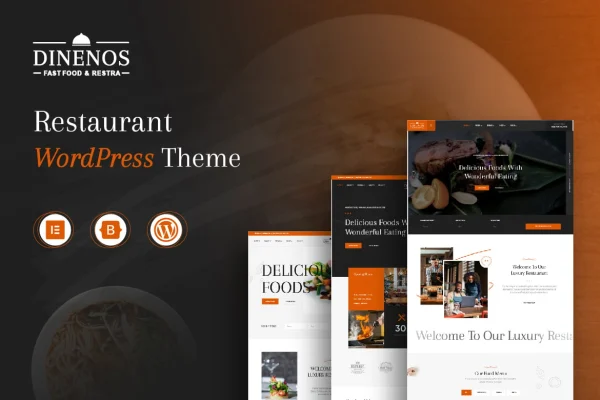
Dinenos is a restaurant WordPress theme by reacthemes, built for cafes, restaurants and other food-related businesses. It gives you ready sections for menus, specials, reservations and customer reviews, so you can present your food and keep diners informed without writing code.
- Version
- 1.2.1
- Released
- Aug 16, 2026
- Developer
- reacthemes
- Type
- WordPress theme
- Licence
- GPL
- Included in
- Every plan, or $3.99 on its own
What’s new in Dinenos 1.2.1
Version 1.2.1 · Aug 16, 2026
Latest
What it does
Running a restaurant leaves little time for building a website, yet customers expect to find your menu, current specials and a way to book a table online. Dinenos is a WordPress theme designed around those needs. It includes built-in sections for menus, reservation forms and testimonials, along with pre-built starter layouts made for food businesses. You can start from a layout that fits your place, swap in your own dishes and photos, and have a working site without starting from a blank page.
The theme is responsive, so pages adjust to phones, tablets and desktops, which matters when people look up a restaurant on the go. It works with drag-and-drop page builders, letting you change layouts without coding. For bookings, you can use the built-in form or connect a reservation plugin you already prefer. Social buttons link visitors to your restaurant's profiles. It suits a new dining spot or an existing one that wants a refreshed site.
Best for
- Restaurants wanting an online menu and table booking
- Cafes and coffee shops promoting daily specials
- Freelancers building sites for food business clients
Features
Menu sections
Display your dishes and beverages in organized, easy-to-browse menus so visitors can quickly see what you serve.
Specials and promotions
Feature daily or seasonal specials on your site so regular customers always know what is new on the table.
Reservation options
Take table bookings with the built-in booking form, or pair the theme with a compatible reservation plugin if you already use one.
Pre-built starter layouts
Choose from multiple starter templates designed for food businesses, then adjust the content to match your restaurant or cafe.
Page builder compatibility
Customize page layouts with a drag-and-drop page builder, so you can arrange sections without editing code.
Responsive design
Pages adapt to phones, tablets and desktops, giving customers a readable layout whichever device they use to find you.
Testimonial sections
Add customer reviews and testimonials to your pages so new visitors can read what past diners thought.
Social media buttons
Link to your restaurant's social profiles with built-in social buttons placed on your site.
Dinenos older versions
- 1.1.9Aug 24, 2025
- 1.1.8Jul 24, 2025
Members and buyers of this product can download older versions.
Questions about Dinenos
Can customers book a table through a site built with this theme?
Yes. The theme includes a built-in booking form for reservations, and it is also compatible with popular reservation plugins, so you can use whichever approach fits how your restaurant manages tables.
Do I need coding skills to customize the layout?
No. The theme works with drag-and-drop page builders, so you can rearrange sections and build pages visually. You can also begin from one of the pre-built starter layouts made for food businesses and edit the content.
Will my restaurant site look right on phones?
The design is responsive and mobile-optimized, so pages adjust to phones, tablets and desktops. That helps customers who check your menu or specials while out looking for a place to eat.
Is Dinenos only for full-service restaurants?
It is aimed at restaurants, cafes and food-related businesses in general. The menu, specials, testimonial and reservation sections work for many kinds of food and beverage venues, from small cafes to larger dining spots.
Is Dinenos free?
The code of Dinenos is licensed under the GPL, so anyone may use, change and share it. GPL Feast is a paid service: a plan or a single purchase gives you the download and automatic updates. The developer's own support, licence key and online services are not included.
Which version of Dinenos is this?
Version 1.2.1, released Aug 16, 2026. New versions appear here when the developer publishes them, and members get them as automatic updates.
How do I update Dinenos?
Install the free GPL Feast Updater on your site and connect it with your API key. It installs new versions of Dinenos automatically and keeps a backup, so you can roll back.