Theme
Updated
DRVNG
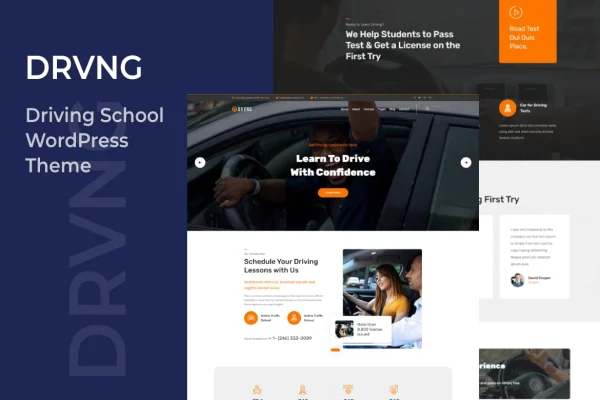
DRVNG is a WordPress theme made for driving schools, driving instructors and related businesses. It gives you a clean, professional layout for presenting your courses, instructors, schedules and pricing plans, and it uses the Elementor page builder so you can edit pages without writing code.
- Version
- 1.1
- Released
- Aug 11, 2026
- Developer
- TonaTheme
- Type
- WordPress theme
- Licence
- GPL
- Included in
- Every plan, or $3.99 on its own
What’s new in DRVNG 1.1
Version 1.1 · Aug 11, 2026
Latest
What it does
Driving schools need a website that answers a few plain questions fast: what lessons you offer, who teaches them, when they run and what they cost. This theme is built around that need. Its layout gives visitors a clear path through your courses, instructor profiles, schedules, pricing and student success stories, so a prospective learner can find what they need and then register or ask about lessons.
You can start from the ready-made demo content with a one-click import, then replace the text and images with your own. Editing happens in Elementor's drag-and-drop interface, and you can adjust headers, footers and page sections to match your brand. The theme is responsive and retina ready, uses the Bootstrap framework, works across major browsers and comes with documentation to guide setup.
Best for
- Independent driving instructors building their first website
- Driving schools listing courses, schedules and pricing plans
- Agencies building sites for local driving school clients
Features
Elementor page building
Edit layouts, add elements and publish pages through Elementor's drag-and-drop interface, with no coding needed to change how your driving school site looks.
One-click demo import
Load the ready-made demo content in one step to get a working site structure, then swap in your own courses, instructors and photos.
Responsive, retina ready design
Pages adapt to desktop, tablet and phone screens, and high-resolution graphics keep images, icons and typography sharp on retina displays.
Pages for driving services
Present your driving courses, instructors, schedules, pricing plans and student success stories in a layout designed for driving school content.
Flexible headers and footers
Customize headers, footers and individual page sections so the site reflects your school's brand identity instead of looking like the stock demo.
Bootstrap framework base
The theme is built to work with the Bootstrap framework, giving its layouts a familiar structure that is compatible across major web browsers.
Included documentation
Detailed guides walk you through setting up and configuring the theme, which helps if you are new to working with WordPress themes.
DRVNG older versions
- 1.0May 21, 2023
Members and buyers of this product can download older versions.
Questions about DRVNG
Do I need coding skills to customize this theme?
No. The theme is built with the Elementor page builder, so you change layouts, add elements and publish pages through a drag-and-drop interface. Headers, footers and page sections can also be adjusted without touching code.
Can I start from the demo design instead of a blank site?
Yes. A one-click demo import loads ready-made content so you have a complete site structure right away. From there you replace the sample text and images with your own courses, instructors and pricing details.
Will my driving school site work on phones?
The theme is fully responsive, so pages adjust to desktop, tablet and mobile screens. It is also retina ready, which keeps images, icons and text crisp on high-resolution displays, and it is built to work across major browsers.
What kind of content can I display with DRVNG?
The design is set up for driving school material: driving courses, instructor profiles, lesson schedules, pricing plans and success stories from past students. Visitors can browse this information and then register or inquire about lessons.
Is DRVNG free?
The code of DRVNG is licensed under the GPL, so anyone may use, change and share it. GPL Feast is a paid service: a plan or a single purchase gives you the download and automatic updates. The developer's own support, licence key and online services are not included.
Which version of DRVNG is this?
Version 1.1, released Aug 11, 2026. New versions appear here when the developer publishes them, and members get them as automatic updates.
How do I update DRVNG?
Install the free GPL Feast Updater on your site and connect it with your API key. It installs new versions of DRVNG automatically and keeps a backup, so you can roll back.