Theme
Updated
Escoot
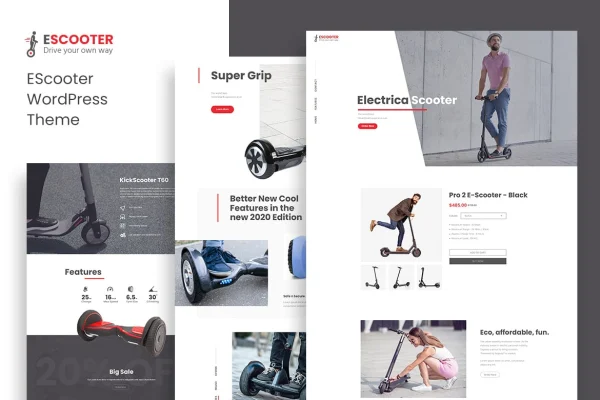
Escoot is a WordPress theme built for WooCommerce stores that focus on one product. It lays out the whole storefront on a single page, so visitors can read about the item, view its images and reach the purchase options without clicking through a maze of menus.
- Version
- 1.2.9
- Released
- Oct 8, 2025
- Developer
- designthemes
- Type
- WordPress theme
- Licence
- GPL
- Included in
- Every plan, or $3.99 on its own
What’s new in Escoot 1.2.9
Version 1.2.9 · Oct 8, 2025
Latest
- FixedWDT demo importer to OCDI converted
- ImprovedCompatible with latest WordPress Version
What it does
Many WooCommerce themes are designed for large catalogs, with category grids, filters and shop archives that a single-product brand never uses. This theme takes the opposite approach. It puts one product at the center of a one-page layout, giving you room for product details, high-resolution images, gallery sliders and call-to-action buttons placed along the page. The result is a focused storefront that suits a brand launching one item or a seller with a single standout offering.
The theme works with WooCommerce, so product variations, checkout and payment options are handled by the store plugin you already know. You can change colors, fonts, layouts and content through the theme settings without writing code, which helps you match the page to your brand. The layout is responsive and adjusts to desktop, tablet and mobile screens. Social media links let you connect your channels so visitors can follow your brand beyond the store page.
Best for
- Brands selling a single flagship product
- Product launch sites built on WooCommerce
- Freelancers building one-product stores for clients
Features
One-page product layout
The entire storefront sits on a single page built around one product, keeping visitors focused on the item and the path to buying it.
WooCommerce compatibility
Works with WooCommerce, so you can use product variations, checkout and payment options inside the one-page design.
Responsive design
The layout adapts to desktop, tablet and mobile screens, so the product page stays readable and usable on any device.
No-code customization
Adjust colors, fonts, layouts and content through an interface in the theme, with no coding needed to match your brand identity.
Image galleries and sliders
Supports high-resolution images and gallery sliders, giving shoppers a closer look at the product from different angles and in more detail.
Call-to-action buttons
Buttons placed throughout the page give visitors clear points to move toward purchasing as they scroll.
Social media links
Connect your social channels to the site so customers can find and follow your brand on other platforms.
Escoot older versions
- 1.2.6Feb 27, 20252 improvements
- 1.2.0Dec 19, 20231 improvement, 1 fix
Members and buyers of this product can download older versions.
Questions about Escoot
Can I sell more than one product with this theme?
The theme is designed around a one-page layout that features a single product. It runs on WooCommerce, but its structure is meant for stores focused on one flagship item rather than a large catalog with category pages.
Does it support product variations like sizes or colors?
Yes. Because Escoot works with WooCommerce, you can use WooCommerce product variations along with its checkout and payment options while keeping the one-page presentation.
Do I need to know how to code to customize it?
No. You can change colors, fonts, layouts and content through the theme's customization options without writing code, which makes it practical for store owners who want to match the page to their brand.
Will the store look right on phones?
The theme is fully responsive, so the layout adjusts to desktop, tablet and mobile screen sizes. Product images, text and buttons rearrange to fit smaller displays.
Is Escoot free?
The code of Escoot is licensed under the GPL, so anyone may use, change and share it. GPL Feast is a paid service: a plan or a single purchase gives you the download and automatic updates. The developer's own support, licence key and online services are not included.
Which version of Escoot is this?
Version 1.2.9, released Oct 8, 2025. New versions appear here when the developer publishes them, and members get them as automatic updates.
How do I update Escoot?
Install the free GPL Feast Updater on your site and connect it with your API key. It installs new versions of Escoot automatically and keeps a backup, so you can roll back.