Theme
Updated
Fabio WooCommerce Shopping Theme
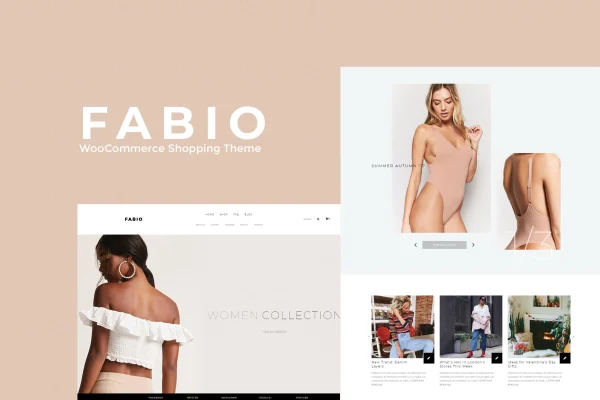
Fabio WooCommerce Shopping Theme is a WordPress theme built for online stores. It pairs a minimalist black and light grey design with Visual Composer page building, so shop owners can lay out product pages, a blog and a contact page without writing code.
- Version
- 1.9
- Released
- Aug 12, 2026
- Developer
- disgogo
- Type
- WordPress theme
- Licence
- GPL
- Included in
- Every plan, or $3.99 on its own
What’s new in Fabio WooCommerce Shopping Theme 1.9
Version 1.9 · Aug 12, 2026
Latest
What it does
Running a shop on WooCommerce means you need a storefront that keeps attention on the products. Fabio takes a clean, uncluttered approach, using a restrained black and light grey palette and a sticky menu so shoppers can always reach navigation as they scroll. It is built on Bootstrap, so layouts adapt to desktops, tablets and phones, and its graphics are retina ready for sharp display on high resolution screens.
For building pages, the theme works with the Visual Composer drag and drop builder and adds page options for adjusting individual pages. You can start from one of six homepage styles and sliders, then change colors, fonts and backgrounds to match your brand. Custom blog and contact templates cover content and customer contact, and WPML compatibility lets you run the store in more than one language. It suits fashion, electronics and other product categories.
Best for
- Small online shops selling fashion or apparel
- Electronics and general product stores built on WooCommerce
- Store owners running multilingual shops with WPML
Features
Six homepage styles
Choose from six different homepage layouts and sliders as a starting point, then adapt the one that best fits your products and brand.
Sticky menu
The main navigation stays fixed at the top of the screen as visitors scroll, so categories and pages remain within reach on long product lists.
Visual Composer page building
Build and edit pages with the Visual Composer drag and drop interface instead of working directly in code or templates.
Color and typography controls
Set fonts, colors and backgrounds through unlimited color and typography options so the store matches your existing brand identity.
Blog and contact templates
Custom templates for blog and contact pages give you ready layouts for publishing articles and letting customers get in touch.
Responsive Bootstrap framework
Built on Bootstrap, the theme adjusts its layouts to desktops, tablets and smartphones, with retina ready graphics for high resolution screens.
WooCommerce and WPML compatibility
Designed to work with WooCommerce for selling products and with WPML for running a multilingual version of your store.
HTML5 and CSS3 animations
Valid HTML5 markup and subtle CSS3 animations add light motion effects, while per page options let you customize each page individually.
Questions about Fabio WooCommerce Shopping Theme
Does this theme work with WooCommerce?
Yes. Fabio is designed for online stores and is compatible with WooCommerce, so you can use it as the storefront for your products, cart and checkout pages while styling them to match the rest of the site.
Which page builder does it use?
The theme integrates with Visual Composer, a drag and drop page builder. You can use it to arrange content on your homepage and other pages, alongside the theme's own page options for customizing each page.
Can I run my store in more than one language?
Fabio is compatible with WPML, the multilingual plugin for WordPress. That lets you offer translated versions of your shop pages and content for customers who speak different languages.
Can I change the black and grey design to my brand colors?
Yes. The default palette is minimalist black and light grey, but the theme includes unlimited color and typography options, so you can adjust colors, fonts and backgrounds to fit your brand.
Is Fabio WooCommerce Shopping Theme free?
The code of Fabio WooCommerce Shopping Theme is licensed under the GPL, so anyone may use, change and share it. GPL Feast is a paid service: a plan or a single purchase gives you the download and automatic updates. The developer's own support, licence key and online services are not included.
Which version of Fabio WooCommerce Shopping Theme is this?
Version 1.9, released Aug 12, 2026. New versions appear here when the developer publishes them, and members get them as automatic updates.
How do I update Fabio WooCommerce Shopping Theme?
Install the free GPL Feast Updater on your site and connect it with your API key. It installs new versions of Fabio WooCommerce Shopping Theme automatically and keeps a backup, so you can roll back.
More from disgogo