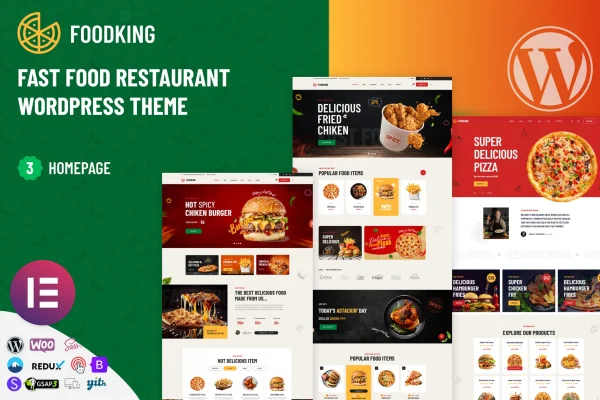
Theme
Updated
Foodking
Foodking is a WordPress theme built for fast food restaurants and quick-service eateries. It gives you a responsive site with menu displays, online ordering support and several ready-made homepage designs, so you can present your food and take orders from one place.
- Version
- 1.2
- Released
- Dec 11, 2024
- Developer
- modinatheme
- Type
- WordPress theme
- Licence
- GPL
- Included in
- Every plan, or $3.99 on its own
What’s new in Foodking 1.2
Version 1.2 · Dec 11, 2024
Latest
- ImprovedWooComerce Template [Updated]
- ImprovedFoodking-toolkit Plugin [Updated]
- ImprovedTheme 1.2 [Updated]
What it does
Fast food restaurants need a website that shows the menu clearly, works on phones and lets customers order without hunting around. Foodking is designed around those needs. It includes a menu display with categories, images, descriptions and pricing, plus support for online ordering so customers can place orders directly from your site. The responsive layout adapts to desktop, tablet and mobile screens, which matters when many visitors are checking the menu on the go.
You can start from one of several pre-built homepage variations and bring in demo content with a one-click import, then adjust the layouts to match your brand. A blog section lets you post news, promotions or recipes, and social media integration connects your profiles to the site. The theme is translation ready, so you can build a multilingual site for a mixed local audience. It suits burger joints, pizza shops and other quick-service restaurants.
Best for
- Fast food and quick-service restaurant websites
- Burger, pizza and takeaway shops taking online orders
- Restaurant owners wanting a ready-made homepage to start from
Features
Menu display with pricing
List your food items by category with images, descriptions and prices, giving customers a clear view of what you serve before they order.
Online ordering integration
Let customers place orders directly from your website, so browsing the menu and ordering happen on the same site.
Multiple homepage variations
Pick from several ready-made homepage designs as a starting point, then adjust the content and styling to suit your restaurant.
One-click demo import
Bring in pre-built demo content in one step, giving you a working layout that you can edit with your own menu, photos and text.
Customizable layouts
Adjust the look and feel of your pages so the site reflects your brand colors, style and personality.
Responsive design
Pages adapt to desktop, tablet and mobile screens, so customers can read the menu and find your details on any device.
Blog and social media
Publish news, promotions and recipes in the blog section, and connect your social media profiles to the site.
Translation ready
The theme is prepared for translation, so you can run a multilingual site for customers who speak different languages.
Questions about Foodking
Can customers order food from a site built with this theme?
Yes. The theme includes online ordering integration, so customers can place orders directly from your website. It also works with WordPress plugins and online ordering systems, which lets you set up ordering alongside your menu pages.
How do I show my menu and prices?
The theme has a menu display that organizes food items into categories. Each item can have an image, a description and a price, so customers can scan your offerings and decide what to order.
Do I have to design the homepage from scratch?
No. Foodking comes with multiple ready-made homepage variations and a one-click demo import. You can load a demo, then replace the sample content with your own menu, photos and branding and adjust the layout as needed.
Will the site work for customers who speak other languages?
The theme is translation ready, which means you can translate its text and build a multilingual website. This is useful if your restaurant serves a community where customers speak more than one language.
Is Foodking free?
The code of Foodking is licensed under the GPL, so anyone may use, change and share it. GPL Feast is a paid service: a plan or a single purchase gives you the download and automatic updates. The developer's own support, licence key and online services are not included.
Which version of Foodking is this?
Version 1.2, released Dec 11, 2024. New versions appear here when the developer publishes them, and members get them as automatic updates.
How do I update Foodking?
Install the free GPL Feast Updater on your site and connect it with your API key. It installs new versions of Foodking automatically and keeps a backup, so you can roll back.