Theme
Updated
Grdeen
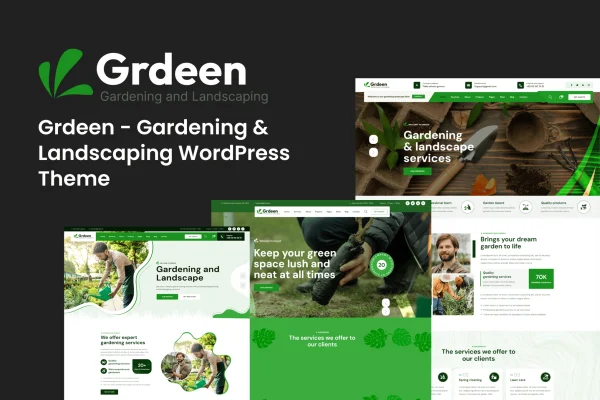
Grdeen is a WordPress theme built for gardening and landscaping businesses. It gives landscapers, gardeners, lawn care crews and nursery owners a ready structure for presenting their services, past projects and client testimonials, with layouts you can adjust to fit your brand.
- Version
- 1.1.0
- Released
- Mar 11, 2025
- Developer
- bracketweb
- Type
- WordPress theme
- Licence
- GPL
- Included in
- Every plan, or $3.99 on its own
What’s new in Grdeen 1.1.0
Version 1.1.0 · Mar 11, 2025
Latest
- NewNew Home 04
- NewNew Home 05
- NewNew Header Style
- NewNew Footer Style
- FixedOutdated WooCommerce Template
What it does
A gardening or landscaping business needs a site that shows the work clearly: the services offered, photos of finished projects and an easy way for people to get in touch. This theme is designed around those needs. It includes pre-built page templates and several layout styles, portfolio and gallery sections for project photos, and built-in contact and booking forms so visitors can send inquiries or request appointments. The design is clean and modern, with simple navigation that helps visitors find what they came for.
You build and edit pages with a drag-and-drop page builder, so changing a layout does not require code. The design is responsive and retina ready, which keeps it sharp on desktops, tablets and phones. If you want to sell plants, gardening tools or services online, the theme works with WooCommerce. It is also multilingual ready and supports translation plugins, which helps if you serve clients in more than one language. It suits a small local crew as well as a larger landscaping company or nursery.
Best for
- Landscaping companies and independent gardeners
- Lawn care specialists promoting local services
- Plant nurseries selling plants and tools online
Features
Pre-built page templates
Pick from various page templates and layout styles, then adjust them so the site reflects your own brand and the services you offer.
Drag-and-drop page building
Supports a drag-and-drop page builder, so you can create and change pages visually without writing any code.
Portfolio and gallery sections
Present completed gardening and landscaping projects in image galleries that let potential clients see the quality of your past work.
Contact and booking forms
Built-in forms give visitors a simple way to send questions or schedule appointments directly from your website.
Responsive and retina ready
Layouts adapt to every screen size and display crisply on high-resolution screens, from large desktop monitors down to smartphones.
WooCommerce compatibility
Add an online store with WooCommerce to sell plants, gardening tools or landscaping services alongside your regular business pages.
Multilingual ready
Works with translation plugins, so you can offer your site in several languages for a multilingual local clientele or a wider audience.
Questions about Grdeen
Can I show photos of my past landscaping projects?
Yes. The theme includes portfolio and gallery sections made for displaying completed gardening and landscaping projects, so potential clients can browse your work before they contact you.
Can customers book appointments through the site?
The theme comes with built-in contact and booking forms. Visitors can use them to send inquiries or request appointments, which gives your clients a direct way to reach you from any page.
Can I sell plants or gardening tools with this theme?
Yes. Grdeen is compatible with WooCommerce, so you can set up an online store to sell plants, gardening tools or landscaping services on the same site as your business pages.
Do I need coding skills to customize the pages?
No. The theme supports a drag-and-drop page builder and includes pre-built page templates, so you can arrange and edit layouts visually without touching code.
Is Grdeen free?
The code of Grdeen is licensed under the GPL, so anyone may use, change and share it. GPL Feast is a paid service: a plan or a single purchase gives you the download and automatic updates. The developer's own support, licence key and online services are not included.
Which version of Grdeen is this?
Version 1.1.0, released Mar 11, 2025. New versions appear here when the developer publishes them, and members get them as automatic updates.
How do I update Grdeen?
Install the free GPL Feast Updater on your site and connect it with your API key. It installs new versions of Grdeen automatically and keeps a backup, so you can roll back.