Theme
Updated
Greenola
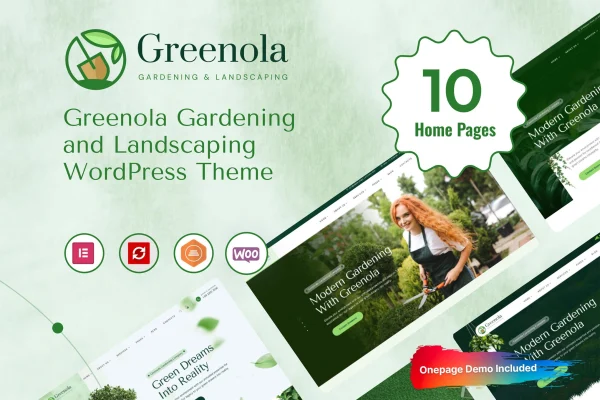
Greenola is a WordPress theme made for gardening and landscaping businesses. It gives you pre-built layouts for presenting your services, completed projects and team, plus a drag-and-drop page builder for adjusting pages without writing code.
- Version
- 1.0.1
- Released
- Aug 14, 2026
- Developer
- Case-Themes
- Type
- WordPress theme
- Licence
- GPL
- Included in
- Every plan, or $3.99 on its own
What’s new in Greenola 1.0.1
Version 1.0.1 · Aug 14, 2026
Latest
What it does
Gardening and landscaping companies need a site that shows off their work and explains what they offer. This theme handles that with layouts designed for the niche, so you start from pages built around gardens, outdoor services and project galleries instead of a blank, generic template. A one-click demo import sets up the ready-made demos, and from there you swap in your own photos, text and branding.
The theme suits small local gardening services and larger landscaping firms alike. You can build a services section with customizable blocks, introduce staff with team member profiles, and present finished jobs as galleries and case studies. A blog layout covers gardening tips and company news. Because it works with WooCommerce, you can also sell plants, tools or consultation services, and the responsive, retina ready design adapts to phones, tablets and desktops.
Best for
- Local gardening and lawn care services
- Landscaping and landscape design companies
- Garden centers selling plants or tools online
Features
Drag-and-drop page builder
Arrange and customize page sections visually, so you can shape each page around your business without touching any code.
Gardening and landscaping layouts
Pre-built templates designed for gardens, landscapes and outdoor services give you a niche-appropriate starting point for your pages.
Portfolio and project pages
Present completed gardening and landscaping jobs with galleries and detailed case studies that let prospective clients see your past work.
Services and team sections
Customizable service blocks describe what you offer, and team member profiles introduce the people who will be working on a client's property.
WooCommerce compatibility
Works with WooCommerce, so you can add a shop for plants, gardening tools or bookable consultation services alongside your business pages.
Blog layouts
Several blog templates are included for publishing gardening tips, landscaping ideas and company news in a readable format.
Header and footer styles
Choose from multiple header and footer designs to match your branding and the way you want visitors to move around the site.
One-click demo import
Bring in a ready-made demo in one step, then replace the sample content with your own text, images and contact details.
Greenola older versions
- 1.0.0May 24, 2025
Members and buyers of this product can download older versions.
Questions about Greenola
Can I sell plants or products with this theme?
Yes. Greenola is WooCommerce compatible, so you can set up a shop for plants, gardening tools or consultation services and run it alongside your service, project and team pages on the same site.
Do I need to know how to code to customize it?
No. The theme includes a drag-and-drop page builder for editing layouts visually, and a one-click demo import gives you finished pages to start from, so most changes can be made without writing code.
Can I display my past landscaping projects?
Yes. The portfolio features let you show completed gardening and landscaping work in galleries and as detailed case studies, which helps potential clients judge the kind of results you deliver.
Will the site work well on phones?
The design is responsive and retina ready, so pages adjust to smartphones, tablets and desktop screens, and images stay sharp on high-resolution displays.
Is Greenola free?
The code of Greenola is licensed under the GPL, so anyone may use, change and share it. GPL Feast is a paid service: a plan or a single purchase gives you the download and automatic updates. The developer's own support, licence key and online services are not included.
Which version of Greenola is this?
Version 1.0.1, released Aug 14, 2026. New versions appear here when the developer publishes them, and members get them as automatic updates.
How do I update Greenola?
Install the free GPL Feast Updater on your site and connect it with your API key. It installs new versions of Greenola automatically and keeps a backup, so you can roll back.