Theme
Updated
Himmelen
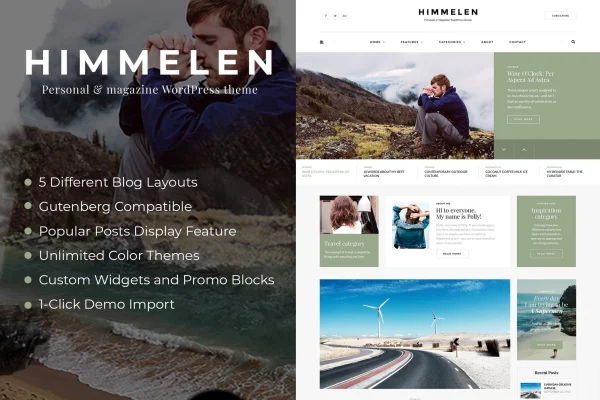
Himmelen is a minimal WordPress blog theme by dedalx, made for personal bloggers and creative writers. It gives your stories, photos and updates a clean, uncluttered home, with customizable layouts and a control panel that lets you style the site without touching code.
- Version
- 2.4.3
- Released
- May 25, 2026
- Developer
- dedalx
- Type
- WordPress theme
- Licence
- GPL
- Included in
- Every plan, or $3.99 on its own
What’s new in Himmelen 2.4.3
Version 2.4.3 · May 25, 2026
Latest
- NewPlugins updated to latest versions
- NewWordPress 7.x support
What it does
Many personal bloggers want a site that looks tidy and puts the writing first, without spending hours on design or learning CSS. Himmelen answers that with a simple, minimal layout suited to travel stories, food finds, fashion notes, wedding moments and everyday inspiration. A one-click demo import brings in the content and pages from the preview site, so you can start from a finished blog and swap in your own posts and images.
The theme works with the Gutenberg editor and is built on the Bootstrap 3 framework, with responsive, retina-ready design so posts read well on phones, tablets and desktops. Settings live in the Himmelen control panel, which handles configuration through options instead of HTML. It supports various post formats and social media integration, and it is compatible with WooCommerce and WPML if you later want to sell products or publish in more than one language.
Best for
- Personal bloggers who want a clean, minimal look
- Travel, food, fashion and wedding blogs
- Beginners building a blog without coding
Features
One-click demo import
Bring in the demo content and pages from the preview site in one step, then customize them with your own posts, photos and text.
Theme control panel
The Himmelen control panel lets you configure the theme through a friendly interface, with no CSS or HTML knowledge needed.
Responsive, retina-ready design
Layouts adjust to mobile phones, tablets and desktops, and graphics are retina ready for sharp display on high-resolution screens.
Gutenberg editor compatibility
The theme works with the WordPress block editor, so you can write and arrange posts using the standard Gutenberg tools.
Nine bundled plugins
Nine WordPress plugins come included with the theme to add extra functionality and interactivity to your blog.
WooCommerce and WPML support
Compatibility with WooCommerce lets you add an online store, and WPML compatibility lets you run your blog in multiple languages.
Post formats and social links
Various post formats suit different kinds of content, and social media integration connects your blog to your social profiles.
Bootstrap 3 foundation
The theme is built on the Bootstrap 3 framework, giving its responsive layouts a familiar and customizable base.
Himmelen older versions
- 2.4.2Jun 26, 2025
Members and buyers of this product can download older versions.
Questions about Himmelen
What kinds of blogs does Himmelen suit?
It is designed for personal and creative blogs. The theme specifically targets writers covering travel adventures, food discoveries, fashion trends, wedding moments and everyday inspiration, with a minimal design that keeps the focus on stories and photos.
Do I need coding skills to customize the theme?
No. The theme includes a control panel for configuring settings without CSS or HTML. You can also import the demo content in one click and edit it, which gives you a ready starting point.
Can I add a shop or a second language later?
Yes. The theme is compatible with WooCommerce, so you can add an online store, and with WPML, so you can publish your blog in more than one language as your audience grows.
Does it work with the block editor?
Yes. The theme is compatible with the Gutenberg block editor, so you can create and format posts with the standard WordPress blocks. It also supports various post formats for different types of content.
Is Himmelen free?
The code of Himmelen is licensed under the GPL, so anyone may use, change and share it. GPL Feast is a paid service: a plan or a single purchase gives you the download and automatic updates. The developer's own support, licence key and online services are not included.
Which version of Himmelen is this?
Version 2.4.3, released May 25, 2026. New versions appear here when the developer publishes them, and members get them as automatic updates.
How do I update Himmelen?
Install the free GPL Feast Updater on your site and connect it with your API key. It installs new versions of Himmelen automatically and keeps a backup, so you can roll back.