Theme
Updated
HomeMaker
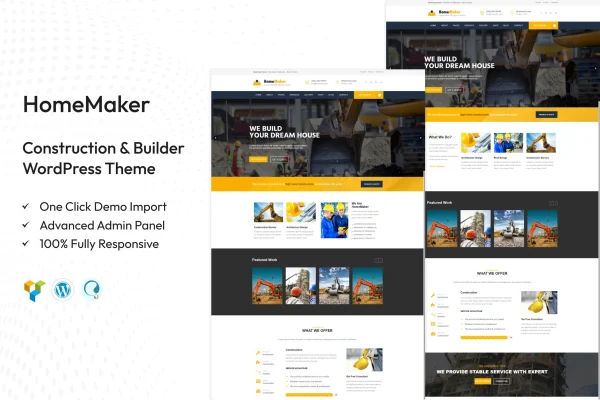
HomeMaker by TonaTheme is a WordPress theme built for construction and building businesses. It gives builders, contractors and construction firms a modern site design with pre-built page templates and drag and drop editing, so they can present their services and past projects without writing code.
- Version
- 2.1
- Released
- Feb 11, 2025
- Developer
- TonaTheme
- Type
- WordPress theme
- Licence
- GPL
- Included in
- Every plan, or $3.99 on its own
What’s new in HomeMaker 2.1
Version 2.1 · Feb 11, 2025
Latest
What it does
A construction company website usually needs to do a few specific jobs: explain the services offered, display finished projects, and make it easy for a prospective client to get in touch or find the office. This theme is set up around those needs. It ships with several pre-designed homepage and inner page templates, so you start from a layout made for the building trade and swap in your own text, photos and project details instead of designing every page from a blank screen.
Editing happens through a drag and drop page builder, which lets you rearrange layouts and content without coding skills. You can adjust color schemes, fonts and layouts to match your brand, and the responsive design adapts pages to desktops, tablets and phones. Contact forms and Google Maps are built in for inquiries and directions. The theme is also WooCommerce compatible if you want to sell products or services, and it is translation ready and works with WPML for multilingual sites.
Best for
- Small local builders and contractors
- Large construction firms presenting services and projects
- Beginners building a trade business site without code
Features
Pre-designed page templates
Multiple homepage and inner page templates give you a starting layout for a construction or builder site that you can fill with your own content.
Drag and drop editing
A drag and drop page builder lets you change layouts and page content directly, so you can customize the site without any coding knowledge.
Service and project displays
Dedicated layout options for services and projects help you present the kind of work your company does and the jobs you have completed.
Brand styling controls
Customization options cover color schemes, fonts and layouts, so the site can follow your company's existing colors and typography.
Responsive layouts
Pages adjust to desktops, tablets and mobile devices, so visitors can browse your services and projects comfortably on any screen size.
Contact forms and maps
Built-in contact forms and Google Maps give potential customers a direct way to send an inquiry and locate your business address.
WooCommerce compatibility
The theme works with WooCommerce, which lets you add a shop for selling products or services directly from your construction website.
Multilingual support
HomeMaker is translation ready and compatible with WPML, so you can run your site in more than one language for a wider audience.
Questions about HomeMaker
Do I need coding skills to customize this theme?
No. The theme includes a drag and drop page builder and pre-designed templates, so you can change layouts, text and images visually. Colors, fonts and layouts can also be adjusted through the customization options without editing code.
Can I display my past construction projects?
Yes. The theme includes service and project display options designed for construction work, so you can present completed jobs alongside descriptions of the services your company offers.
Can I sell products or services through the site?
The theme is compatible with WooCommerce, so you can add an online store to sell products or services directly from your website while keeping the same design.
Will it work for a site in more than one language?
Yes. The theme is translation ready and compatible with WPML, which means you can translate its text and set up a multilingual version of your construction website.
Is HomeMaker free?
The code of HomeMaker is licensed under the GPL, so anyone may use, change and share it. GPL Feast is a paid service: a plan or a single purchase gives you the download and automatic updates. The developer's own support, licence key and online services are not included.
Which version of HomeMaker is this?
Version 2.1, released Feb 11, 2025. New versions appear here when the developer publishes them, and members get them as automatic updates.
How do I update HomeMaker?
Install the free GPL Feast Updater on your site and connect it with your API key. It installs new versions of HomeMaker automatically and keeps a backup, so you can roll back.