Theme
Updated
Konsal
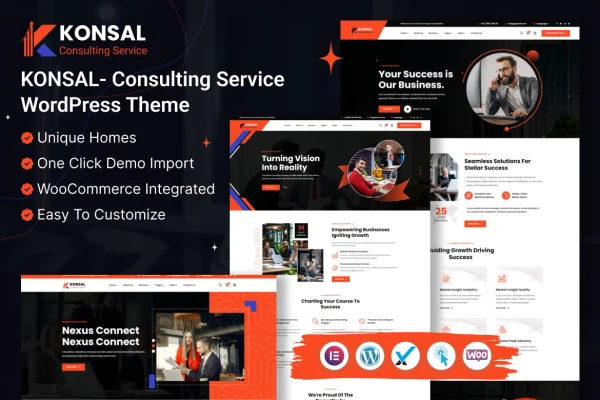
Konsal is a WordPress theme made for corporate businesses and consulting services. It gives firms in consulting and finance a professional site built around Elementor's drag and drop editor, with ready-made homepages, a large set of inner pages and header and footer styles you can adapt to your brand.
- Version
- 1.0.0
- Released
- Feb 7, 2024
- Developer
- themeholy
- Type
- WordPress theme
- Licence
- GPL
- Included in
- Every plan, or $3.99 on its own
What’s new in Konsal 1.0.0
Version 1.0.0 · Feb 7, 2024
Latest
What it does
Consulting firms, accountants and financial advisors usually need the same things from a website: clear pages for services, team members and past projects, plus a layout that looks trustworthy. This theme covers that ground with several homepage layouts and more than 270 pre-built inner pages, so most of the structure is already in place before you write a word. A one-click demo import loads the sample content, giving you a working starting point to edit instead of a blank install.
Page building happens in Elementor's frontend editor, so you can rearrange sections and change content without writing code. The theme adds its own custom Elementor widgets and a theme options panel for colors, typography and layouts. It is built on the Bootstrap framework, with a responsive, retina-ready design for different screen sizes. It works with WooCommerce if you want to sell products or services, and with WPML if your firm needs a multilingual site.
Best for
- Consulting firms and corporate business websites
- Financial advisors, accountants and insurance brokers
- Agencies building multilingual sites for finance clients
Features
Elementor drag and drop editing
Build and adjust pages visually in Elementor's frontend editor, moving sections and editing content directly on the page with no coding required.
Multiple homepage layouts
Choose from several creative, professional homepage designs suited to presenting consulting and corporate services to new visitors.
More than 270 inner pages
A large library of pre-built inner pages covers common business needs, giving you ready layouts for services, team, projects and more.
Header and footer styles
Pick from a variety of pre-made header and footer designs to match the look of your site to your brand identity.
Custom Elementor widgets
The theme includes its own tailor-made Elementor widgets, adding ready-to-use content blocks beyond the standard Elementor set.
One-click demo import
Import the demo content in one step to get a complete sample site, then replace the text and images with your own.
Theme options panel
Set site colors, typography, layouts and other global settings from a central theme options interface.
WooCommerce and WPML compatibility
Add an online shop with WooCommerce or translate your site into multiple languages with WPML.
Questions about Konsal
Do I need to know how to code to customize this theme?
No. Konsal works with Elementor's drag and drop frontend editor, so you can build and edit pages visually. Global settings such as colors, typography and layouts are handled through the theme options panel, which also requires no code.
What kinds of businesses is the design aimed at?
It is built for the consulting and finance sectors, including consulting firms, financial advisors, insurance brokers, accountants and similar corporate businesses. The layouts are geared toward presenting services, team members and projects in a professional way.
Can I sell services or products from the site?
Yes. The theme is compatible with WooCommerce, so you can add e-commerce features and sell products or services online alongside your regular business pages.
Will it work for a site in more than one language?
The theme supports WPML, which lets you run a multilingual version of your site. That is useful for firms serving clients in different countries or language groups.
Is Konsal free?
The code of Konsal is licensed under the GPL, so anyone may use, change and share it. GPL Feast is a paid service: a plan or a single purchase gives you the download and automatic updates. The developer's own support, licence key and online services are not included.
Which version of Konsal is this?
Version 1.0.0, released Feb 7, 2024. New versions appear here when the developer publishes them, and members get them as automatic updates.
How do I update Konsal?
Install the free GPL Feast Updater on your site and connect it with your API key. It installs new versions of Konsal automatically and keeps a backup, so you can roll back.