Theme
Updated
LeMar
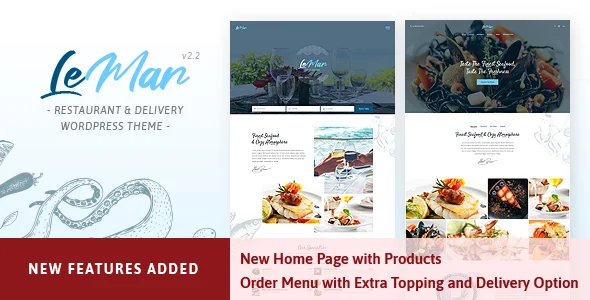
LeMar is a WordPress theme made for seafood restaurants. It pairs a coastal, seafood-inspired design with a drag-and-drop builder and pre-built templates for menus, photo galleries and reservations, so a restaurant can present its dishes and take bookings from one site.
- Version
- 2.4
- Released
- Sep 14, 2025
- Type
- WordPress theme
- Licence
- GPL
- Included in
- Every plan, or $4.79 on its own
What’s new in LeMar 2.4
Version 2.4 · Sep 14, 2025
Latest
- ImprovedPlugins
What it does
Restaurant owners often end up with a generic theme that needs heavy reworking before it looks anything like their dining room. This theme starts from a seafood and coastal look, so the visual direction is already set for fish houses, oyster bars and similar spots. From there, the drag-and-drop builder lets owners and managers adjust layouts and content without writing code, which helps when the person running the site is also running the kitchen or the floor.
The included templates cover the pages a seafood restaurant tends to need most. Menu templates give you customizable layouts for listing dishes, gallery templates display food photography, and the built-in reservation feature lets guests request a table from the site. The layouts are responsive, so pages adapt to phones, tablets and desktops. The theme also works alongside common WordPress plugins for things like SEO, social sharing and analytics, and it comes with documentation to help with setup.
Best for
- Seafood restaurants and fish bistros
- Coastal or waterfront dining venues
- Restaurant owners who want to edit pages without code
Features
Seafood-inspired design
Thematic visuals drawn from coastal dining give the site a look suited to seafood restaurants, bistros and other waterfront-style eateries from the start.
Drag-and-drop builder
Customize page layouts and content by dragging elements into place, with no coding knowledge needed to rearrange sections or update text.
Menu templates
Pre-built, customizable menu layouts let you list your seafood dishes in an organized way that is easy for visitors to browse.
Built-in reservations
An integrated reservation feature gives customers a way to book a table directly on your website, along with ready-made reservation templates.
Photo gallery templates
Gallery templates are designed for displaying food and restaurant photography, giving your dishes and dining space a dedicated place on the site.
Responsive layouts
Pages adjust to different screen sizes, so the menu, gallery and booking pages work for visitors on smartphones, tablets and desktops.
Works with common plugins
The theme is compatible with popular WordPress plugins for SEO, social sharing, analytics and similar additions you may want on your site.
LeMar older versions
- 2.3Sep 19, 20241 removal
- 2.2Aug 26, 20241 improvement, 1 fix, 1 change
- 2.1Apr 9, 20241 improvement
- 2.0Aug 14, 2023
- 1.9Apr 18, 2023
Members and buyers of this product can download older versions.
Questions about LeMar
Can guests book a table through the theme?
Yes. The theme includes an integrated reservation feature along with pre-built reservation templates, so customers can make a booking directly from your restaurant's website instead of calling.
Do I need coding skills to customize the layout?
No. It comes with a drag-and-drop builder that lets you change layouts and content visually. Restaurant owners and managers can update pages without touching any code.
Is it only suitable for seafood restaurants?
The design is built around seafood and coastal dining themes, so it fits seafood restaurants most naturally. It suits anything from a small seafood bistro to a larger restaurant group with that style.
Will the site work on mobile phones?
Yes. The layouts are responsive and mobile-optimized, so your menu, gallery and reservation pages adapt to smartphones, tablets and desktop screens.
Is LeMar free?
The code of LeMar is licensed under the GPL, so anyone may use, change and share it. GPL Feast is a paid service: a plan or a single purchase gives you the download and automatic updates. The developer's own support, licence key and online services are not included.
Which version of LeMar is this?
Version 2.4, released Sep 14, 2025. New versions appear here when the developer publishes them, and members get them as automatic updates.
How do I update LeMar?
Install the free GPL Feast Updater on your site and connect it with your API key. It installs new versions of LeMar automatically and keeps a backup, so you can roll back.
You might also like