Theme
Updated
Luxrio
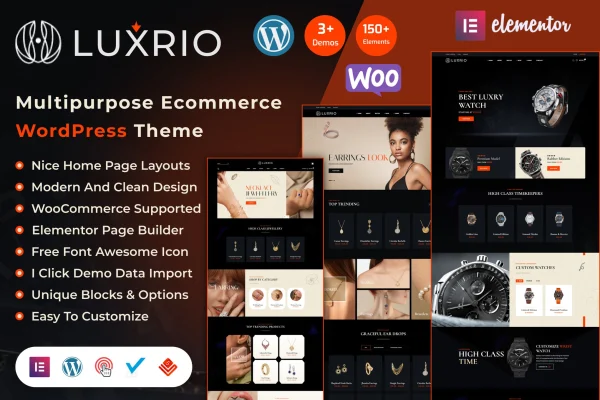
Luxrio is an eCommerce WordPress theme built for jewelry businesses. It works with WooCommerce to run your product catalog and checkout, and it gives you elegant layouts, flexible product displays and styling options you can adjust without writing code.
- Version
- 1.0.1
- Released
- Aug 8, 2026
- Developer
- vecuro_themes
- Type
- WordPress theme
- Licence
- GPL
- Included in
- Every plan, or $3.99 on its own
What’s new in Luxrio 1.0
Version 1.0 · Dec 12, 2024
Latest
- NewReleased.
What it does
Selling jewelry online depends on presentation. Shoppers want to see pieces clearly, move between categories easily and trust the store they are buying from. This theme gives jewelers a polished storefront designed around that kind of product. It is compatible with WooCommerce, so product management, checkout and payment processing run through a familiar eCommerce plugin, while the theme handles how everything looks. The layout is responsive, so your collections display properly on phones and tablets as well as desktop screens.
Customization happens through theme options where you can change colors, fonts and layouts without coding knowledge. You can present products in grid, carousel or masonry layouts, pick from several header and footer styles to match your brand, and set up a built-in mega menu for stores with many categories. An integrated blog lets you publish news, style tips and updates, and social media integration connects the store to your social profiles. It suits boutique jewelers and established brands alike.
Best for
- Independent jewelers opening an online store
- Established jewelry brands selling through WooCommerce
- Accessory boutiques wanting an elegant storefront design
Features
WooCommerce compatible
Works with WooCommerce for product management, checkout and payment processing, so your jewelry catalog runs on a widely used eCommerce plugin.
Responsive layout
The design adapts to different screen sizes, so your store displays and functions properly on smartphones, tablets and desktop computers.
Customization without code
Theme options let you adjust colors, fonts, layouts and other settings without needing any coding knowledge.
Several product display styles
Present jewelry pieces in grid, carousel or masonry layouts, choosing the format that best fits each collection or page.
Built-in mega menu
A mega menu helps customers browse your product categories, which is useful when you sell rings, necklaces, earrings and more.
Header and footer choices
Pick from multiple header and footer styles to give the store a look that matches your brand identity.
Integrated blog
Publish news, style tips and store updates through the built-in blog to keep your audience informed.
Social media integration
Connect the store with popular social platforms so visitors can find and follow your brand elsewhere.
Luxrio older versions
- 1.0.0Feb 11, 2025
Members and buyers of this product can download older versions.
Questions about Luxrio
Does this theme work with WooCommerce?
Yes. The theme is WooCommerce compatible, so you use WooCommerce for product management, checkout and payment processing while the theme controls the design of your shop pages and product displays.
Can I change the look without knowing how to code?
Yes. The theme options let you customize colors, fonts, layouts and more without coding. You can also choose between multiple header and footer styles and different product display layouts to shape the store's appearance.
How can I display my jewelry products?
Luxrio offers grid, carousel and masonry layouts for products. You can use whichever suits a collection, for example a carousel for featured pieces and a grid for a full category listing.
Will my store look right on mobile devices?
The theme uses a fully responsive layout, so pages adjust to smartphones and tablets. Shoppers browsing on a phone see your products and menus arranged for the smaller screen.
Is Luxrio free?
The code of Luxrio is licensed under the GPL, so anyone may use, change and share it. GPL Feast is a paid service: a plan or a single purchase gives you the download and automatic updates. The developer's own support, licence key and online services are not included.
Which version of Luxrio is this?
Version 1.0.1, released Aug 8, 2026. New versions appear here when the developer publishes them, and members get them as automatic updates.
How do I update Luxrio?
Install the free GPL Feast Updater on your site and connect it with your API key. It installs new versions of Luxrio automatically and keeps a backup, so you can roll back.
More from vecuro_themes