Theme
Updated
MBStore Theme
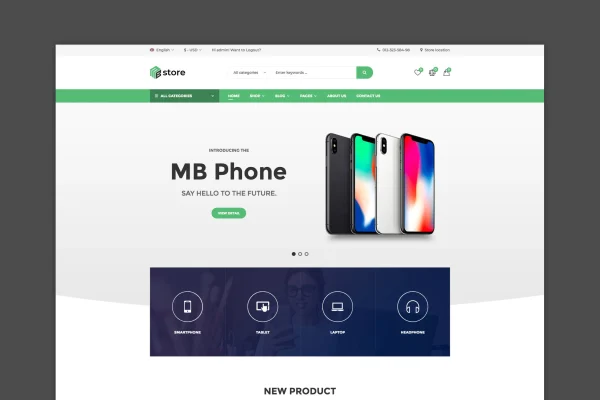
MBStore Theme is a WordPress theme built for WooCommerce shops that sell digital goods. It gives store owners several homepage layouts, AJAX shopping tools and detailed product presentation options, so a shop selling software, digital products or electronics can be set up with a clear, modern storefront.
- Version
- 2.4
- Released
- Jun 23, 2025
- Developer
- snstheme
- Type
- WordPress theme
- Licence
- GPL
- Included in
- Every plan, or $3.99 on its own
What’s new in MBStore Theme 2.4
Version 2.4 · Jun 23, 2025
Latest
What it does
Running a digital store on WooCommerce means presenting many products clearly and letting shoppers find, compare and buy them without friction. This theme handles the storefront side of that job. It includes AJAX search, an AJAX shopping cart, wishlists, product comparison and quick view, so visitors can browse and act on products without constant page reloads. Product images can use popup views, cloud zoom in more than two styles and lazy loading, and video products are supported too.
The theme is built on Bootstrap 3.x and uses Font Awesome icons. You start from one of three or more homepage layouts, import demo content with one click, and adjust colors with unlimited color options. An admin panel with advanced meta options controls store settings. Visual Composer and Slider Revolution are bundled for page building and hero sliders, and WPML support lets you run the store in more than one language.
Best for
- WooCommerce shops selling software or digital products
- Online electronics stores wanting quick view and product comparison
- Store owners running multilingual shops with WPML
Features
AJAX search and cart
Shoppers can search products and update their cart through AJAX, which keeps browsing and checkout steps moving without full page reloads.
Wishlists, compare and quick view
Visitors can save items to a wishlist, compare products side by side and open a quick view of product details from listing pages.
Multiple homepage layouts
Choose from three or more homepage designs and customize them to build a storefront that fits the look of your digital shop.
Detailed product presentation
Products can use popup images and videos, more than two cloud zoom styles, and color or image swatches for product variations.
Unlimited color options
Adjust the color scheme of site elements so the store matches your brand colors without editing theme files.
Bundled page builder and slider
Visual Composer is included for drag and drop page building, and Slider Revolution is included for sliders and hero sections.
Multilingual store support
WPML support lets you translate the store and run it in several languages for customers in different regions.
Lazy load and AJAX tabs
Product images load lazily as visitors scroll, and product tabs switch through AJAX effects for interactive browsing.
MBStore Theme older versions
- 2.2Nov 11, 2023
Members and buyers of this product can download older versions.
Questions about MBStore Theme
Does this theme need WooCommerce?
Yes. The theme is designed specifically for WooCommerce, which supplies the store functions such as product management and payment gateways. The theme adds the storefront design and shopping features like the AJAX cart, wishlists, comparison and quick view on top of it.
Can I start from a ready-made design?
Yes. The theme comes with three or more homepage layouts and a one-click demo import that loads pre-built demo content. You can then change layouts, colors and page content to fit your own store.
Which page builder does the theme use?
Visual Composer is bundled with the theme as a drag and drop page builder. Slider Revolution is also included for building sliders and hero sections on your homepage and other pages.
Can I run my store in more than one language?
Yes. The theme supports WPML, so you can create a multilingual version of your store and offer product pages and content in several languages.
Is MBStore Theme free?
The code of MBStore Theme is licensed under the GPL, so anyone may use, change and share it. GPL Feast is a paid service: a plan or a single purchase gives you the download and automatic updates. The developer's own support, licence key and online services are not included.
Which version of MBStore Theme is this?
Version 2.4, released Jun 23, 2025. New versions appear here when the developer publishes them, and members get them as automatic updates.
How do I update MBStore Theme?
Install the free GPL Feast Updater on your site and connect it with your API key. It installs new versions of MBStore Theme automatically and keeps a backup, so you can roll back.