Theme
Updated
Mediax
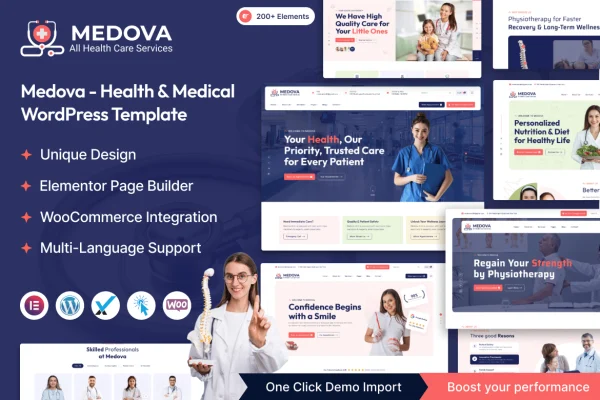
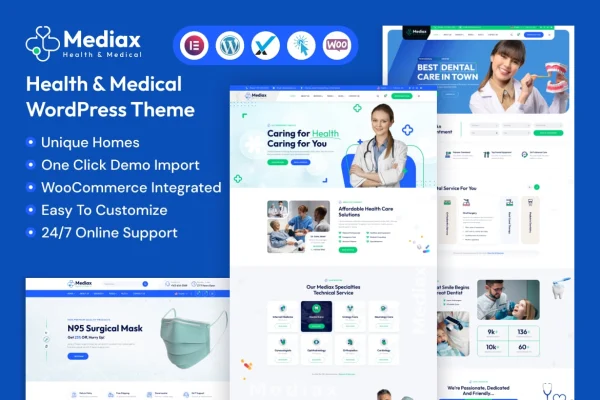
Mediax is a WordPress theme built for medical and health websites. It gives clinics, hospitals, dental offices and individual practitioners ready-made homepages and inner pages they can edit visually in Elementor, so they can present services, team members and patient information without writing code.
- Version
- 1.0.0
- Released
- Feb 7, 2024
- Developer
- themeholy
- Type
- WordPress theme
- Licence
- GPL
- Included in
- Every plan, or $3.99 on its own
What’s new in Mediax 1.0.0
Version 1.0.0 · Feb 7, 2024
Latest
What it does
Healthcare websites need to cover a lot of ground: service descriptions, doctor and staff profiles, patient resources, contact details and often a way to request appointments. This theme gives you a starting point for all of that. It includes multiple homepage layouts designed for health and medical niches, plus more than 270 inner pages such as service details, team profiles, blog pages and contact forms. You pick the layouts that match your practice and adjust them to your brand.
The theme is built on the Bootstrap framework and works with Elementor, so you edit pages with a drag and drop editor on the front end. A one-click demo import loads sample content, and a theme options panel controls layout, colors and typography. WooCommerce compatibility lets you sell skincare, beauty or medical products, and WPML support helps you run the site in more than one language. It suits dental clinics, cosmetic surgery centers, skincare shops and general practices.
Best for
- Hospitals, clinics and individual medical practitioners
- Dental offices and cosmetic surgery centers
- Skincare and beauty product shops with a health focus
Features
Elementor visual editing
Build and adjust pages with Elementor's drag and drop front end editor, making layout and content changes visually without touching code.
Multiple medical homepages
Choose from several homepage designs made for health and medical niches, then adapt the one that best fits your practice or business.
Over 270 inner pages
Use more than 270 ready inner pages, including service details, team profiles, blog layouts and contact forms, to fill out a full practice website.
One-click demo import
Import the demo content in one step to get a working site structure in place, then replace the sample text and images with your own.
Theme options panel
Manage your site's layout, colors, typography and other settings from a single options panel inside the WordPress dashboard.
WooCommerce store support
Set up an online shop with WooCommerce to sell medical supplies, beauty items or skincare products alongside your practice information.
Multilingual with WPML
The theme is ready for WPML, so you can create translated versions of your medical site for patients who speak other languages.
Responsive, retina ready design
Layouts adapt to phones, tablets and desktops, and graphics are retina ready so they display sharply on high resolution screens.
Questions about Mediax
Do I need coding skills to customize this theme?
No. Pages are edited with Elementor's drag and drop front end editor, and global settings like layout, colors and typography are handled in the theme options panel. The one-click demo import also gives you a complete starting structure to edit.
Can I sell products on my medical website with Mediax?
Yes. The theme is compatible with WooCommerce, so you can add an online store for items such as skincare products, beauty items or medical supplies next to your service and team pages.
What kinds of pages are included?
You get multiple homepage layouts for health and medical niches and more than 270 inner pages. These cover service details, team profiles, blog layouts and contact forms, along with several header and footer styles you can customize.
Can I run the site in more than one language?
Yes. The theme is WPML ready, which lets you build translated versions of your pages so patients can read your site in their preferred language.
Is Mediax free?
The code of Mediax is licensed under the GPL, so anyone may use, change and share it. GPL Feast is a paid service: a plan or a single purchase gives you the download and automatic updates. The developer's own support, licence key and online services are not included.
Which version of Mediax is this?
Version 1.0.0, released Feb 7, 2024. New versions appear here when the developer publishes them, and members get them as automatic updates.
How do I update Mediax?
Install the free GPL Feast Updater on your site and connect it with your API key. It installs new versions of Mediax automatically and keeps a backup, so you can roll back.