
Theme
Updated
Medicox
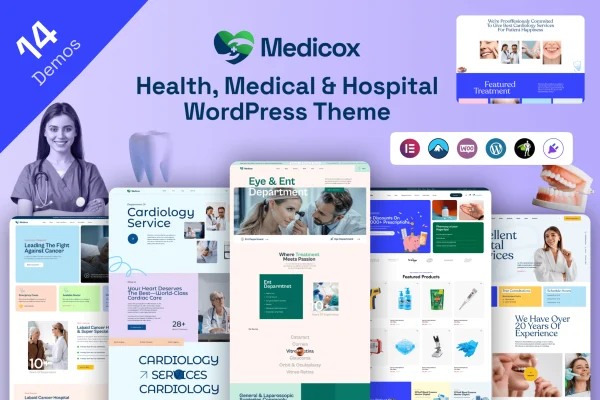
Medicox is a WordPress theme built for healthcare websites, including clinics, hospitals, medical practitioners and wellness centers. It gives you ready layouts for presenting services, introducing staff, sharing patient testimonials and taking appointment requests online.
- Version
- 1.0
- Released
- Feb 11, 2025
- Developer
- themexriver
- Type
- WordPress theme
- Licence
- GPL
- Included in
- Every plan, or $3.99 on its own
What’s new in Medicox 1.0.0
Version 1.0.0
Latest
- NewInitial release of medicox theme.
What it does
Healthcare providers need a website that explains their services clearly and helps patients feel comfortable before they ever walk in the door. This theme is designed around those needs. It includes pre-built sections for medical services, staff profiles with biographies and a patient testimonials module, so the pages a clinic or practice usually needs are already planned out. An online appointment booking system lets patients schedule visits from the site.
The theme works with Elementor for drag and drop page editing and with WooCommerce if you want to sell products online. You can choose from customizable homepage layouts and multiple header and footer styles to match your branding. A built-in blog gives practitioners a place to post health tips, news and updates, and the responsive design adapts pages to desktops, tablets and smartphones.
Best for
- Clinics and private medical practices
- Hospitals and larger healthcare institutions
- Wellness centers and independent health practitioners
Features
Customizable homepage layouts
Pick a homepage layout and adjust it to fit your brand, placing your medical services and practice details where visitors will see them first.
Online appointment booking
Patients can request and schedule appointments directly through your website, which gives your practice a simple way to handle bookings online.
Pre-built service sections
Ready sections let you present each healthcare service with a clear description and supporting visuals, so patients can understand what you offer.
Staff profiles with biographies
Introduce doctors, nurses and other team members with individual profiles and written biographies that help patients learn who will care for them.
Patient testimonials module
Display feedback from patients on your pages so new visitors can read about other people's experiences with your clinic or practice.
Blog for health content
Publish health tips, clinic news and updates through the built-in blog, giving you a regular way to share information with your audience.
Elementor and WooCommerce support
Edit pages with the Elementor drag and drop builder, and add an online store with WooCommerce if your practice sells products.
Header and footer styles
Choose from multiple header and footer styles to give your pages a distinct look that suits your institution's branding.
Questions about Medicox
Can patients book appointments through a site built with this theme?
Yes. The theme includes an online appointment booking system, so patients can schedule visits from your website. This works alongside the service sections and staff profiles, letting visitors read about a treatment or a doctor and then book.
Does Medicox work with Elementor?
Yes. The theme is compatible with the Elementor page builder, which lets you customize pages with drag and drop editing. It also supports WooCommerce if you want to add an online store to your healthcare site.
Will my medical website look right on phones and tablets?
The theme uses a responsive, mobile-friendly design, so layouts adjust to desktops, tablets and smartphones. Patients checking your services or booking an appointment from their phone get pages sized for their screen.
Can I write blog posts with this theme?
Yes. Blog functionality is built in, so you can publish health tips, news and practice updates. It suits clinics and practitioners who want to share helpful information with patients on a regular basis.
Is Medicox free?
The code of Medicox is licensed under the GPL, so anyone may use, change and share it. GPL Feast is a paid service: a plan or a single purchase gives you the download and automatic updates. The developer's own support, licence key and online services are not included.
Which version of Medicox is this?
Version 1.0, released Feb 11, 2025. New versions appear here when the developer publishes them, and members get them as automatic updates.
How do I update Medicox?
Install the free GPL Feast Updater on your site and connect it with your API key. It installs new versions of Medicox automatically and keeps a backup, so you can roll back.