
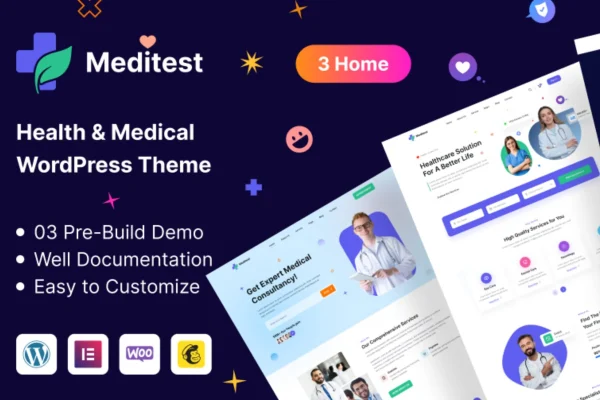
Theme
Updated
Meditest
Meditest is a WordPress theme by CodeIndeed built for healthcare providers, medical clinics and hospitals. It gives you a responsive, clean layout for presenting medical services, staff profiles, appointment bookings and patient resources on one site.
- Version
- 1.1.6
- Released
- Mar 24, 2025
- Developer
- CodeIndeed
- Type
- WordPress theme
- Licence
- GPL
- Included in
- Every plan, or $3.99 on its own
What’s new in Meditest 1.1.6
Version 1.1.6 · Mar 24, 2025
Latest
What it does
Medical practices need a website that looks professional and is easy for patients to use on any screen. This theme is designed around that need, with a fully responsive layout that adapts to desktops, tablets and smartphones. It covers the pages a healthcare site usually needs, such as service pages, staff profiles, appointment booking and patient resources, so doctors, dentists and larger facilities can present their care in an organized way.
Styling is handled through an options panel where you manage site-wide settings, layouts and features, along with unlimited fonts and colors to match your brand. Pages can be built and edited with Elementor or Elementor Pro using drag and drop. The theme is built on the Bootstrap framework, uses retina ready graphics for sharp visuals and works with WooCommerce if you want to sell medical products or handle online appointments and payments.
Best for
- Medical clinics and private doctor practices
- Hospitals and multi-department medical centers
- Dentists and other healthcare providers needing appointment pages
Features
Fully responsive layout
Pages adjust to desktops, tablets and smartphones, so patients can read about services and book appointments comfortably on whatever device they use.
Unlimited fonts and colors
Change typography and color choices across the site to match your clinic or hospital branding without writing any code.
Elementor and Elementor Pro support
Build and edit pages with the Elementor drag and drop page builder, including Elementor Pro, to arrange content the way you want.
WooCommerce integration
Add a shop to sell medical products, or use WooCommerce to manage online appointments and take payments through your site.
Bootstrap framework
The theme is built on Bootstrap, a widely used front-end framework that helps layouts behave consistently across browsers and devices.
Retina ready graphics
High-resolution visuals stay crisp and sharp on high-density screens, giving your medical content a clean, professional look.
Theme options panel
Manage site-wide settings, layouts and features from one options panel instead of editing templates by hand.
Meditest older versions
- 1.1.1Feb 27, 2024
Members and buyers of this product can download older versions.
Questions about Meditest
Can patients book appointments through a site built with this theme?
Yes. The theme includes support for appointment booking, and its WooCommerce integration can be used to manage online appointments and payments. This lets a clinic or practice take bookings directly on its own website alongside its service and staff pages.
Does Meditest work with Elementor?
Yes. Meditest is compatible with both Elementor and Elementor Pro, so you can build and customize pages with drag and drop editing. This makes it practical to adjust service pages, staff profiles and other layouts without touching code.
Can I match the site to my practice's branding?
You can. The theme offers unlimited fonts and colors, and an options panel for site-wide settings, layouts and features. Together these let you adapt the look to your clinic's logo, colors and overall style.
Will the site look good on phones and tablets?
The layout is fully responsive and adapts to desktops, tablets and smartphones. Retina ready graphics keep images sharp on high-resolution screens, and the Bootstrap framework helps pages display consistently across devices and browsers.
Is Meditest free?
The code of Meditest is licensed under the GPL, so anyone may use, change and share it. GPL Feast is a paid service: a plan or a single purchase gives you the download and automatic updates. The developer's own support, licence key and online services are not included.
Which version of Meditest is this?
Version 1.1.6, released Mar 24, 2025. New versions appear here when the developer publishes them, and members get them as automatic updates.
How do I update Meditest?
Install the free GPL Feast Updater on your site and connect it with your API key. It installs new versions of Meditest automatically and keeps a backup, so you can roll back.
You might also like