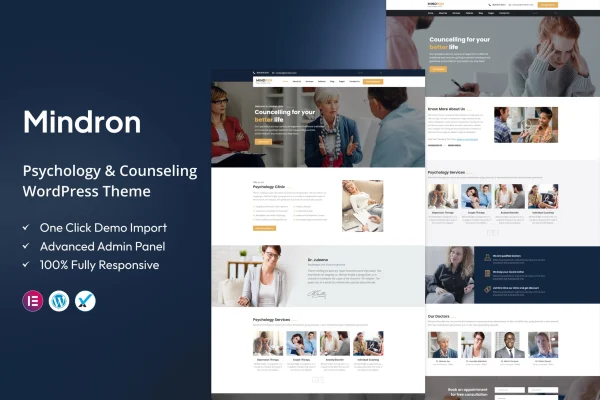
Theme
Updated
Mindron
Mindron is a WordPress theme built for psychology and counseling practices. It gives therapists, counselors, psychologists and life coaches a calm, professional website with psychology-focused templates, appointment booking and blog layouts for sharing their expertise.
- Version
- 2.4
- Released
- Feb 11, 2025
- Developer
- ThemeArc
- Type
- WordPress theme
- Licence
- GPL
- Included in
- Every plan, or $3.99 on its own
What’s new in Mindron 2.4
Version 2.4 · Feb 11, 2025
Latest
What it does
Mental health professionals need a website that feels welcoming and trustworthy, and that also handles practical jobs like presenting services and taking appointments. This theme starts from that need. Its templates are designed around psychology and counseling, so you begin with pages that already suit a practice instead of adapting a generic business layout. A drag-and-drop page builder lets you change those pages without writing code, which helps if you run a small practice and manage the site yourself.
Beyond the layouts, the theme includes an appointment booking system for client scheduling and several blog layouts for posting mental health tips and articles. Color schemes and typography can be adjusted to match your brand and keep the calm tone that clients often look for. The design is responsive, so pages adapt to phones and tablets. It also works with common plugin types such as contact forms, social media tools and multilingual plugins, which makes it a practical fit for solo practitioners and growing counseling practices alike.
Best for
- Therapists and counselors in private practice
- Psychologists and mental health clinics
- Life coaches who want a calm, professional site
Features
Psychology-focused templates
Ready-made page designs aimed at therapy and counseling practices give you a professional, welcoming starting point for presenting your services and background.
Drag-and-drop page builder
Edit and rearrange page content visually with a drag-and-drop builder, so you can customize layouts without any coding knowledge.
Appointment booking system
An integrated booking system lets clients schedule sessions through your site and helps you keep track of appointments in one place.
Multiple blog layouts
Choose from several blog layouts to publish mental health tips, articles and insights that help visitors get to know your approach.
Custom colors and typography
Adjust color schemes and fonts to match your brand identity and create the calm, reassuring atmosphere suited to a counseling practice.
Responsive, mobile-friendly design
Layouts adapt to different screen sizes, so clients can read about your services and book sessions comfortably on phones and tablets.
Common plugin compatibility
The theme supports plugins for contact forms, social media integration and multilingual sites, letting you add these functions as your practice needs them.
Questions about Mindron
Can I take client appointments with this theme?
Yes. The theme includes an integrated appointment booking system, so clients can schedule sessions from your website. This helps you manage your calendar and services without sending people to a separate scheduling page.
Do I need coding skills to customize the design?
No. Pages can be edited with a drag-and-drop page builder, and color schemes and typography can be changed through customization options. That makes it manageable for practitioners with little or no coding experience.
Is it suitable for a multilingual practice website?
The theme supports multilingual compatibility along with contact form and social media plugins. You would add a multilingual plugin of your choice to translate your pages for clients who speak different languages.
Can I run a blog alongside my service pages?
Yes. Mindron offers multiple blog layouts for publishing mental health tips, articles and other insights, so you can share your expertise next to your service and booking pages.
Is Mindron free?
The code of Mindron is licensed under the GPL, so anyone may use, change and share it. GPL Feast is a paid service: a plan or a single purchase gives you the download and automatic updates. The developer's own support, licence key and online services are not included.
Which version of Mindron is this?
Version 2.4, released Feb 11, 2025. New versions appear here when the developer publishes them, and members get them as automatic updates.
How do I update Mindron?
Install the free GPL Feast Updater on your site and connect it with your API key. It installs new versions of Mindron automatically and keeps a backup, so you can roll back.