Theme
Updated
Mireya
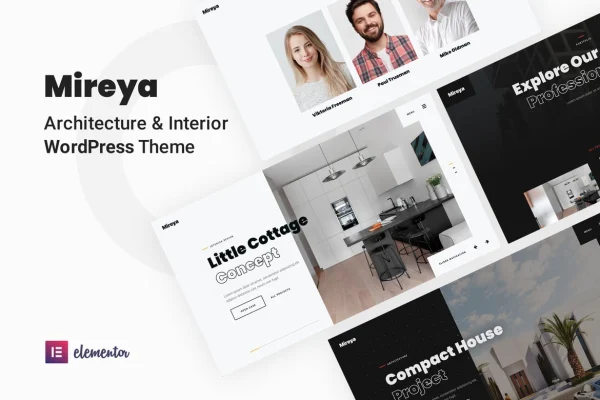
Mireya is a WordPress theme by bslthemes built for interior designers, architects and creative studios. It runs on Elementor, so you can edit layouts visually, and it ships with pre-built pages and a filterable portfolio for presenting projects and services.
- Version
- 1.3.1
- Released
- Aug 17, 2026
- Developer
- bslthemes
- Type
- WordPress theme
- Requires
- Elementor
- Licence
- GPL
- Included in
- Every plan, or $3.99 on its own
What’s new in Mireya 1.3.1
Version 1.3.1 · Aug 17, 2026
Latest
What it does
Design studios need a site that puts their projects first and still explains their services clearly. This theme is aimed at architecture firms, interior designers, artists, photography studios and creative agencies. It comes with 10+ pre-built pages, including portfolio, services, about and contact layouts, so the main parts of a studio website are already planned out. A one-click demo import lets you start from the demo content and replace it with your own work.
Because the theme requires Elementor, you adjust pages with drag and drop editing instead of code. You can pick between dark and light versions, add animation and parallax effects, and use smooth page transitions between pages. The portfolio supports filters and a lightbox gallery. Contact Form 7 handles client inquiries, WPML support covers multilingual sites, and child theme support helps developers keep their customizations separate.
Best for
- Interior design studios presenting projects and services
- Architecture firms needing a portfolio website
- Artists, photographers and creative agencies building multilingual sites
Features
Elementor drag and drop editing
Build and adjust page layouts visually with the Elementor page builder, without writing code, so the site can match your studio's branding.
More than 10 pre-built pages
Start with ready layouts for portfolio, services, about and contact pages, covering the core sections a design studio website usually needs.
Dark and light versions
Choose a dark or light look for the site, depending on which style suits your projects and brand.
Filterable portfolio with lightbox
Display projects in a portfolio that visitors can filter by category, with images opening in a lightbox gallery for closer viewing.
Animations and page transitions
Add animation and parallax effects to sections, and use smooth page transitions as visitors move from one page to the next.
One-click demo import
Import the demo content in one step to replicate the sample site, then swap in your own text, images and projects.
Multilingual and translation ready
WPML support and translation readiness let you run the site in more than one language or translate the theme text.
Contact Form 7 and child themes
Collect client inquiries through Contact Form 7, and use the included child theme support to keep custom code safe from theme changes.
Mireya older versions
- 1.2.9Sep 4, 2025
- 1.2.3May 13, 2023
Members and buyers of this product can download older versions.
Questions about Mireya
Do I need Elementor to use Mireya?
Yes. The theme requires the Elementor page builder. Elementor handles the drag and drop editing, so you can change layouts, text and images on the pre-built pages without touching code.
Can I switch between a dark and a light design?
The theme includes both dark and light versions. You can pick the one that fits your brand and the type of projects you display, such as moody interiors or bright, airy spaces.
How does the portfolio work?
The portfolio supports filters, so visitors can sort projects by category, and a lightbox gallery that opens images in an overlay. It suits studios with many projects across different styles or room types.
Can I build a site in more than one language?
Yes. The theme supports WPML for multilingual sites and is translation ready, so you can offer content in several languages or translate the theme's built-in text strings.
Is Mireya free?
The code of Mireya is licensed under the GPL, so anyone may use, change and share it. GPL Feast is a paid service: a plan or a single purchase gives you the download and automatic updates. The developer's own support, licence key and online services are not included.
Which version of Mireya is this?
Version 1.3.1, released Aug 17, 2026. New versions appear here when the developer publishes them, and members get them as automatic updates.
How do I update Mireya?
Install the free GPL Feast Updater on your site and connect it with your API key. It installs new versions of Mireya automatically and keeps a backup, so you can roll back.
What does Mireya need?
Mireya needs Elementor installed and active.
More from bslthemes