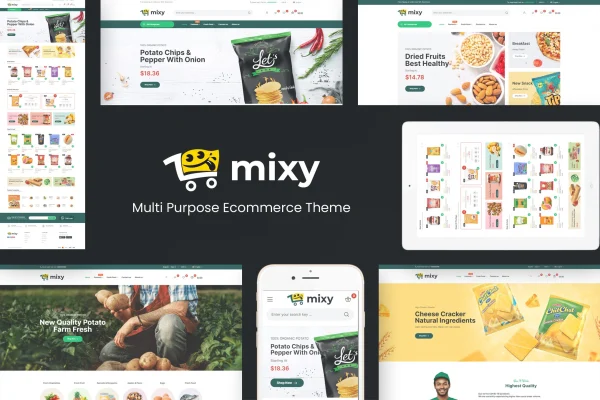
Theme
Updated
Mixy
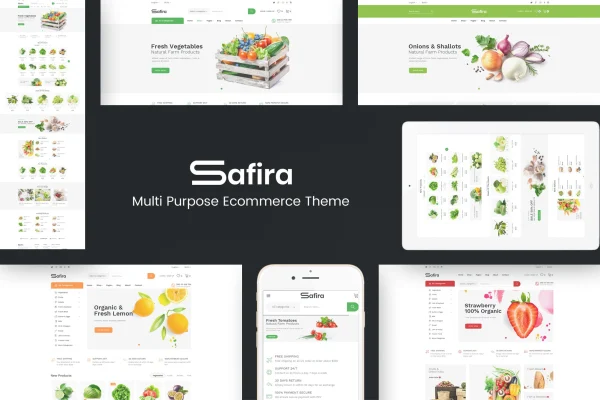
Mixy is a WordPress theme built for organic food stores, online supermarkets and fresh produce shops. It pairs WooCommerce for selling with Elementor for page building, so you can set up a clean, responsive storefront and adjust its look without writing code.
- Version
- 1.0.3
- Released
- Aug 13, 2026
- Developer
- Plaza-Themes
- Type
- WordPress theme
- Licence
- GPL
- Included in
- Every plan, or $3.99 on its own
What’s new in Mixy 1.0.3
Version 1.0.3 · Aug 13, 2026
Latest
What it does
Running an online grocery or organic shop means presenting a lot of products in a way that is easy to browse. This theme gives you a clean, modern store design aimed at vegetable stores, fresh food markets, natural health product sellers and similar businesses. WooCommerce handles products, orders and inventory. The layout adapts to desktops, tablets and phones, and retina ready graphics keep images sharp on high resolution screens.
Customization happens through an admin panel where you can change colors, fonts, backgrounds, the header, the footer and product grids. Elementor lets you build and edit pages by drag and drop, adding slideshows, banners, product tabs, countdowns, brand logos, testimonials and blog sections. You can pick product page styles and set how many products appear per page. The theme is built on Bootstrap, works with WPML for multilingual stores, and includes Sketch and PSD source files for designers.
Best for
- Organic food shops and fresh produce markets
- Online supermarkets and grocery stores using WooCommerce
- Sellers of natural health products
Features
WooCommerce store management
Manage products, orders and inventory through WooCommerce, with store layouts designed around organic food and grocery retail.
Elementor drag and drop pages
Build and edit pages in Elementor, adding slideshows, banners, product tabs, countdowns, brand logos, testimonials and blog sections.
No code design controls
Change colors, fonts, backgrounds, header, footer and product grids from an admin panel without editing any code.
Product display options
Choose between different product page styles and set the number of products shown per page to suit the size of your catalog.
Responsive and retina ready
Layouts adapt to desktops, tablets and smartphones, and retina ready graphics keep product images and site visuals crisp on high definition displays.
WPML translation support
Compatibility with WPML lets you translate your store into multiple languages for customers who shop in different languages.
Bootstrap foundation
The theme is built on the Bootstrap framework, giving it a mobile first structure that many developers already know.
Sketch and PSD files
Design source files in Sketch and PSD formats are included, so designers can work on mockups or further customize the visuals.
Mixy older versions
- 1.0.2Jan 16, 2025
Members and buyers of this product can download older versions.
Questions about Mixy
Does this theme work with WooCommerce?
Yes. The theme integrates with WooCommerce, so you manage products, orders and inventory there. It also gives you a choice of product page styles and lets you set how many products appear on each page.
Can I edit the pages without coding?
Yes. You can change colors, fonts, backgrounds, the header, the footer and product grids from the admin panel. Pages can be built and edited in Elementor with drag and drop, including sections like banners, slideshows, testimonials and countdowns.
Can I run my store in more than one language?
The theme is compatible with WPML, a multilingual plugin for WordPress. With WPML you can translate your site content into multiple languages and serve customers in their preferred language.
Will Mixy look good on phones and tablets?
The design is fully responsive, adapting to desktops, tablets and smartphones. It is built on the mobile first Bootstrap framework, and retina ready graphics keep visuals sharp on high resolution screens.
Is Mixy free?
The code of Mixy is licensed under the GPL, so anyone may use, change and share it. GPL Feast is a paid service: a plan or a single purchase gives you the download and automatic updates. The developer's own support, licence key and online services are not included.
Which version of Mixy is this?
Version 1.0.3, released Aug 13, 2026. New versions appear here when the developer publishes them, and members get them as automatic updates.
How do I update Mixy?
Install the free GPL Feast Updater on your site and connect it with your API key. It installs new versions of Mixy automatically and keeps a backup, so you can roll back.