Theme
Updated
Monni
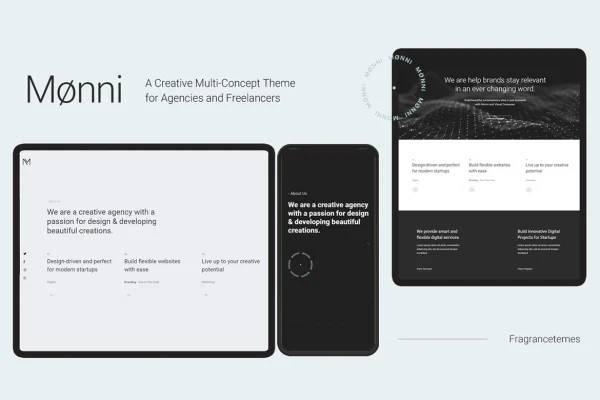
Monni by FragranceThemes is a WordPress theme built for creative professionals, agencies and studios who want a portfolio website. It gives you customizable layouts, demo content and portfolio shortcodes so you can present your projects without writing code.
- Version
- 1.0
- Developer
- FragranceThemes
- Type
- WordPress theme
- Licence
- GPL
- Included in
- Every plan, or $3.99 on its own
What’s new in Monni 1.0
Version 1.0
Latest
What it does
Creatives often need a site that puts their work front and center, yet building portfolio pages from scratch takes time and technical skill. This theme handles that job with an admin interface for adjusting site settings, a one-click demo content import to get a starting layout in place, and design options you can change to match your branding. The layouts are responsive and retina ready, so your projects display properly on phones, tablets, desktops and high-resolution screens.
Page building runs through the Visual Composer page builder, which lets you drag and drop elements to arrange pages. Slider Revolution is included for adding sliders to your site. For the portfolio itself, shortcodes cover masonry galleries, portfolio lists, project info and category lists. The theme is also described as compatible with WooCommerce and Bootstrap, which helps if you plan to sell products or prints alongside your portfolio. It suits designers, photographers, artists and digital agencies who want a ready structure for presenting their work.
Best for
- Designers and artists building an online portfolio
- Photographers who want gallery-style project pages
- Creative agencies and studios presenting client work
Features
One-click demo import
Import ready-made demo content in one step to get a working layout in place, then swap in your own projects, text and images.
Admin settings interface
Adjust site settings through an admin interface with controls for customizing the design, so you can match your brand without editing code.
Visual Composer page builder
Build and arrange pages with the Visual Composer drag-and-drop page builder, which lets you create custom layouts from the editor.
Slider Revolution included
The theme comes with Slider Revolution, a responsive slider tool you can use to add rotating image or content sliders to your pages.
Portfolio shortcodes
Present projects with shortcodes for masonry galleries, portfolio lists, project info and category lists, giving you several ways to organize your work.
Responsive and retina ready
Layouts adapt to desktops, tablets and smartphones, and graphics are prepared for high-resolution retina screens so your work looks sharp.
WooCommerce compatibility
The theme works with WooCommerce, so you can add a shop to your portfolio site and sell products alongside your creative work.
Questions about Monni
Can I build a portfolio site without knowing how to code?
Yes. The theme is designed so users without coding skills can customize it. You can import demo content in one click, adjust settings in the admin interface, and arrange pages with the Visual Composer drag-and-drop page builder.
What options do I have for displaying my projects?
Monni includes portfolio shortcodes for masonry galleries, portfolio lists, project info and category lists. You can mix these on your pages to show your work as a grid, a list, or detailed project entries grouped by category.
Can I sell products on a site using this theme?
The theme is described as compatible with WooCommerce, so you can add an online shop to your portfolio site. This works well if you want to sell prints, products or services next to the projects you present.
Will my site look right on phones and tablets?
Yes. The theme is responsive and retina ready, so layouts adjust to different screen sizes, from desktops to smartphones, and images display clearly on high-resolution screens.
Is Monni free?
The code of Monni is licensed under the GPL, so anyone may use, change and share it. GPL Feast is a paid service: a plan or a single purchase gives you the download and automatic updates. The developer's own support, licence key and online services are not included.
Which version of Monni is this?
Version 1.0. New versions appear here when the developer publishes them, and members get them as automatic updates.
How do I update Monni?
Install the free GPL Feast Updater on your site and connect it with your API key. It installs new versions of Monni automatically and keeps a backup, so you can roll back.
You might also like