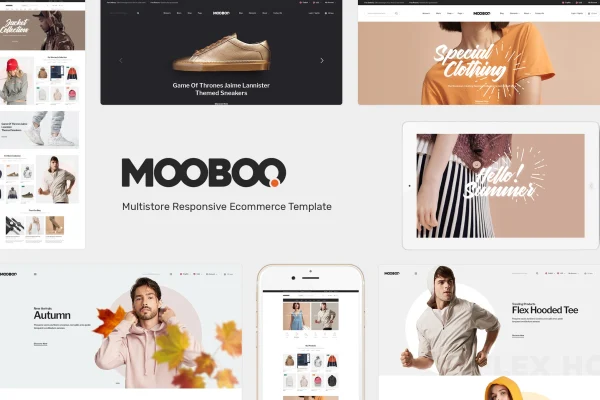
Theme
Updated
Mooboo
Mooboo is a WordPress theme built for clothing and fashion stores running on WooCommerce. It gives apparel and accessories shops a minimal, responsive storefront with six predesigned demos, mega menus and several ways to display products, all adjustable without writing code.
- Version
- 1.1.0
- Released
- Aug 12, 2026
- Developer
- roadthemes
- Type
- WordPress theme
- Licence
- GPL
- Included in
- Every plan, or $3.99 on its own
What’s new in Mooboo 1.1.0
Version 1.1.0 · Aug 12, 2026
Latest
What it does
Setting up a fashion store means presenting a lot of products clearly while keeping the design clean enough that the clothes stay in focus. This theme handles that with a minimal layout designed around apparel and accessories. You start from one of six predesigned fashion demos, then adjust layouts with a drag-and-drop page builder. WooCommerce runs the store side, so products, payments, shipping and checkout work through tools many store owners already know.
Browsing is organized through multiple mega menu styles, which help group categories and collections in larger catalogs. Products can appear in sliders, tabbed views, or grid and list modes, configured from the admin panel. The design is responsive and retina ready, and it is WPML compatible for multilingual stores. Mailchimp integration supports email list building, while the Bootstrap framework, PSD files and LESS files give designers and developers room for deeper custom work.
Best for
- Online clothing and apparel boutiques
- Fashion accessory shops built on WooCommerce
- Multilingual fashion stores using WPML
Features
Six predesigned fashion demos
Pick from six ready-made fashion demo designs to get a store layout in place quickly, then adapt it to match your brand and niche.
Drag-and-drop page builder
Build and rearrange page layouts with a visual editor, so you can create custom pages without needing any coding knowledge.
WooCommerce store features
Manage products, payments, shipping and checkout through WooCommerce, which the theme is designed around for running an online clothing shop.
Multiple mega menu styles
Organize product categories and collections into mega menus, with several styles available to suit catalogs of different sizes and structures.
Flexible product displays
Show items in product sliders, tabbed product views, or grid and list modes, all set up from the admin panel.
Multilingual and email ready
WPML compatibility lets you build stores in multiple languages, and Mailchimp integration helps you collect subscribers for email campaigns.
Responsive and retina ready
The layout adapts to different screen sizes from desktop to mobile, and graphics stay sharp on high-resolution displays.
Developer-friendly source files
Built on the Bootstrap framework and supplied with PSD and LESS files, giving designers and developers a base for deeper customization.
Questions about Mooboo
Does this theme work with WooCommerce?
Yes. It is designed specifically for WooCommerce, so you handle products, payments, shipping and checkout through WooCommerce while the theme provides the fashion-focused storefront design, product displays and menus.
Can I customize the design without coding?
Yes. The theme includes a drag-and-drop page builder for creating layouts visually, and product displays such as sliders, tabs and grid or list modes are configured from the admin panel. Designers who want to go further can use the included PSD and LESS files.
Can I run my store in more than one language?
The theme is WPML compatible, so you can use WPML to build a multilingual version of your fashion store and serve shoppers in different languages.
How many demo designs are included?
Mooboo comes with six predesigned fashion demos. You can choose the one closest to your brand style and use it as the starting point for your store.
Is Mooboo free?
The code of Mooboo is licensed under the GPL, so anyone may use, change and share it. GPL Feast is a paid service: a plan or a single purchase gives you the download and automatic updates. The developer's own support, licence key and online services are not included.
Which version of Mooboo is this?
Version 1.1.0, released Aug 12, 2026. New versions appear here when the developer publishes them, and members get them as automatic updates.
How do I update Mooboo?
Install the free GPL Feast Updater on your site and connect it with your API key. It installs new versions of Mooboo automatically and keeps a backup, so you can roll back.