Theme
Updated
Mounter
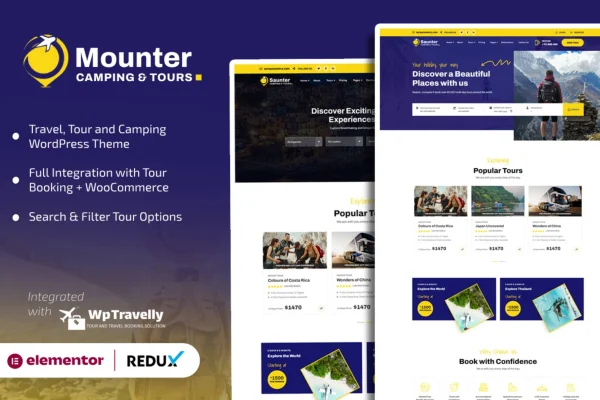
Mounter is a WordPress theme built for camping, travel and tour booking websites. It gives campgrounds, guided tour companies and travel agencies a ready-made design along with booking features, so visitors can check availability, book trips and manage their reservations on your site.
- Version
- 1.2.1
- Released
- Feb 11, 2025
- Developer
- nauthemes
- Type
- WordPress theme
- Licence
- GPL
- Included in
- Every plan, or $3.99 on its own
What’s new in Mounter 1.2.1
Version 1.2.1 · Feb 11, 2025
Latest
What it does
Travel and camping businesses need a website that does more than look good. Visitors want to see where a trip goes, find something that matches their plans and reserve a spot without hassle. This theme brings those pieces together. It includes booking system integration for checking availability and managing reservations, search and filtering to narrow down tours or campsites, and Google Maps support for showing locations and route information.
Getting started is easier with the pre-built demo pages, which are designed for camping, tour and travel businesses. From there you can adjust layouts and styles to match your brand, and edit content with a visual drag-and-drop page builder. The design is responsive across desktops, tablets and phones. It is also translation ready with right-to-left language support, which helps if you serve travelers who speak different languages.
Best for
- Campgrounds and campsite operators taking online reservations
- Guided tour companies listing and booking trips
- Travel agencies serving international or multilingual customers
Features
Booking system integration
Visitors can check availability, book trips and manage their reservations directly on your site, which keeps the booking process in one place.
Search and filtering
Search and filter tools help visitors find tours or campsites that suit their preferences without scrolling through every listing.
Google Maps support
Integrated Google Maps display exact locations and route information so travelers can see where a campsite or tour is and plan their journey.
Pre-built demo pages
Ready-to-use demo pages made for camping, tour and travel businesses give you a starting point you can adapt instead of building from scratch.
Customizable layouts and styles
Layout and style options let you change the look of your site so it reflects your brand and the kind of trips you offer.
Responsive design
Pages adjust to desktops, tablets and smartphones, so travelers browsing on the go can view trips and make bookings on any device.
Multilingual and RTL support
The theme is translation ready and supports right-to-left languages, making it workable for sites that serve an international audience.
Visual page builder compatibility
Works with a visual page builder, so you can create and arrange content with drag and drop and control your page layouts.
Questions about Mounter
Can customers book trips directly through a site built with this theme?
Yes. The theme includes booking system integration that lets visitors check availability, book trips and manage their reservations on your website, so you can handle bookings without sending people elsewhere.
Will it work for a campground as well as a tour company?
It is designed for both. The pre-built demo pages cover camping, tour and travel businesses, and the search and filtering tools help visitors find either tours or campsites that match what they are looking for.
Can I show where my tours and campsites are located?
Yes. Mounter has integrated Google Maps support, which lets you display exact locations and route information. This helps travelers understand where they are going and plan their trip before they book.
Does the theme support other languages?
The theme is translation ready and includes right-to-left language support. That makes it suitable for travel businesses that want to present their site in multiple languages or in languages such as Arabic or Hebrew.
Is Mounter free?
The code of Mounter is licensed under the GPL, so anyone may use, change and share it. GPL Feast is a paid service: a plan or a single purchase gives you the download and automatic updates. The developer's own support, licence key and online services are not included.
Which version of Mounter is this?
Version 1.2.1, released Feb 11, 2025. New versions appear here when the developer publishes them, and members get them as automatic updates.
How do I update Mounter?
Install the free GPL Feast Updater on your site and connect it with your API key. It installs new versions of Mounter automatically and keeps a backup, so you can roll back.
You might also like