Theme
Updated
Mremot
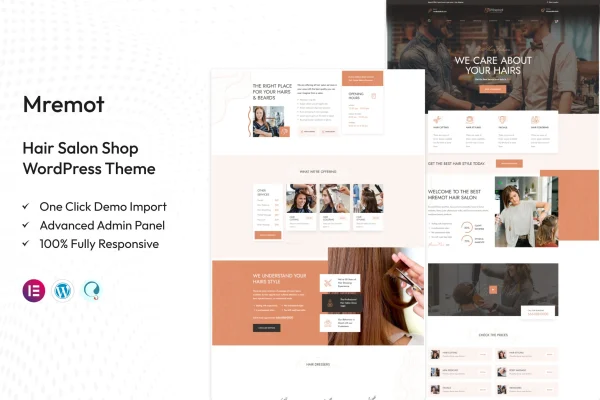
Mremot is a WordPress theme by TonaTheme built for hair salons, beauty shops and wellness centers. It gives you a polished salon layout with pages for services, team and pricing, plus tools for taking appointments and selling hair care products online.
- Version
- 1.2
- Released
- May 23, 2024
- Developer
- TonaTheme
- Type
- WordPress theme
- Licence
- GPL
- Included in
- Every plan, or $3.99 on its own
What’s new in Mremot 1.2
Version 1.2 · May 23, 2024
Latest
- FixedPHP 8.2.4 compatibility issues are fixed.
- ImprovedAll Plugins are up to date.
What it does
A salon website has a few clear jobs: show what services you offer, introduce your stylists, list prices and make it easy for clients to book. This theme is designed around those needs. It comes with pre-built page templates for services, galleries, team introductions, pricing and contact details, so you can start from layouts that already fit a salon instead of building every page from a blank canvas.
Beyond the core pages, the theme includes booking and appointment features so clients can schedule visits through your site. It works with WooCommerce, which lets you add a shop for hair care products and beauty items. You can adjust colors, fonts, layouts and content without writing code, and the layout is responsive, so pages adapt to phones, tablets and desktops. It suits boutique hair studios and full-service beauty shops alike.
Best for
- Hair salons and boutique hair studios
- Beauty shops selling hair care products online
- Wellness centers that take appointments through their website
Features
Salon-focused design
An elegant layout built around hair salon content, giving your services and products a clean, polished presentation that fits a beauty business.
Booking and appointments
Built-in booking and appointment features let clients schedule their salon visits directly through your website.
WooCommerce shop support
Compatible with WooCommerce, so you can set up an online store to sell hair care products and other beauty items.
Pre-built page templates
Ready-made pages cover services, galleries, team introductions, pricing and contact information, giving you a starting point for each part of the site.
No-code customization
Change colors, fonts, layouts and content through the theme options without needing any coding knowledge.
Responsive layout
Pages adjust to different screen sizes, so your salon site works on desktops, tablets and smartphones.
Retina ready graphics
Images display crisply on high-resolution screens, which helps photos of hairstyles and treatments look clear and sharp.
Social media links
Connect your salon's social profiles to the site so visitors can find and follow you on the platforms you use.
Questions about Mremot
Can clients book appointments through this theme?
Yes. The theme includes integrated booking and appointment features, so clients can schedule their visits directly on your website rather than calling or messaging to arrange a time.
Can I sell hair care products with Mremot?
Yes. Mremot is compatible with WooCommerce, so you can add an online shop for hair care products and beauty items alongside your service pages, booking features and team information.
What pages come ready to use?
The theme includes pre-built page templates for services, galleries, team introductions, pricing and contact information. You can customize these with your own content, colors and fonts to match your salon's brand.
Do I need coding skills to customize the design?
No. The customization options let you change colors, fonts, layouts and content without any coding knowledge, so salon owners can adjust the look of the site on their own.
Is Mremot free?
The code of Mremot is licensed under the GPL, so anyone may use, change and share it. GPL Feast is a paid service: a plan or a single purchase gives you the download and automatic updates. The developer's own support, licence key and online services are not included.
Which version of Mremot is this?
Version 1.2, released May 23, 2024. New versions appear here when the developer publishes them, and members get them as automatic updates.
How do I update Mremot?
Install the free GPL Feast Updater on your site and connect it with your API key. It installs new versions of Mremot automatically and keeps a backup, so you can roll back.