Theme
Updated
Nautica
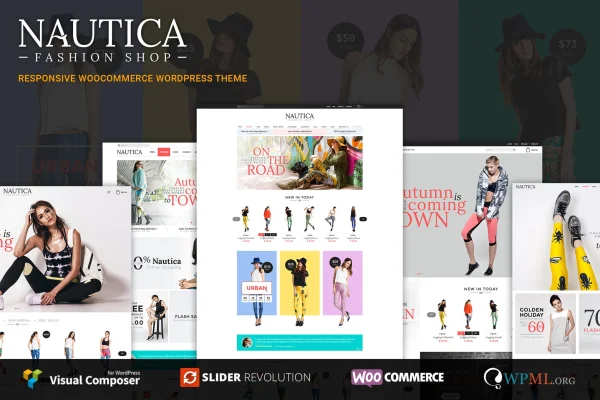
Nautica is a responsive WordPress theme by EngoTheme, built for online stores running WooCommerce. It gives shops a clean, modern layout that adapts to desktops, tablets and phones, with styling handled through the native WordPress Customizer.
- Version
- 1.1.0
- Released
- May 14, 2016
- Developer
- EngoTheme
- Type
- WordPress theme
- Licence
- GPL
- Included in
- Every plan, or $3.99 on its own
What’s new in Nautica 1.1.0
Version 1.1.0 · May 14, 2016
Latest
- NewAdded header position for archive page
- NewAdded child theme default
What it does
Setting up a shop that looks tidy on every screen can take a lot of design work. This theme starts you off with a clean layout built on the Bootstrap framework, and a one-click demo import loads pre-built content so you can replace sample products and text with your own instead of building pages from scratch. It works with WooCommerce for the store side, so your catalog, product pages and checkout sit inside a design made for selling.
Customization runs through the WordPress native Customizer, where you can adjust layouts, colors and other elements without writing code. Retina-ready graphics keep visuals sharp on high-resolution displays, and WPML compatibility lets you run the store in more than one language. The theme is also ready for Revolution Slider, so you can add animated sliders for products and promotions. Archive pages offer a header position setting, and a default child theme is included for safe custom changes.
Best for
- Fashion and clothing boutiques selling with WooCommerce
- Accessories and lifestyle brands wanting a clean storefront
- Store owners running multilingual shops with WPML
Features
Responsive store layout
The design adapts to desktop, tablet and smartphone screens, so shoppers get a layout that fits whatever device they browse with.
WooCommerce compatibility
Built to work with WooCommerce, giving your product catalog, shop pages and checkout a design that matches the rest of the site.
One-click demo import
Import pre-built demo content in one step to get a working store structure, then swap in your own products, images and text.
Native Customizer options
Change layouts, colors and page elements through the WordPress Customizer with a live preview and no coding needed.
Multilingual support with WPML
Compatible with WPML, so you can translate your store and offer it to shoppers in several languages.
Revolution Slider ready
Add animated sliders with Revolution Slider to feature products, collections and promotions on your homepage or other pages.
Retina-ready graphics
Visual elements are prepared for high-resolution screens, keeping icons and graphics crisp on retina displays.
Bootstrap and child theme
Built on the Bootstrap framework and shipped with a default child theme, so custom code changes stay separate from the parent theme.
Questions about Nautica
Does this theme work with WooCommerce?
Yes. The theme is designed for WooCommerce stores, so your shop pages, product listings and checkout display inside its responsive layout. It suits fashion, accessories and lifestyle brands, and its clean design also fits other kinds of online shops.
Can I customize the look without coding?
Yes. Layouts, colors and other elements are adjusted through the native WordPress Customizer, which shows changes as you make them. If you do want to add custom code, the included default child theme keeps those edits separate from the main theme files.
Can I build a store in more than one language?
The theme is compatible with WPML, the multilingual plugin for WordPress. With WPML in place, you can translate your pages and products and run the store for shoppers who speak different languages.
Is there a quick way to get a starting layout?
Yes. The one-click demo import loads pre-built demo content so your site matches the theme's demo layout right away. From there you replace the sample content with your own products, images and branding.
Is Nautica free?
The code of Nautica is licensed under the GPL, so anyone may use, change and share it. GPL Feast is a paid service: a plan or a single purchase gives you the download and automatic updates. The developer's own support, licence key and online services are not included.
Which version of Nautica is this?
Version 1.1.0, released May 14, 2016. New versions appear here when the developer publishes them, and members get them as automatic updates.
How do I update Nautica?
Install the free GPL Feast Updater on your site and connect it with your API key. It installs new versions of Nautica automatically and keeps a backup, so you can roll back.
You might also like