
Theme
Updated
Onsus
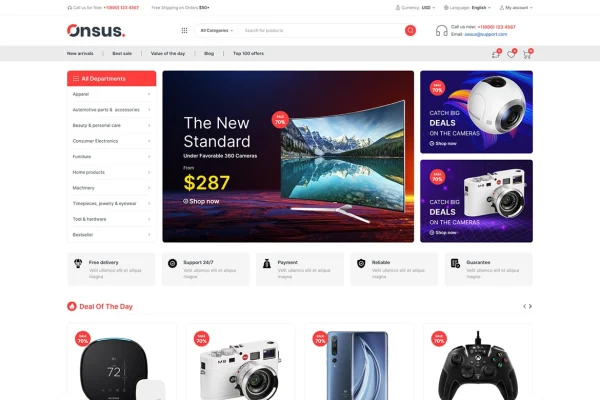
Onsus is a WordPress theme built for electronics e-commerce websites. It works with WooCommerce to handle product listings and checkout, and it gives store owners a clean, tech-focused design they can adjust to fit their brand and inventory.
- Version
- 1.1.1
- Released
- Feb 23, 2026
- Developer
- themesflat
- Type
- WordPress theme
- Licence
- GPL
- Included in
- Every plan, or $3.99 on its own
What’s new in Onsus 1.1.1
Version 1.1.1 · Feb 23, 2026
Latest
- FixedImport demo data
What it does
Selling electronics online means presenting a lot of product detail: specifications, reviews, variations and accessories. A general-purpose theme often leaves you building that structure yourself. Onsus is designed around the needs of tech stores, so its layouts already account for product details, specs and reviews. It runs on WooCommerce, which handles the store side of things, from product listings through to checkout, while the theme provides the look and the page structure around it.
The theme includes several pre-built homepage layouts, so you can pick a front page that suits your branding and the kind of products you carry, whether that is gadgets, accessories or home electronics. Product pages offer flexible layout options and widget areas, and search and filtering tools help shoppers narrow down a large catalog. The layout is responsive across desktops, tablets and phones, and the theme is built with clean, semantic code and social media connections.
Best for
- Online electronics and gadget stores
- WooCommerce shops selling tech accessories
- Agencies building e-commerce sites for electronics retailers
Features
WooCommerce integration
Works with WooCommerce to run product listings, the cart and secure checkout, so you manage your electronics store from the familiar WordPress dashboard.
Multiple homepage layouts
Choose from several pre-built front page designs and tailor the one you pick to your branding and the product categories you focus on.
Customizable product pages
Flexible layout options and widget areas let you present product details, customer reviews and technical specifications in the arrangement that suits your catalog.
Search and filtering
Advanced search and filtering tools help customers narrow a large electronics catalog and find the specific item they are looking for.
Responsive layout
Pages adapt to desktops, tablets and mobile devices, giving shoppers a consistent experience whatever screen they browse your store on.
Clean, semantic code
The theme is built with a clean, semantic code structure, which gives search engines a tidy page structure to index.
Social media and payments
Connect your store to your social channels, and offer customers a range of payment options through compatible payment gateways.
Questions about Onsus
Does Onsus need WooCommerce to run a store?
Yes, the store features come from its WooCommerce integration. WooCommerce handles product listings, the cart and secure checkout, while Onsus supplies the design, homepage layouts and product page structure built around electronics products.
Can I change the homepage design?
Yes. The theme includes multiple pre-built homepage layouts. You can choose the one that fits your store and then adjust it to match your branding and the types of electronics you sell, such as gadgets, accessories or home electronics.
Will product pages handle detailed specifications?
Product pages offer flexible layout options and widget areas meant for displaying product details, reviews and specifications. That makes it practical for electronics, where shoppers often compare technical information before buying.
Will my store work on phones and tablets?
Onsus uses a responsive layout that adjusts to desktops, tablets and mobile devices, so customers can browse products, use search and filters, and reach checkout on any screen size.
Is Onsus free?
The code of Onsus is licensed under the GPL, so anyone may use, change and share it. GPL Feast is a paid service: a plan or a single purchase gives you the download and automatic updates. The developer's own support, licence key and online services are not included.
Which version of Onsus is this?
Version 1.1.1, released Feb 23, 2026. New versions appear here when the developer publishes them, and members get them as automatic updates.
How do I update Onsus?
Install the free GPL Feast Updater on your site and connect it with your API key. It installs new versions of Onsus automatically and keeps a backup, so you can roll back.