Theme
Updated
Orologio
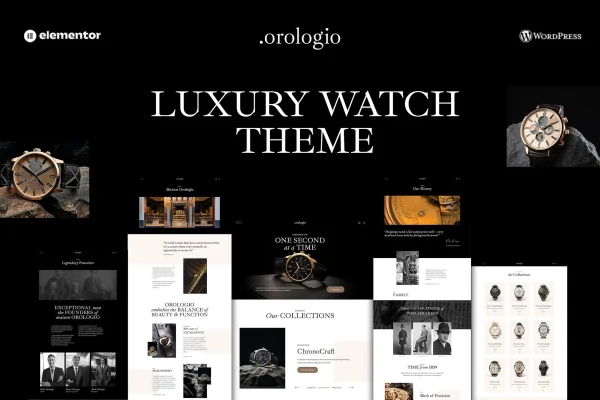
Orologio is a WordPress theme built for online watch retailers and collectors who sell high-end timepieces. It pairs refined, detail-focused layouts with WooCommerce so you can list products, take payments and manage orders from one place.
- Version
- 1.4
- Released
- Jan 27, 2026
- Developer
- disgogo
- Type
- WordPress theme
- Licence
- GPL
- Included in
- Every plan, or $3.99 on its own
What’s new in Orologio 1.4
Version 1.4 · Jan 27, 2026
Latest
What it does
Selling luxury watches online calls for a store that looks as polished as the products. This theme is designed around that niche, with layouts that give watches room to stand out and product pages that put details and high-resolution images front and center. It works with WooCommerce, so the usual store tasks such as adding products, handling payments and processing orders run through the platform many WordPress shop owners already know.
You can adjust fonts, colors, layouts and header styles without writing code, which helps the store match your brand. Ready-made pages for About, Shop, Blog and Contact give you a starting structure, and the blog layouts let you publish watch news or buying advice. Shoppers can save favorites to a wishlist and compare models side by side. The theme is responsive across screen sizes, translation ready and supports right-to-left languages for stores serving international customers.
Best for
- Online shops selling luxury or high-end watches
- Watch boutiques moving their catalog to WooCommerce
- Collectors running a watch blog with a small store
Features
WooCommerce store integration
Manage products, payments and orders through WooCommerce, so your watch catalog and checkout run on a familiar WordPress eCommerce setup.
Product galleries and sliders
Present watch details, features and high-resolution images using sleek galleries and interactive sliders that let shoppers look closely at each model.
No-code style controls
Change fonts, colors, layouts and header styles from the theme options to match your brand identity without touching any code.
Wishlist and compare tools
Shoppers can save favorite watches to a wishlist and compare models against each other while deciding what to buy.
Pre-built core pages
Start with ready-to-use About, Shop, Blog and Contact pages instead of building the basic structure of your store from scratch.
Blog layouts included
Use the built-in blog layouts to share watch expertise, trends or industry news alongside your product pages.
Responsive on all devices
The layouts adapt to desktops, tablets and smartphones, so customers can browse and shop comfortably on whatever screen they use.
Translation and RTL support
The theme is translation ready and supports right-to-left languages, which helps when building a store for customers in other regions.
Orologio older versions
- 1.3Aug 26, 2025
- 1.0May 12, 2025
Members and buyers of this product can download older versions.
Questions about Orologio
Does this theme work with WooCommerce?
Yes. It integrates with WooCommerce, so you handle products, payments and orders through that plugin. The theme's product galleries, sliders, wishlist and compare features are built around a WooCommerce store setup.
Can I change the look to match my brand without coding?
Yes. The customization options cover fonts, colors, layouts and header styles, and they are designed to be adjusted without writing code. That lets you shape the store around your own brand identity.
Can I sell to customers who use right-to-left languages?
Yes. Orologio is translation ready and includes right-to-left language support, so you can prepare a store for audiences that read languages such as Arabic or Hebrew, or translate it into other languages.
What pages come ready to use?
The theme includes pre-built About, Shop, Blog and Contact pages. You can use them as a starting point and then adjust the content and styling to suit your watch store.
Is Orologio free?
The code of Orologio is licensed under the GPL, so anyone may use, change and share it. GPL Feast is a paid service: a plan or a single purchase gives you the download and automatic updates. The developer's own support, licence key and online services are not included.
Which version of Orologio is this?
Version 1.4, released Jan 27, 2026. New versions appear here when the developer publishes them, and members get them as automatic updates.
How do I update Orologio?
Install the free GPL Feast Updater on your site and connect it with your API key. It installs new versions of Orologio automatically and keeps a backup, so you can roll back.
More from disgogo