Theme
Updated
Osterisk
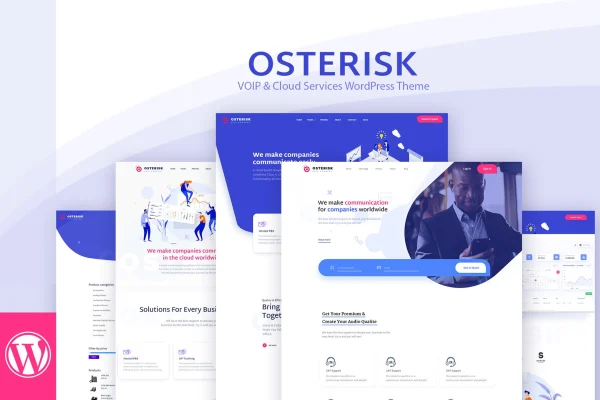
Osterisk is a WordPress theme made for VoIP, telecom and cloud services companies. It gives you a responsive, retina ready design, a drag and drop page builder and pre-built layouts so you can present services like SIP, cloud PBX and internet calls without writing code.
- Version
- 3.0
- Released
- Feb 8, 2024
- Developer
- Mymoun
- Type
- WordPress theme
- Licence
- GPL
- Included in
- Every plan, or $3.99 on its own
What’s new in Osterisk 3.0
Version 3.0 · Feb 8, 2024
Latest
What it does
Telecom and cloud businesses often sell services that are hard to explain at a glance, such as SIP trunking, VoIP phones, cloud PBX and internet calling. A general purpose theme leaves you designing those pages from scratch. Osterisk starts you off with layouts and design elements built around these offerings, so you can lay out your services, introduce your team and add client testimonials with far less setup work.
Pages are built with the included drag and drop page builder, where you add and rearrange elements visually. The theme also works with Gutenberg and WPBakery Page Builder, so you can stay with the editor you already know. WPML compatibility lets you run the site in more than one language, and the responsive, retina ready layout keeps text and images sharp on phones, tablets and high resolution screens.
Best for
- VoIP and SIP service providers
- Cloud PBX and cloud telephony companies
- Telecom software developers building a company site
Features
Responsive, retina ready design
Layouts adjust to different screen sizes, and support for high resolution displays keeps images and graphics crisp on retina screens.
Drag and drop page builder
Create and edit pages by adding and repositioning elements visually, with no coding knowledge needed to build or change a layout.
Layouts for telecom services
Pre-built layouts and design components are tailored to VoIP providers, SIP, cloud telephony, PBX systems and internet call services.
Gutenberg and WPBakery support
The theme works with the Gutenberg block editor and WPBakery Page Builder, so you can build pages with whichever tool you prefer.
WPML compatible
Run a multilingual site by managing translations and localization through WPML, useful for telecom providers serving customers in several languages.
Service, team and testimonial sections
Present your services, introduce the people behind your company and display client testimonials using the theme's ready-made sections.
Questions about Osterisk
Do I need to know how to code to build pages with this theme?
No. Osterisk includes a drag and drop page builder where you add and move elements visually. It also comes with pre-built layouts and design components, so you can start from a ready page structure and swap in your own content.
Can I use Gutenberg or WPBakery instead of the included builder?
Yes. The theme is compatible with both the Gutenberg block editor and WPBakery Page Builder, so you can build and edit pages with the tool you are most comfortable using.
Will it work for a multilingual telecom website?
Yes. Osterisk is compatible with WPML, which lets you manage translations and localization for your pages. This suits providers who serve customers in different countries or languages.
What kinds of services is the design built around?
The layouts and elements are aimed at VoIP and telecom businesses, including SIP services, VoIP phones, cloud PBX, cloud telephony and internet calls. There are also sections for your team and client testimonials.
Is Osterisk free?
The code of Osterisk is licensed under the GPL, so anyone may use, change and share it. GPL Feast is a paid service: a plan or a single purchase gives you the download and automatic updates. The developer's own support, licence key and online services are not included.
Which version of Osterisk is this?
Version 3.0, released Feb 8, 2024. New versions appear here when the developer publishes them, and members get them as automatic updates.
How do I update Osterisk?
Install the free GPL Feast Updater on your site and connect it with your API key. It installs new versions of Osterisk automatically and keeps a backup, so you can roll back.