Theme
Updated
Ovent
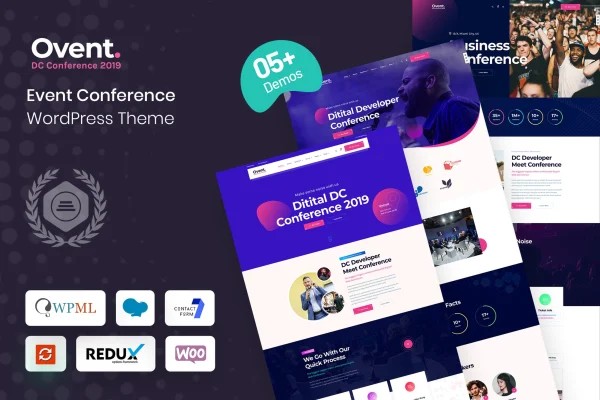
Ovent is a WordPress theme built for event and conference websites. It gives organizers responsive layouts, speaker and schedule sections, ticketing and registration support and a countdown timer, so one site can hold everything attendees need to know before the day arrives.
- Version
- 1.1.0
- Released
- Feb 11, 2025
- Developer
- Case-Themes
- Type
- WordPress theme
- Licence
- GPL
- Included in
- Every plan, or $3.99 on its own
What’s new in Ovent 1.1.0
Version 1.1.0 · Feb 11, 2025
Latest
What it does
Event sites need to carry a lot of information in a clear order: who is speaking, when each session starts, how to register and how long until doors open. This theme brings those pieces together in one place. It includes dedicated sections for speaker profiles and detailed agendas, plus built-in support for selling tickets and handling registrations directly on your site. Layouts are responsive, so pages adjust to desktops, tablets and phones.
You can start from one of several demo layouts made for different kinds of events and conferences, then change layouts, colors and content to match your event branding without writing code. The theme works with Elementor for drag and drop editing, and it is compatible with WooCommerce if you want to sell merchandise or extra services. Social media integration helps with sharing, and a live countdown timer shows visitors how long remains until the event date.
Best for
- Conference organizers running multi-speaker events
- Workshop and professional meetup planners
- Agencies building websites for event clients
Features
Speaker profile sections
Present keynote speakers and presenters in dedicated sections so attendees can see who is taking the stage at your conference or meetup.
Schedule and agenda layouts
Lay out detailed agendas for your event, giving visitors a clear view of sessions and timings in one place on the site.
Ticketing and registration support
Sell tickets and manage attendee registrations directly through your website using the theme's built-in ticketing and registration support.
Live countdown timer
Display a live countdown to your conference or event date, giving visitors a clear reminder of how much time is left.
Multiple demo layouts
Choose from ready-to-use demo templates designed for various types of events and conferences, then adjust them to fit your own event.
Customizable event pages
Change layouts, colors and content to reflect your event branding and style, with no coding knowledge required for these adjustments.
Elementor and WooCommerce compatibility
Edit pages with Elementor's drag and drop builder, and use WooCommerce to sell merchandise or additional services alongside your event.
Social media integration
Share event pages and promote your event across social platforms using the theme's built-in social media integration options.
Questions about Ovent
Can I sell event tickets with this theme?
Yes. The theme includes built-in ticketing and registration support, so you can sell tickets and manage registrations directly through your website. It is also compatible with WooCommerce if you want to sell merchandise or additional services.
Does Ovent work with Elementor?
Yes. The theme supports page builders such as Elementor, which lets you customize pages with drag and drop editing. You can change layouts, colors and content to match your event branding without needing technical skills or code.
Is it suitable for small events as well as large conferences?
It is designed for both. The theme targets everything from small workshops and professional meetups to large-scale conferences, and its multiple demo layouts cover various types of events, so you can pick a starting point that fits your scale.
Will my event site look right on phones?
The theme uses responsive layouts that adapt to desktops, tablets and smartphones, so speaker profiles, schedules and registration pages remain readable on smaller screens.
Is Ovent free?
The code of Ovent is licensed under the GPL, so anyone may use, change and share it. GPL Feast is a paid service: a plan or a single purchase gives you the download and automatic updates. The developer's own support, licence key and online services are not included.
Which version of Ovent is this?
Version 1.1.0, released Feb 11, 2025. New versions appear here when the developer publishes them, and members get them as automatic updates.
How do I update Ovent?
Install the free GPL Feast Updater on your site and connect it with your API key. It installs new versions of Ovent automatically and keeps a backup, so you can roll back.