Theme
Updated
Photia
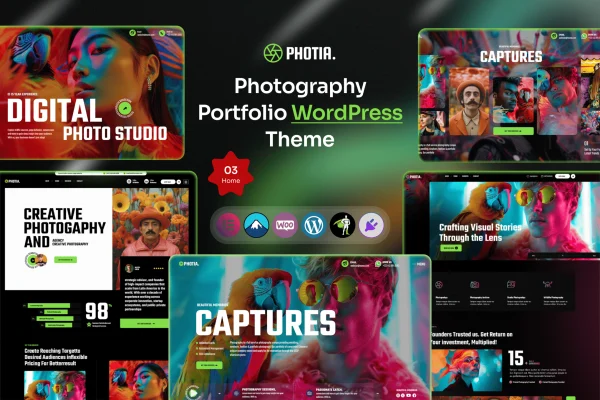
Photia is a photography portfolio WordPress theme built for photographers who want to present their images on a clean, professional website. It offers grid and masonry portfolio layouts, several gallery styles and a drag-and-drop page builder, so you can arrange your work without writing code.
- Version
- 1.0.1
- Released
- Aug 18, 2026
- Developer
- themexriver
- Type
- WordPress theme
- Licence
- GPL
- Included in
- Every plan, or $3.99 on its own
What’s new in Photia 1.0.0
Version 1.0.0
Latest
- NewInitial release of photia theme.
What it does
Photographers need a website that puts their images first and keeps everything else out of the way. This theme uses a clean, modern layout so your photos stay the focus. You can choose from multiple customizable grid and masonry portfolio layouts, then present individual sets of images with sliders, lightboxes or carousels. A one-click demo import loads pre-built content, which gives you a working starting point that you can adjust to your own work.
Beyond the portfolio, the theme covers the other parts of a photographer's site. A drag-and-drop page builder lets you create and arrange pages without coding. You can change color schemes and fonts to match your style and brand, and an integrated blog section gives you a place for stories, tips and behind-the-scenes posts. The layout is responsive and retina ready, so images look sharp on desktops, tablets and phones.
Best for
- Freelance photographers building a client-facing portfolio
- Wedding, portrait and event photographers
- Agencies creating sites for photography clients
Features
Grid and masonry portfolios
Multiple customizable grid and masonry layouts let you arrange your photography in the format that suits each collection or project best.
Multiple gallery styles
Present images with sliders, lightboxes or carousels, so you can pick a different viewing style for different galleries across your site.
Drag-and-drop page builder
Build and arrange your website pages visually with a drag-and-drop builder, with no coding skills needed to set up your layouts.
One-click demo import
Import the pre-built demo content with a single click, then replace the sample images and text with your own photography and details.
Custom colors and fonts
Adjust color schemes and fonts throughout the theme so the look of your site matches your personal style and brand identity.
Responsive and retina ready
Layouts adapt to desktops, tablets and smartphones, and retina support keeps your photos looking crisp on high-resolution screens.
Integrated blog section
A built-in blog lets you publish stories, shooting tips and behind-the-scenes posts alongside your portfolio on the same site.
Photia older versions
- 1.0.0Nov 13, 2025
Members and buyers of this product can download older versions.
Questions about Photia
Do I need to know how to code to build my site with this theme?
No. Photia includes a drag-and-drop page builder for creating and arranging pages, and you can customize colors and fonts through the theme options. The one-click demo import also gives you a finished starting layout to edit.
What portfolio and gallery layouts are available?
The theme provides multiple customizable grid and masonry portfolio layouts. For displaying images, you can choose between sliders, lightboxes and carousels, which lets you vary the presentation across different collections.
Will my photos look good on phones and high-resolution screens?
Yes. The theme is responsive, so layouts adjust to desktops, tablets and smartphones. It is also retina ready, which keeps images sharp on high-resolution displays.
Can I run a blog alongside my portfolio?
Yes. There is an integrated blog section where you can post stories, tips and behind-the-scenes content, so your writing and your portfolio live on the same website.
Is Photia free?
The code of Photia is licensed under the GPL, so anyone may use, change and share it. GPL Feast is a paid service: a plan or a single purchase gives you the download and automatic updates. The developer's own support, licence key and online services are not included.
Which version of Photia is this?
Version 1.0.1, released Aug 18, 2026. New versions appear here when the developer publishes them, and members get them as automatic updates.
How do I update Photia?
Install the free GPL Feast Updater on your site and connect it with your API key. It installs new versions of Photia automatically and keeps a backup, so you can roll back.