Theme
Updated
Pizzan
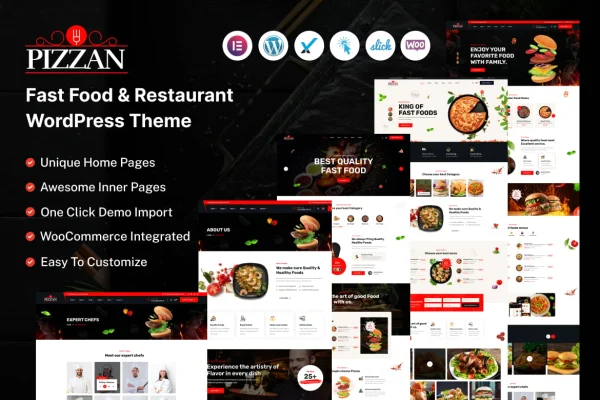
Pizzan is a WordPress theme built for fast food joints, restaurants, cafes and food delivery services. It gives you ready-made homepages, menu and gallery pages, and Elementor editing so you can put your food business online without writing code.
- Version
- 1.0.0
- Developer
- themeholy
- Type
- WordPress theme
- Licence
- GPL
- Included in
- Every plan, or $3.99 on its own
What’s new in Pizzan 1.0
Version 1.0
Latest
- ChangedInitial release
- ChangedComplete Demo Homepage and 50+ Awesome Inner Pages.
- ChangedHeader Style
- ChangedFooter Style
- ChangedBuilt on Bootstrap V5 and SASS
- ChangedPowerful Theme Options
- ChangedRegular Update
- ChangedLatest: WordPress 6.2.x / Elementor 3.9.x
What it does
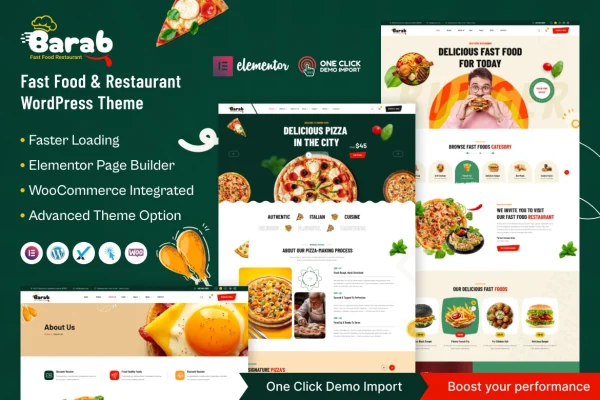
Food businesses need a site that shows the menu clearly, looks good on phones and can take orders or reservations. Pizzan covers that ground with several homepage layouts aimed at restaurants, fast food outlets and burger places, plus more than 50 pre-built inner pages. Those include menu pages, galleries, a blog, about and contact pages, and FAQs, so most of the site structure is already there when you start.
Pages are edited with the Elementor drag and drop builder, and a theme options panel handles colors, typography and layouts to match your branding. WooCommerce compatibility lets you sell food products or services from the site. The theme is built on Bootstrap 5 and SASS, works on any screen size, and includes LayerSlider for sliders that feature menu items, promos and special events. A one-click demo import copies the demo site as a starting point.
Best for
- Pizza places, burger joints and fast food outlets
- Restaurants and cafes wanting a menu-focused website
- Food delivery services selling through WooCommerce
Features
Multiple ready-made homepages
Choose from distinct restaurant, fast food and burger-focused homepage layouts and pick the one that fits your brand identity.
More than 50 inner pages
Pre-built layouts include menu pages, galleries, blogs, about us, contact forms and FAQs, giving you a full set of pages to work from.
Elementor page editing
Customize layouts with the Elementor drag and drop frontend editor, so changing sections and content requires no coding experience.
WooCommerce compatibility
Set up an online store with WooCommerce to sell food products or services directly through your restaurant website.
Theme options panel
Adjust colors, typography, layouts and other settings from one panel to match the site to your restaurant's branding.
Header and footer variations
Pick from several header and footer styles to shape navigation and give the site a look that suits your business.
LayerSlider included
Build animated sliders with LayerSlider to feature your menu, current promotions and special events on the homepage or other pages.
Responsive Bootstrap 5 build
The theme uses Bootstrap 5 and SASS, adapts to all screen sizes and is retina ready for sharp display on high-resolution screens.
Questions about Pizzan
Can I sell food online with this theme?
Yes. The theme is compatible with WooCommerce, so you can set up an online store and sell food products or services directly through your website. The pre-built pages also include menu layouts you can use alongside the store.
Do I need to know how to code to customize it?
No coding is needed for typical changes. Pages are edited with the Elementor drag and drop builder, and the theme options panel lets you change colors, typography and layouts from settings screens.
What kinds of food businesses does Pizzan suit?
It is designed for restaurants, fast food outlets, cafes and food delivery services. The homepage choices include restaurant, fast food and burger-focused layouts, which makes it a good match for pizza shops and casual dining spots.
Can I start from the demo design?
Yes. A one-click demo import copies the demo site so you begin with the layouts, pages and sliders already in place, then swap in your own menu, photos and text.
Is Pizzan free?
The code of Pizzan is licensed under the GPL, so anyone may use, change and share it. GPL Feast is a paid service: a plan or a single purchase gives you the download and automatic updates. The developer's own support, licence key and online services are not included.
Which version of Pizzan is this?
Version 1.0.0. New versions appear here when the developer publishes them, and members get them as automatic updates.
How do I update Pizzan?
Install the free GPL Feast Updater on your site and connect it with your API key. It installs new versions of Pizzan automatically and keeps a backup, so you can roll back.