Theme
Updated
Qeducato
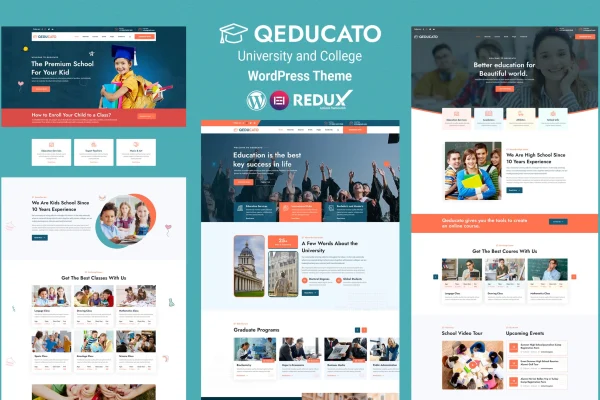
Qeducato is a WordPress theme built for universities, colleges and other educational institutions. It gives schools a responsive site with course layouts, an events calendar and pages for faculty and campus information, and you can set it up without writing code.
- Version
- 2.1
- Released
- Jul 1, 2026
- Developer
- zcubethemes
- Type
- WordPress theme
- Licence
- GPL
- Included in
- Every plan, or $3.99 on its own
What’s new in Qeducato 2.1
Version 2.1 · Jul 1, 2026
Latest
- ImprovedUpdated FontAwesome to the latest version for better icon compatibility
- FixedSome CSS Fixed
What it does
Educational websites have a lot to cover: course details, schedules, instructors, campus events and general information for students and visitors. This theme gives that content a ready structure. Course layouts hold descriptions, schedules and instructor profiles, so prospective students can compare programs in one place. The built-in events calendar handles seminars, workshops and campus activities, and RSVP functionality lets visitors respond to events directly on the site.
The design is responsive, so pages adjust to desktops, tablets and phones. A theme customizer with live preview lets you change colors, fonts and layouts to match your institution's branding. The theme works with WooCommerce, Contact Form 7 and LMS plugins, and it supports translation and right-to-left languages. That makes it a practical fit for colleges, universities and training institutions serving students in more than one language.
Best for
- Universities and colleges building or rebuilding their website
- Schools and training institutes promoting courses and events
- Agencies building sites for education clients
Features
Customizable course layouts
Present each course with a detailed description, schedule and instructor profile so prospective students can see what a program involves before they apply.
Events calendar with RSVP
Organize campus events, seminars and workshops in a built-in events calendar, and let visitors confirm attendance through RSVP functionality.
Live preview customizer
Adjust colors, fonts and layouts in the theme customizer and watch the changes in a live preview before publishing them.
Responsive design
Layouts adapt to desktops, tablets and smartphones, so students, faculty and visitors can read course and event information on any device.
Plugin compatibility
Works with WooCommerce, Contact Form 7 and LMS plugins, which lets you add a shop, contact forms or online learning to your site.
Translation and RTL support
Translate the site for a multilingual student body, with compatibility for right-to-left languages such as Arabic or Hebrew.
Typography and icon options
Choose from a wide selection of fonts and icons designed to suit academic content across course, faculty and campus pages.
Questions about Qeducato
Can I list courses with schedules and instructor details?
Yes. The theme includes customizable course layouts that hold detailed descriptions, schedules and instructor profiles, giving prospective students the information they need to compare programs.
Does it handle campus events?
It has built-in event management with an events calendar for seminars, workshops and campus activities. RSVP functionality is included, so visitors can respond to events from the site itself.
Can I sell items or run online courses with it?
The theme is compatible with WooCommerce for selling products and with LMS plugins for online learning. It also works with Contact Form 7 if you need contact or inquiry forms.
Will it work for a site in more than one language?
Yes. Qeducato supports translation and is compatible with right-to-left languages, which helps institutions that serve students across different language groups.
Is Qeducato free?
The code of Qeducato is licensed under the GPL, so anyone may use, change and share it. GPL Feast is a paid service: a plan or a single purchase gives you the download and automatic updates. The developer's own support, licence key and online services are not included.
Which version of Qeducato is this?
Version 2.1, released Jul 1, 2026. New versions appear here when the developer publishes them, and members get them as automatic updates.
How do I update Qeducato?
Install the free GPL Feast Updater on your site and connect it with your API key. It installs new versions of Qeducato automatically and keeps a backup, so you can roll back.