Theme
Updated
Qomfort Theme
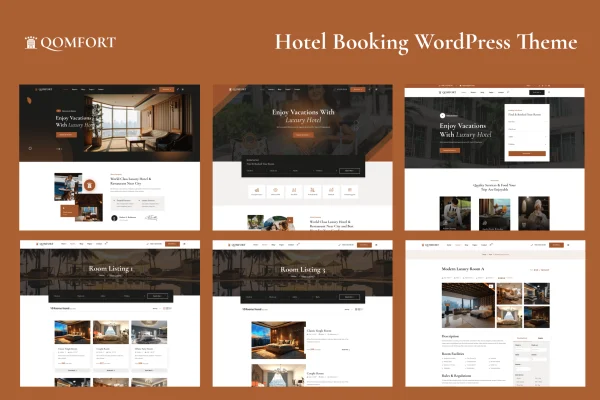
Qomfort Theme is a hotel booking WordPress theme for hotels, hostels, resorts, apartments and other accommodation businesses. It gives guests a room listing page with search filters, lets them book several rooms from one place, and works with Elementor and WooCommerce for page building and payments.
- Version
- 1.1.4
- Released
- May 5, 2026
- Developer
- ovatheme
- Type
- WordPress theme
- Licence
- GPL
- Included in
- Every plan, or $3.99 on its own
What’s new in Qomfort Theme 1.1.4
Version 1.1.4 · May 5, 2026
Latest
- ImprovedUpdate Theme to version 1.1.4
- ImprovedUpdate Revolution Slider Plugin version 6.7.54
What it does
Accommodation sites often make guests click through one room page after another before they can reserve anything. This theme puts rooms on a single booking listing page with search filters, so visitors can narrow the options to what they need and book from there. Guests who want more than one room can book multiple rooms from that same page instead of returning to separate room detail pages for each one.
The design is clean and modern, responsive across desktops, tablets and phones, and retina ready for sharp graphics on high-resolution screens. You can build and adjust pages with Elementor, Elementor Pro or the Block Editor. WooCommerce handles payments and transactions, and WPML compatibility lets you run the site in more than one language. Developers get modular CSS, SASS and JS code that is organized for customization, and documentation is included.
Best for
- Hotels and resorts taking room reservations online
- Bed and breakfasts, hostels and apartment rentals
- Agencies building multilingual hospitality websites
Features
Booking listing with search filters
A central listing page lets guests filter rooms by their preferences and find suitable options without opening every single room page.
Multi-room booking
Guests can book several rooms from one page, which suits families, groups and travelers reserving for more than one party.
Elementor and Block Editor support
Build and edit pages with drag-and-drop tools in Elementor or Elementor Pro, or use the WordPress Block Editor if you prefer it.
WooCommerce payments
The theme works with WooCommerce to manage payments and transactions for room bookings on your site.
Multilingual with WPML
WPML compatibility lets you translate the site and serve guests in several languages, useful for properties with international visitors.
Responsive, retina ready layout
Pages adapt to desktops, tablets and smartphones, and graphics stay sharp on high-resolution retina displays.
Modular CSS, SASS and JS
Clean, modular code makes it easier for developers and designers to customize styles and scripts or extend the theme.
Qomfort Theme older versions
- 1.0.6Dec 27, 20242 improvements
- 1.0.2Feb 11, 20242 improvements
- 1.0.1Oct 19, 20232 improvements
- 1.0.0Sep 9, 2023
Members and buyers of this product can download older versions.
Questions about Qomfort Theme
Can guests book more than one room at a time?
Yes. The booking listing page supports multi-room booking, so guests can reserve several rooms from a single page instead of going through each room detail page separately.
Which page builders does this theme work with?
It is compatible with Elementor and Elementor Pro for drag-and-drop page building, and it also supports the WordPress Block Editor, so you can edit layouts without writing code.
How are booking payments handled?
Qomfort Theme integrates with WooCommerce, which manages the payments and transactions for bookings. You will need WooCommerce set up on your site to take payments this way.
Can I run my hotel site in several languages?
Yes. The theme is WPML compatible, so you can build a multilingual site for guests who speak different languages, which helps properties that welcome international travelers.
Is Qomfort Theme free?
The code of Qomfort Theme is licensed under the GPL, so anyone may use, change and share it. GPL Feast is a paid service: a plan or a single purchase gives you the download and automatic updates. The developer's own support, licence key and online services are not included.
Which version of Qomfort Theme is this?
Version 1.1.4, released May 5, 2026. New versions appear here when the developer publishes them, and members get them as automatic updates.
How do I update Qomfort Theme?
Install the free GPL Feast Updater on your site and connect it with your API key. It installs new versions of Qomfort Theme automatically and keeps a backup, so you can roll back.
More from ovatheme