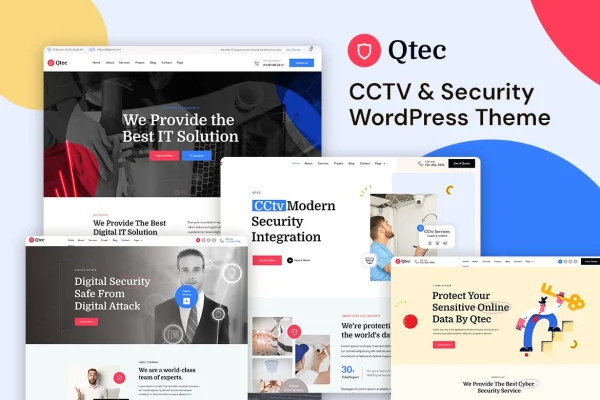
Theme
Updated
Qtec
Qtec is a WordPress theme made for CCTV and security businesses. It gives installers, monitoring companies and security consultants a ready structure for presenting their services, building credibility with testimonials and certifications, and collecting quote requests from visitors.
- Version
- 1.0.0
- Released
- Feb 11, 2025
- Developer
- bracketweb
- Type
- WordPress theme
- Licence
- GPL
- Included in
- Every plan, or $3.99 on its own
What’s new in Qtec 1.0
Version 1.0 · May 12, 2015
Latest
- NewInitial release.
What it does
Security companies need a website that explains what they offer and gives visitors reasons to trust them. This theme is built around that job. Its homepage is made of customizable sections you can point at services such as CCTV installation, security monitoring and consultation, and it includes dedicated layouts for detailed service descriptions and pricing plans. Trust elements like client testimonials, certifications and case studies sit alongside that content, so prospects can see your experience before they get in touch.
Setup starts with a one-click demo import that loads pre-built demo content, which you then replace with your own text, images and branding. The layout is responsive, so pages adapt to phones, tablets and desktops. Contact and quote forms let visitors ask questions or request estimates, and the theme is designed to work with common WordPress plugins for contact forms, SEO and e-commerce. It suits new security firms building a first site as well as established CCTV providers refreshing an older one.
Best for
- CCTV installation and maintenance companies
- Security monitoring and alarm service providers
- Web designers building sites for security clients
Features
Customizable homepage sections
Adjust homepage content blocks to feature the services you offer, such as CCTV installation, security monitoring or consultation, in the order that suits your business.
Service and pricing layouts
Dedicated templates present detailed service descriptions and pricing plans, giving each offering its own clear space on the site.
Trust and credibility elements
Built-in sections for client testimonials, certifications and case studies help visitors see your track record before they contact you.
Contact and quote forms
Forms let potential clients send questions or request estimates for a job, giving you a direct way to receive inquiries from the site.
One-click demo import
Load the pre-built demo content in one step, then swap in your own text and images instead of building every page from scratch.
Responsive layout
Pages adjust to different screen sizes so visitors on phones, tablets and desktops can read about your services and reach your forms.
Works with popular plugins
The theme is designed to run alongside common WordPress plugins for contact forms, SEO and e-commerce when you need extra functionality.
Questions about Qtec
What kind of business is this theme designed for?
It is built for CCTV and security service providers. The layouts and sections are geared toward presenting services like camera installation, monitoring, maintenance and consultation, along with testimonials, certifications and case studies that help a security company establish credibility.
Can visitors request a quote through the site?
Yes. The theme includes contact and quote forms so potential clients can ask for information or request an estimate. These forms give you a straightforward way to collect inquiries from people interested in your security services.
Do I have to build the pages myself from a blank start?
No. A one-click demo import loads pre-built demo content, giving you a working site structure right away. From there you customize the homepage sections, service pages and trust elements with your own content and branding.
Can I show pricing for my security packages?
The theme includes service layouts designed for detailed service descriptions and pricing plans. You can use them to lay out packages such as installation or monitoring options so visitors can compare what you offer.
Is Qtec free?
The code of Qtec is licensed under the GPL, so anyone may use, change and share it. GPL Feast is a paid service: a plan or a single purchase gives you the download and automatic updates. The developer's own support, licence key and online services are not included.
Which version of Qtec is this?
Version 1.0.0, released Feb 11, 2025. New versions appear here when the developer publishes them, and members get them as automatic updates.
How do I update Qtec?
Install the free GPL Feast Updater on your site and connect it with your API key. It installs new versions of Qtec automatically and keeps a backup, so you can roll back.