Theme
Updated
Redlight
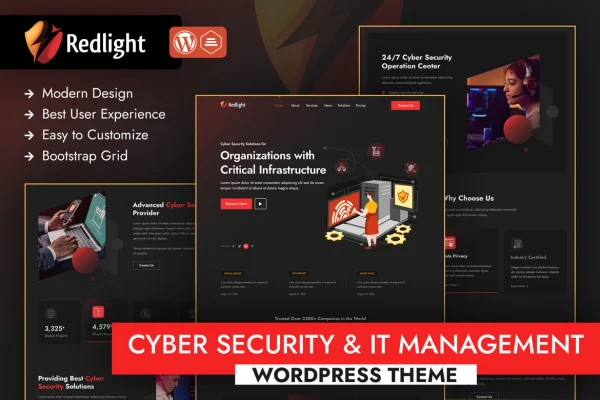
Redlight is a WordPress theme built for businesses in the cybersecurity and IT management space. It gives security firms, IT consultants and tech service providers a clean, professional site with pre-built industry templates and layouts you can adjust without writing code.
- Version
- 1.2
- Released
- Aug 15, 2026
- Developer
- designingmedia
- Type
- WordPress theme
- Licence
- GPL
- Included in
- Every plan, or $3.99 on its own
What’s new in Redlight 1.0
Version 1.0 · Mar 31, 2023
Latest
- NewInitial release
What it does
Tech service companies need a website that explains technical services clearly and looks credible to prospective clients. Redlight is designed around that need. It ships with pre-built templates aimed at cybersecurity and IT businesses, so you start from layouts that already fit the industry instead of a blank page. The design is clean and modern, and it is responsive, so pages adapt to desktops, tablets and phones.
Customization happens through a drag-and-drop page builder and multiple customizable sections, which lets you match pages to your brand and service list without coding. The theme works with popular WordPress plugins for things like contact forms, live chat and analytics, and it is multilingual ready through translation plugins. Integrated blog layouts give you a place to publish security tips, industry insights and company news alongside your service pages.
Best for
- Cybersecurity firms and security consultants
- IT management and managed service providers
- Tech companies wanting a blog alongside service pages
Features
Cybersecurity and IT templates
Pre-built layouts designed for tech industry sites give you a starting point for presenting cybersecurity and IT management services.
Drag-and-drop page builder
Build and rearrange page content visually, so you can create and adjust pages without touching code.
Customizable layouts and sections
Multiple sections can be tailored on every page to fit your brand style and the specific services your company offers.
Responsive design
Layouts adapt to different screen sizes, so your site displays properly on desktops, tablets and smartphones.
Popular plugin compatibility
Works with common WordPress plugins for added functions such as contact forms, live chat and analytics.
Multilingual ready
Supports translation plugins, letting you offer your site in more than one language for clients in different regions.
Integrated blog layouts
Dedicated blog layouts let you publish security tips, industry insights and company news on the same site as your services.
SEO-friendly structure
The theme is built with a search-friendly structure that gives your service pages and blog posts a sound technical base.
Redlight older versions
- 1.1Aug 7, 2025
- 1.0Feb 27, 2025
- 1.0Feb 16, 2024
Members and buyers of this product can download older versions.
Questions about Redlight
Do I need coding skills to customize this theme?
No. The theme includes a drag-and-drop page builder and customizable sections, so you can change layouts, rearrange content and match pages to your brand without writing code.
Does it include templates made for IT and security businesses?
Yes. It comes with pre-built templates designed for cybersecurity and IT companies, which gives you ready layouts for presenting your services that you can then adjust to suit your own business.
Can I run my site in multiple languages with Redlight?
Yes. Redlight is multilingual ready and supports translation plugins, so you can offer your content in more than one language and reach clients in other countries.
Will it work with contact forms and live chat plugins?
The theme is compatible with popular WordPress plugins, including ones for contact forms, live chat and analytics, so you can add those functions to your site as needed.
Is Redlight free?
The code of Redlight is licensed under the GPL, so anyone may use, change and share it. GPL Feast is a paid service: a plan or a single purchase gives you the download and automatic updates. The developer's own support, licence key and online services are not included.
Which version of Redlight is this?
Version 1.2, released Aug 15, 2026. New versions appear here when the developer publishes them, and members get them as automatic updates.
How do I update Redlight?
Install the free GPL Feast Updater on your site and connect it with your API key. It installs new versions of Redlight automatically and keeps a backup, so you can roll back.