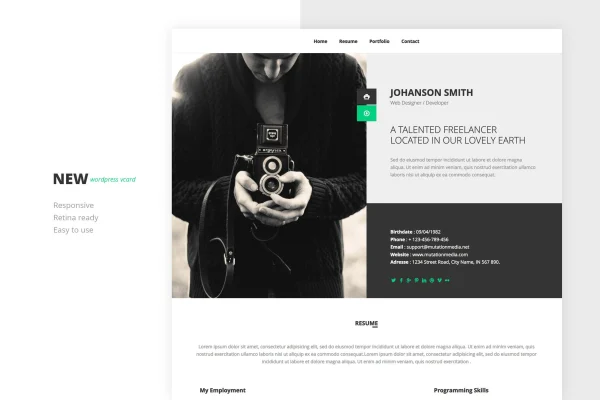
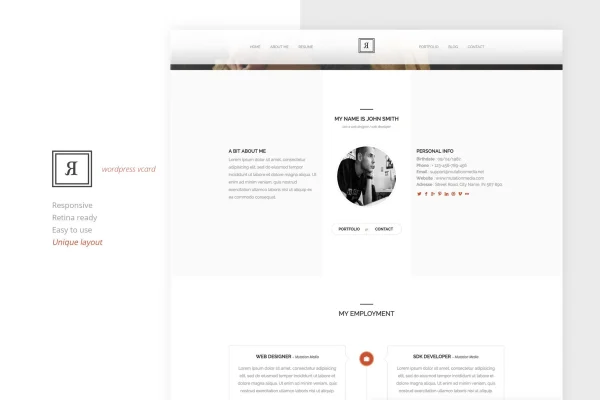
Theme
Updated
RIVAL One Page Vcard WordPress Theme
RIVAL One Page Vcard WordPress Theme is a one-page WordPress theme for personal vCard, CV and portfolio sites. It puts your bio, skills, timeline, projects and contact details on a single scrolling page, so clients or employers can learn about you in one visit.
- Version
- 1.0
- Released
- Sep 2, 2026
- Developer
- mutationthemes
- Type
- WordPress theme
- Licence
- GPL
- Included in
- Every plan, or $3.99 on its own
What’s new in RIVAL One Page Vcard WordPress Theme 1.0.0
Version 1.0.0 · May 20, 2014
Latest
- NewFirst release.
What it does
A personal site often needs only one page: who you are, what you can do, what you have made and how to reach you. This theme is built around that idea. It gives you a single-page layout with sections for your bio, skills, portfolio and contact information, plus one-page navigation that jumps visitors to each part. A timeline section lets you lay out your professional history and achievements in order, which works well as an online CV.
You shape the layout with a drag and drop page builder, so rearranging sections does not require code. Color styles can be adjusted to match your personal brand, and the design is responsive and retina ready for desktops, tablets and phones. The code is written in HTML5 and CSS3, right-to-left languages are supported, and the theme works with Contact Form 7 for the contact section. Documentation with step-by-step guides covers setup and customization.
Best for
- Freelancers who want a simple one-page portfolio
- Job seekers presenting an online CV and work history
- Creative professionals sharing projects and contact details
Features
Single-page responsive layout
All your sections sit on one page that adapts to desktop, tablet and mobile screens, keeping your vCard readable on any device.
Drag and drop page builder
Rearrange and customize the page layout by dragging elements into place, with no coding needed to change how your sections appear.
Timeline for your career
Present your professional journey and achievements in a timeline format, a natural fit for an online CV or resume.
Built-in portfolio section
Display your projects and work samples in a portfolio area that comes with the theme, alongside your bio and skills.
Custom color styles
Change the color scheme to suit your personal brand or taste, with unlimited color style options to choose from.
Contact Form 7 compatibility
Add contact forms through Contact Form 7 so potential clients or employers can message you directly from the page.
Right-to-left language support
The theme supports RTL languages, so you can build your vCard site in languages such as Arabic or Hebrew.
Retina ready visuals
Graphics are prepared for high-resolution displays, so images and interface elements stay crisp on retina screens.
Questions about RIVAL One Page Vcard WordPress Theme
Can I show my work history on this theme?
Yes. The theme includes a timeline feature for laying out your professional journey and achievements, along with sections for your bio and skills. Together these work as an online CV that visitors can scroll through on a single page.
Do I need to know how to code to customize the layout?
No. The theme includes a drag and drop page builder for adjusting your layout without code, and you can change color styles to match your brand. Step-by-step documentation is included to guide you through setup and customization.
How do visitors contact me through the site?
The theme has a contact section and is compatible with Contact Form 7, so you can add a form where potential clients or employers send you messages directly. One-page navigation helps visitors jump straight to it.
Will the site work in a right-to-left language?
Yes. The theme supports right-to-left languages, so you can build your vCard and portfolio site in languages that read from right to left while keeping the same single-page layout.
Is RIVAL One Page Vcard WordPress Theme free?
The code of RIVAL One Page Vcard WordPress Theme is licensed under the GPL, so anyone may use, change and share it. GPL Feast is a paid service: a plan or a single purchase gives you the download and automatic updates. The developer's own support, licence key and online services are not included.
Which version of RIVAL One Page Vcard WordPress Theme is this?
Version 1.0, released Sep 2, 2026. New versions appear here when the developer publishes them, and members get them as automatic updates.
How do I update RIVAL One Page Vcard WordPress Theme?
Install the free GPL Feast Updater on your site and connect it with your API key. It installs new versions of RIVAL One Page Vcard WordPress Theme automatically and keeps a backup, so you can roll back.
You might also like