Theme
Updated
Roofan
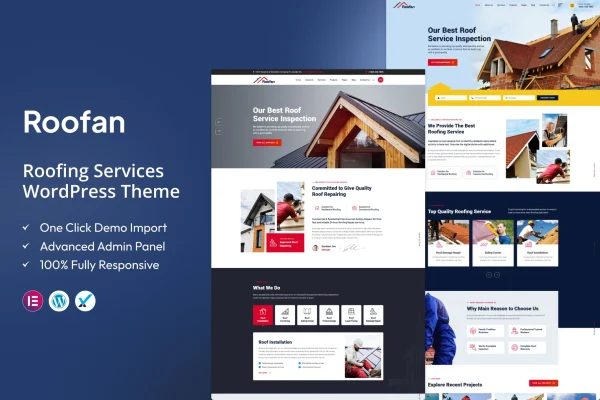
Roofan is a WordPress theme built for roofing companies, contractors and roofing service providers. It gives you a clean, professional layout for presenting your services, completed projects and customer testimonials, and it lets visitors book consultations or service visits from your site.
- Version
- 1.4
- Released
- Feb 11, 2025
- Developer
- ThemeArc
- Type
- WordPress theme
- Licence
- GPL
- Included in
- Every plan, or $3.99 on its own
What’s new in Roofan 1.4
Version 1.4 · Feb 11, 2025
Latest
What it does
Roofing businesses need a website that explains what they do, shows proof of past work and makes it simple for a homeowner to get in touch. This theme is designed around those needs. It includes a built-in project portfolio for photo galleries of finished jobs, service section templates for describing each type of work you offer, and space for customer testimonials. The design is responsive, so pages adjust to desktops, tablets and phones.
You can shape layouts with a drag-and-drop page builder, so no coding is required to change how pages look or are structured. The header and footer are customizable, which makes it easy to place contact details and social media links where visitors expect them. An online appointment booking feature lets people schedule consultations or service visits directly. If you also sell roofing materials or accessories, WooCommerce support lets you add an online store, and setup guides are included in the documentation.
Best for
- Local roofing contractors building a business website
- Roofing companies that want online appointment booking
- Roofers who also sell materials or accessories online
Features
Built-in project portfolio
Present completed roofing jobs in photo galleries so prospective clients can see examples of your past work before they contact you.
Service section templates
Dedicated pages and sections help you describe each roofing service you offer clearly, from repairs to full replacements.
Online appointment booking
Visitors can schedule consultations or service visits directly from your website without needing to call or send an email first.
Drag-and-drop builder compatibility
Build and adjust page layouts visually with a drag-and-drop page builder, with no coding knowledge needed to change structure or appearance.
Customizable header and footer
Edit navigation and footer areas to include contact information, social media links and other details your visitors look for.
Responsive design
Layouts adapt to different screen sizes, so your roofing site displays properly on desktops, tablets and smartphones.
WooCommerce support
Add an online store with WooCommerce to sell roofing materials or accessories alongside your service pages.
Customer testimonials
Display reviews and feedback from past clients to give new visitors a sense of the experience others had with your business.
Questions about Roofan
Do I need coding skills to customize this theme?
No. The theme works with a drag-and-drop page builder, so you can change layouts and page structure visually. The header and footer are also customizable, letting you add contact details and social links without editing code.
Can customers book appointments through my site?
Yes. The theme includes online appointment booking, so potential clients can schedule consultations or service visits directly from your website. This gives homeowners a quick way to request a visit at a time that suits them.
Can I sell roofing products with Roofan?
Yes. The theme supports WooCommerce, which lets you add an online store to sell roofing materials or accessories. Your shop can sit alongside your service pages, project portfolio and booking options on the same site.
How can I show off past roofing projects?
Roofan has a built-in project portfolio for galleries of completed jobs. You can pair those galleries with customer testimonials and dedicated service pages so visitors see both your work and what past clients thought of it.
Is Roofan free?
The code of Roofan is licensed under the GPL, so anyone may use, change and share it. GPL Feast is a paid service: a plan or a single purchase gives you the download and automatic updates. The developer's own support, licence key and online services are not included.
Which version of Roofan is this?
Version 1.4, released Feb 11, 2025. New versions appear here when the developer publishes them, and members get them as automatic updates.
How do I update Roofan?
Install the free GPL Feast Updater on your site and connect it with your API key. It installs new versions of Roofan automatically and keeps a backup, so you can roll back.