Theme
Updated
Salmon
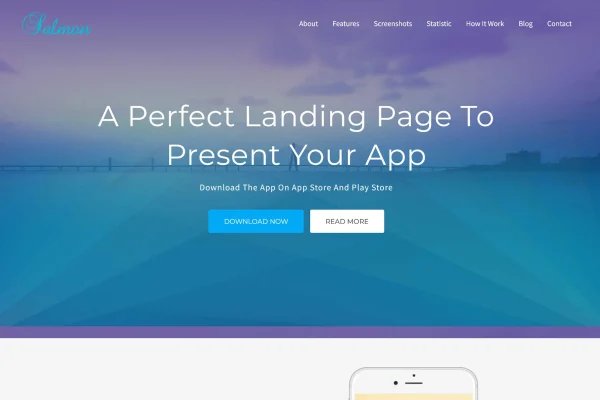
Salmon is a one-page WordPress theme built for presenting mobile apps and digital products. It places your app's screenshots, features, pricing plans and testimonials on a single scrolling page, with a responsive layout and options for adjusting colors, fonts and sections to match your brand.
- Version
- 1.9
- Released
- Aug 9, 2026
- Developer
- themesvila
- Type
- WordPress theme
- Licence
- GPL
- Included in
- Every plan, or $3.99 on its own
What’s new in Salmon 1.9
Version 1.9 · Aug 9, 2026
Latest
What it does
Launching an app usually calls for a simple site that explains what the app does and gives visitors a clear next step. Salmon handles this with a one-page layout, so all of the main information sits on one scrolling page. Visitors move from section to section without hunting through menus, and you get one focused place to describe your product, display screenshots and point people toward signing up or getting in touch.
The theme includes dedicated sections for screenshots, features, pricing plans and user testimonials, plus call to action buttons for downloads, sign-ups or inquiries. You can change colors, typography and sections without writing code. The design is responsive, so the page adapts to desktops, tablets and phones. It also works alongside common WordPress plugins for things like contact forms and analytics, which lets you add those functions when your site needs them.
Best for
- Startups launching a mobile app
- App developers needing a product landing page
- Digital product makers wanting a single-page site
Features
One-page scrolling layout
All of your app information sits on a single scrolling page, so visitors can read about the product from top to bottom without switching between pages.
App screenshot sections
Dedicated areas let you display screenshots of your app so visitors can see the interface and how the product looks before trying it.
Features and pricing sections
Built-in sections present your app's features and pricing plans, giving visitors the details they need to compare options on the same page.
Testimonial area
A section for user testimonials lets you add feedback from people who already use your app, placed alongside the rest of your product details.
Call to action buttons
Buttons placed throughout the page can point visitors toward downloading the app, signing up or sending an inquiry, depending on your goal.
Customization without code
You can adjust colors, typography and sections to fit your brand identity without needing any coding knowledge.
Responsive design
The layout adapts to desktops, tablets and smartphones, so your app page displays properly whichever device a visitor is using.
Works with common plugins
Salmon is compatible with popular WordPress plugins, so you can add features such as contact forms and analytics to your site.
Salmon older versions
- 1.7Jun 8, 2024
Members and buyers of this product can download older versions.
Questions about Salmon
Can I show pricing plans for my app on this theme?
Yes. The theme includes a dedicated pricing plans section as part of its app sections, alongside areas for screenshots, features and user testimonials. All of these sit on the same scrolling page, so visitors can review your plans right after reading about what the app does.
Do I need to know how to code to change the design?
No coding knowledge is needed for the main changes. You can modify colors, typography and sections through the theme's customization options, which makes it practical to match the page to your brand's look without editing theme files.
Will the site look right on phones?
The theme uses a fully responsive design, so the layout adjusts to desktops, tablets and smartphones. That matters for an app site in particular, since many visitors will arrive on the same mobile devices your app runs on.
Can I add a contact form or analytics?
The theme is compatible with popular WordPress plugins for contact forms, analytics and similar functions. You add the plugin you prefer, and the theme's call to action buttons can also direct visitors toward inquiries or sign-ups.
Is Salmon free?
The code of Salmon is licensed under the GPL, so anyone may use, change and share it. GPL Feast is a paid service: a plan or a single purchase gives you the download and automatic updates. The developer's own support, licence key and online services are not included.
Which version of Salmon is this?
Version 1.9, released Aug 9, 2026. New versions appear here when the developer publishes them, and members get them as automatic updates.
How do I update Salmon?
Install the free GPL Feast Updater on your site and connect it with your API key. It installs new versions of Salmon automatically and keeps a backup, so you can roll back.