Theme
Updated
SalvaVita
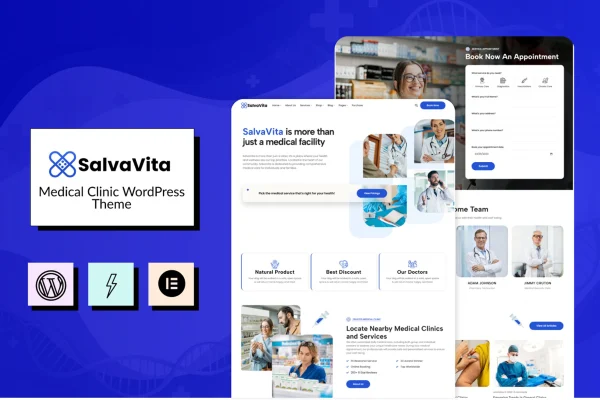
SalvaVita is a WordPress theme built for medical clinics, healthcare providers and wellness professionals. It gives you a clean, modern layout for presenting your services, introducing your team and sharing patient testimonials, with a way for patients to book appointments through your site.
- Version
- 1.4
- Released
- Feb 11, 2025
- Developer
- modeltheme
- Type
- WordPress theme
- Licence
- GPL
- Included in
- Every plan, or $3.99 on its own
What’s new in SalvaVita 1.4
Version 1.4 · Feb 11, 2025
Latest
What it does
A clinic website has a few jobs to do well. Patients want to know which treatments you offer, who will be treating them and how to get an appointment. This theme is organized around those needs, with sections for services, staff profiles and patient feedback. The design is clean and modern, which suits a healthcare practice that wants to look professional and approachable. It works for a small private practice as well as a larger healthcare facility with many departments and team members.
Customization happens through the theme options and compatible drag and drop page builders, so you can adjust layouts and content without writing code. The layout is responsive, so pages adapt to desktops, tablets and phones. Appointment booking lets patients schedule visits directly on the site, and you can also publish health information for your visitors. If your clinic serves people who speak different languages, the theme works with translation plugins so you can offer content in more than one language.
Best for
- Private medical practices and family clinics
- Healthcare facilities presenting multiple doctors and departments
- Wellness professionals who take appointments online
Features
Clean, modern design
A professional, uncluttered look suited to medical clinics and healthcare providers who want their website to feel trustworthy and welcoming to patients.
Responsive layout
Pages adjust to different screen sizes, so visitors can browse your clinic's site on desktops, tablets and smartphones.
Page builder compatibility
Use intuitive theme options and compatible drag and drop page builders to tailor layouts and content without any coding knowledge.
Appointment booking
Patients can book appointments directly through your website, giving them a simple way to schedule a visit with your practice.
Services section
Present detailed overviews of your medical treatments and healthcare offerings in a clear, organized layout that patients can scan easily.
Team member profiles
Introduce your doctors, nurses and other staff with dedicated profiles so patients can learn who will be caring for them.
Patient testimonials
A testimonials section displays feedback from your patients, helping new visitors see what others have experienced at your clinic.
Translation plugin support
The theme is multilingual ready and works with translation plugins, so you can publish your site in more than one language.
Questions about SalvaVita
Can patients book appointments on a site built with this theme?
Yes. The theme includes appointment booking integration, which lets patients schedule visits directly through your website instead of calling or emailing your front desk.
Do I need coding skills to customize SalvaVita?
No. The theme offers intuitive customization options and is compatible with drag and drop page builders, so you can change layouts, text and images without touching code.
Can I build a clinic website in more than one language?
Yes. SalvaVita is multilingual ready and compatible with translation plugins, which makes it a good fit for clinics serving patients in regions where several languages are spoken.
Is it suitable for a larger healthcare facility with many staff?
It is designed for both small practices and larger healthcare facilities. Team member profiles let you introduce doctors, nurses and staff, and the services layout can present a wide range of treatments.
Is SalvaVita free?
The code of SalvaVita is licensed under the GPL, so anyone may use, change and share it. GPL Feast is a paid service: a plan or a single purchase gives you the download and automatic updates. The developer's own support, licence key and online services are not included.
Which version of SalvaVita is this?
Version 1.4, released Feb 11, 2025. New versions appear here when the developer publishes them, and members get them as automatic updates.
How do I update SalvaVita?
Install the free GPL Feast Updater on your site and connect it with your API key. It installs new versions of SalvaVita automatically and keeps a backup, so you can roll back.
More from modeltheme